
jensinea34187845
Participating Frequently
September 6, 2018
Answered

Track matte doesn´t seem to work

  • September 6, 2018
  • 3 replies
  • 10650 views

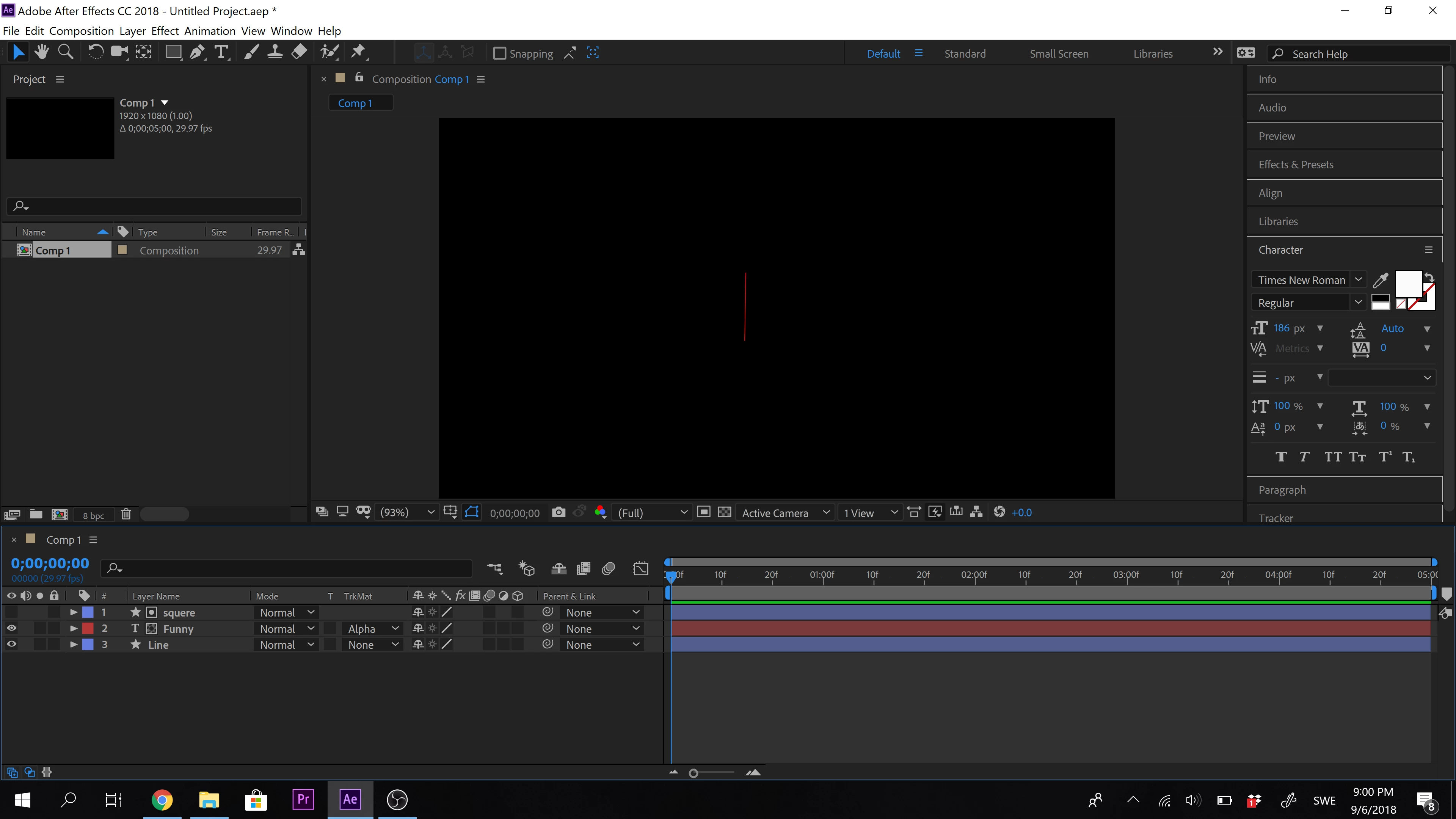
I have problems with alpha matte. I want a text move from left to right.With the pencil i made a line that i want the text to come out from. Shape 1 is the line. Shape two is the box where i want med text to reveal. Between the two shapes i have a text. With the text layer i choose track matte alpa. But it´s not working. It looks like the line is stopping the animation and no text is reveled in the shape 2. I have black background with white text. What am i doing wrong? I have tried it also with video at the background with the same result.

Kindly Regards Jensine
    This topic has been closed for replies.
    Correct answer OussK

    The text is invisible to the left as it should be. The text has an animation from left to right. The text is meaning to look like it comes out from the line but it´s invisible. What is wrong?


    From this picture, everything look right, just try to check the opacity of the "squere"layer must be 100% also same for text layer

    one more question, if you remove the  track matte, than turn on the "squere"layer are you able to see everything in the right place?

    anyway here's a file include what you'r doing, you can check it, 

    Dropbox - title.aep

    3 replies

    danorg75334407
    Participant
    October 27, 2021

    I know this is an old thread but I had the same problem and was getting frustrated to the point of getting a headache. Turns out I had "Draft 3D" active (bottom right corner of the Viewer window. The project is very big with a lot of layers and effects so Draft 3D helps things playback faster. But it also makes it so that the track matte simply doesn't show on the screen. TOTALLY FRUSTRATING! You can do everything right and a simple efficiency option destroys your workflow for an hour. So check that if nothing else is working

    Participant
    January 28, 2022

    I am having the same issue... I need the shape INSIDE the character but track matte isn't being useful at all 

    OussK
    Community Expert
    Community Expert
    September 6, 2018

    Please post a screenshot so we can get better idea where is you issue.

    jensinea34187845
    Participating Frequently
    September 6, 2018

    I will do that as soon as im home from school

    jensinea34187845
    Participating Frequently
    September 6, 2018

    The text is invisible to the left as it should be. The text has an animation from left to right. The text is meaning to look like it comes out from the line but it´s invisible. What is wrong?

    P.M.B
    Legend
    September 6, 2018

    TrkMat uses the layer above it as the matte.  So your "box" needs to be directly above your text.

    ~Gutterfish
    Legend
    September 6, 2018

    Gutterfish  wrote

    So your "box" needs to be directly above your text.

    Or use the Set Matte effect, and pick any layer you want.