
May 6, 2017
Answered

Tracker panel is completely grayed out and won't let me track anything.

  • May 6, 2017
  • 9 replies
  • 28130 views

Can't track any layers in the composition, even pre-composed ones, because the menu is simply grayed out. Anyone know how to fix this? I desperately need to finish a project.
Correct answer Roei Tzoref

Thanks, but my issue is that when i click on the menu to select target the option of Null Object is greyed out. I can't select anything in the menu.


I appreciate the detailed response, but my issue is not that the tracker fails to accurately track, it is that I cannot use the menu to make a tracker in the first place.

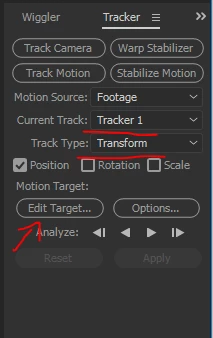
are you sure your track type is set to Transform and not Stabilize?

a screenshot could save you so show us.

9 replies

we135b
Known Participant
September 10, 2023

I had this same problem. I understand I'm a few years late to this thread but just in case there are other googlers like me, here is my experience. I'm using CS6. For me, my tracking panel was greyed out also. I've used AE CS6 many times before using the same types of clips (sony RX100V and iPhone) and have never had this problem. I first tried reloading the .mp4 clip and that solved the problem initially.  However, I needed to edit the clip after which the problem recurred. So, I went into forensics mode and tried checking which step it was that was causing the problem. Of course, I stepped my way all the way through (invert, trim, resize) only to find that the clip now worked with the same processes applied. The problem was solved but no indication of the culprit except that it seemed to be related to the clip and its processing.

Participant
June 8, 2020

mine is set to stablilize but that's greyed out too so i can't change it.

lhawkarticulate
Participant
September 17, 2019

If you have footage that is precomposed, you must uncheck collapse transformations - If you're not seeing your switches, look at the bottom left of the timeline (under all the layer names) and click toggle switches / modes. Then uncheck collapse transformations on that precomp. Then your tracker will let you select that footage layer. Sorry this isn't the best gif - just demoing with a project I already had open.


I know this is a SUPER late reply to an old thread but maybe it'll help someone new.
Cheers!
-Laura Hawk 

rickg30235638
Participant
September 24, 2019
Been looking for a fix, for a solid hour and you just came in clutch!!! Thanks!
raphaelc86852332
Participant
September 1, 2018

Click on layer 'video name' in the top right of the video screen

May 6, 2017

This is for After Effects, forgot to mention in the question.

Roei Tzoref
Legend
May 6, 2017

if the advice given here not helping, show us some screenshots

Community Expert
May 6, 2017

You track in the layer panel, not the composition panel. Open the layer in the Layer Panel and you should be able to track.

May 6, 2017

Thanks, I can track in the layer panel, but I'd like to apply the tracking data to a null object like I've done previously. How do I change the target from the layer panel?

May 7, 2017

When you are having problems with any feature in AE the first thing you should do is type the name of the procedure in the Search Help field at the top right corner of AE and check the Help files, they are much improved, and the community resources. YouTube and Google are usually a last resort because most of the 'tutorials' you find on YouTube are done by amateurs who really don't know what they are doing. They give bad, sometimes really bad advice and describe inefficient workflows. Make sure you vet your trainers.

I would type "Motion Track" in the search help field and study up. It will save you hours in the long run.

As Szalam said, nothing has changed, except that it is now a little easier. The first thing I do when I Motion Track or do any other kind of tracking is to open up the "Motion Tracking" workspace. Then you simply select the layer in the main composition and when you check the Motion Tracking Panel you should see the layer selected. If you don't select it from the drop down. When you click Track Motion the Layer Panel should open and your Search Area, Detail Area, and Attach point should show up in the middle of the comp.

Here's a point that most new users don't understand. AE's motion tracker is not a Point Tracker, it's a detail tracker. The detail you are tracking is in the inner box. The little x is the attach point. Most tracking problems can be solved by making sure that you include enough detail. For most shots the box is a bit too small so make it big enough to include enough detail to get good results. The second most common problem with motion tracking is that the search area, the outer box, is too small. It must be big enough to include all of the detail area that may move between frames.

I hope this helps. Spend some time with the community resources and the help files and you'll do fine if your shot is suitable for tracking.


I appreciate the detailed response, but my issue is not that the tracker fails to accurately track, it is that I cannot use the menu to make a tracker in the first place.

Szalam
Community Expert
Community Expert
May 6, 2017

Have you tried restarting your computer?

May 6, 2017

Yes, and updated After Effects, did not work.

John T Smith
Community Expert
Community Expert
May 6, 2017

The Lounge Forum is not for technical help, please provide the name of the program you are using so your message may be moved to the correct program forum... A program would be Photoshop or InDesign or Muse or Premiere Pro or ???