Inspiring
March 27, 2021
Answered

Tracking to Mocha AE mask

  • March 27, 2021
  • 2 replies
  • 7935 views

I created a mask on a video layer with Mocha AW. I want to place a video under the top layer wth the new mask and track the motion of the layer with the Mocha mask.  Is there a plug in to track another layer to a Mocha AE mask in a different layer? Or, does the Mocha Pro allow to export tracking data? 

This topic has been closed for replies.
Correct answer Rick Gerard

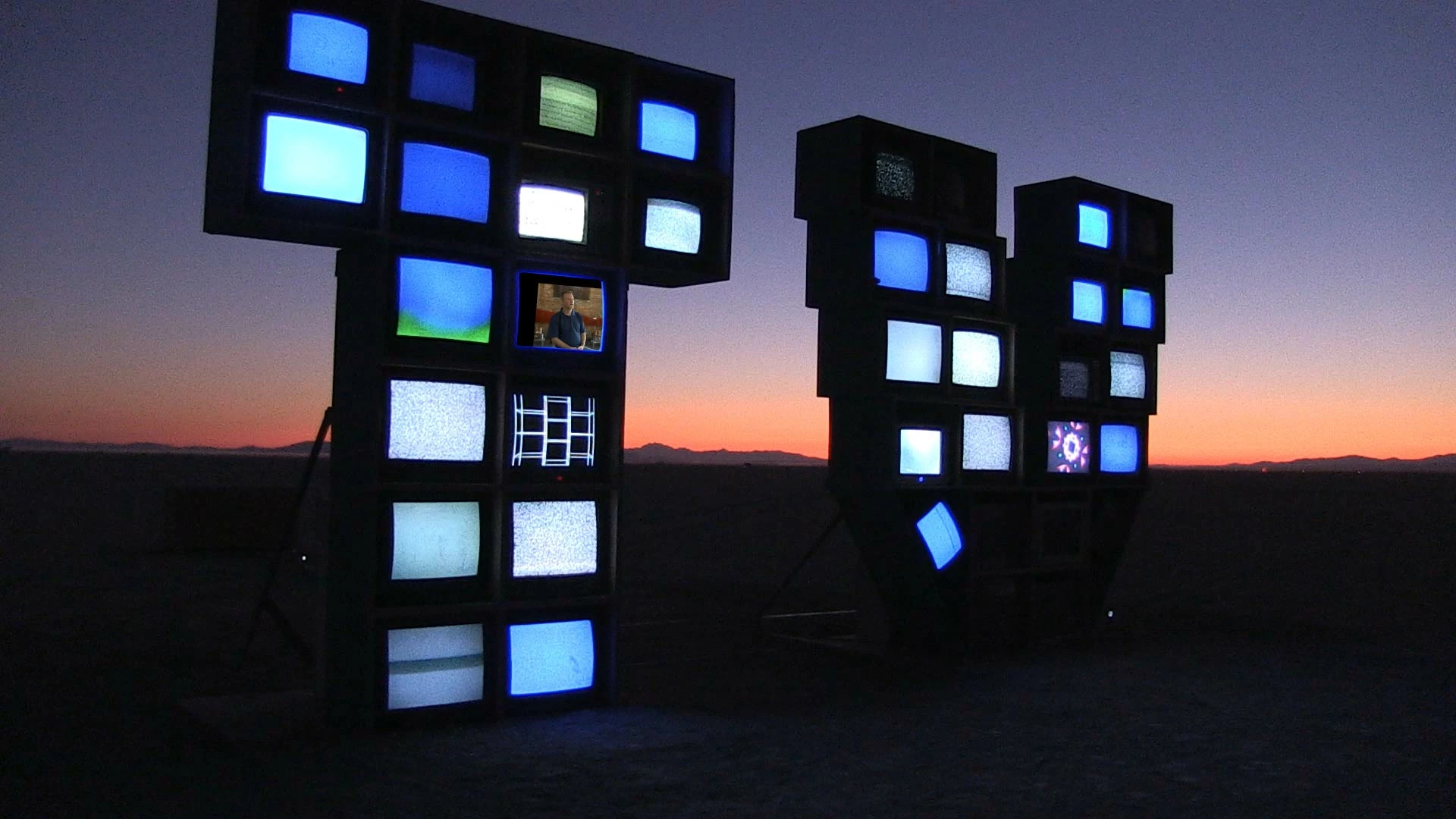
 Hi Rick, here is the shot. All the screens in the monitor installation are showing static except for the one I created a mask in Mocha AE. I simply want to track the video replacing the screen and track it with the motion of the shot. I resolved my issue by manually doing key frame edits using the Transform - position tool. It seems to me that AE tracking has to be done frame by frame as there is no automation. A friend who does visual effects told me I should use Fusion instead?  Also, Mocha  AE workflow doesn't work for the video layer beneath the monitor installation. Does native AE tracking provide any automation or is does that have to be done manually frame by frame? 


The workflow is even easier. Draw a spline around a couple of the monitors that are on the same plane. Perspective track the movement. Adjust the surface so that it just covers the screen. Verify that the track is good and the surface sticks to the screen.


Name the layer Corner Pin, turn off the tracking cog, lock the layer. 


Add another spline to act as a mask for the shape of the screen that is tight to the screen and adjust the edge properties as in any of the Rotoscoping tutorials you'll find on the Boris FX Mocha tutorials page.


Name the layer Mask, turn off the tracking cog, lock the layer, and return to After Effects.


Make sure your replacement screen fits the comp, pre-compose if necessary, then apply the corner pin data from Mocha to the replacement screen. Use the mask data to create a mask and set it to subtract to poke a hole in the shot. You're done. The tracking is taken care of. Here's a link to the project file. Here's a video showing the workflow. I just simulated a camera move and ran Mocha AE to create corner pin data, a couple of surfaces, and a couple of masks to replace two screens in the shot.

Honestly, about 10 minutes with this introduction to Mocha AE tutorial should have given you all you need to know.



2 replies

Community Expert
March 27, 2021

There are lots of ways to do that. If the camera is moving the Stabilized Power Pin workflow I describe in this thread is just what the doctor ordered. The tutorial in that thread is an updated version of one I created a while ago before Mocha AE was attached to the Effects Control Panel. 


There are another 10 or 20 ways to approach that kind of problem. The most efficient method depends entirely on the shot. If the Stabilized Power Pin workflow does not work for you, post the shot.


I've got a bunch of other Mocha AE workflow tutorials coming up. 

Indie767Author
Inspiring
March 28, 2021

Hi Rick, your workflow is very cool but it's way beyond the simple shot I am trying to do. I think I discovered my problem, though. I upgraded to AE 2021 and the motion tracker in this verion is very buggy as the edit target option doesn't work (when using a Null Object). I guess it's a bug that Adobe will fix, but in the meantime, I'm going back to the previous version and see if that solves my problem. Unfortunatly, I will have to rebuild the composition.  

Community Expert
March 29, 2021

Hi Rick, I really appreciate your effort in this. I was able to track the video layer with your workflow. However,I failed to mention that I am not inserting a still image in the monitors, I using full frame video, it tracks at full frame but it won't track when I scale down the video to fit inside the mask. Can Mocha AE actually track motion video into AE or am I constrained to using still images only? If it can track motion video, should scale down the video first before I import into AE? If so, how to I determine the exact scale size and horizontal and vertical position so it fits into the mask? 


Yes, I do it all the time.

Community Expert
March 27, 2021

If you are going to spend any time at all with Mocha AE you need to visit the Boris FX Tutorials Mocha Tutorials page and learn about the tool. You can also get to those tutorials right from the Mocha/Help/Tutorials menu.


Mocha can have as many layers as you like. Each layer can have as many splines as you need. Each layer can track any surface inside the spline. You can export the tracking data in 3 different formats from Mocha AE to any other layer. You can create masks from any Mocha Layer and copy them and paste them to other paths or create motion paths from them, or you can link to them with expressions.


Mocha AE will only track the layer it is on, but you can apply Mocha to any layer, even if it is a nested comp.


I'm not exactly sure what you are trying to do. If you can give a little better workflow and design description, and post a screenshot on the forum using the toolbar it will help up help us help you. Please do not use the "Drag and drop here..." area at the bottom of the reply form. It's useless for sharing images.


Indie767Author
Inspiring
March 27, 2021

Hello Rick,

I drew and tracked a mask inside an image of a vintage TV set which is slowing moving. I want to place an image inside the TV screen (mask) and track that image with the motion of the TV set. I searched through several Boris tutorials but none address my issue. This should be a general capabilty, so I don't know if  Mocha AE can handle this type of motion tracking. I also read that I need Mocha Pro to achieve the result I am looking for? Or shoud I look at using Fusion or more pro program? 


Thanks,


DC