Participant
October 1, 2021
Frage

Transparency issue with image layer

  • October 1, 2021
  • 3 Antworten
  • 306 Ansichten

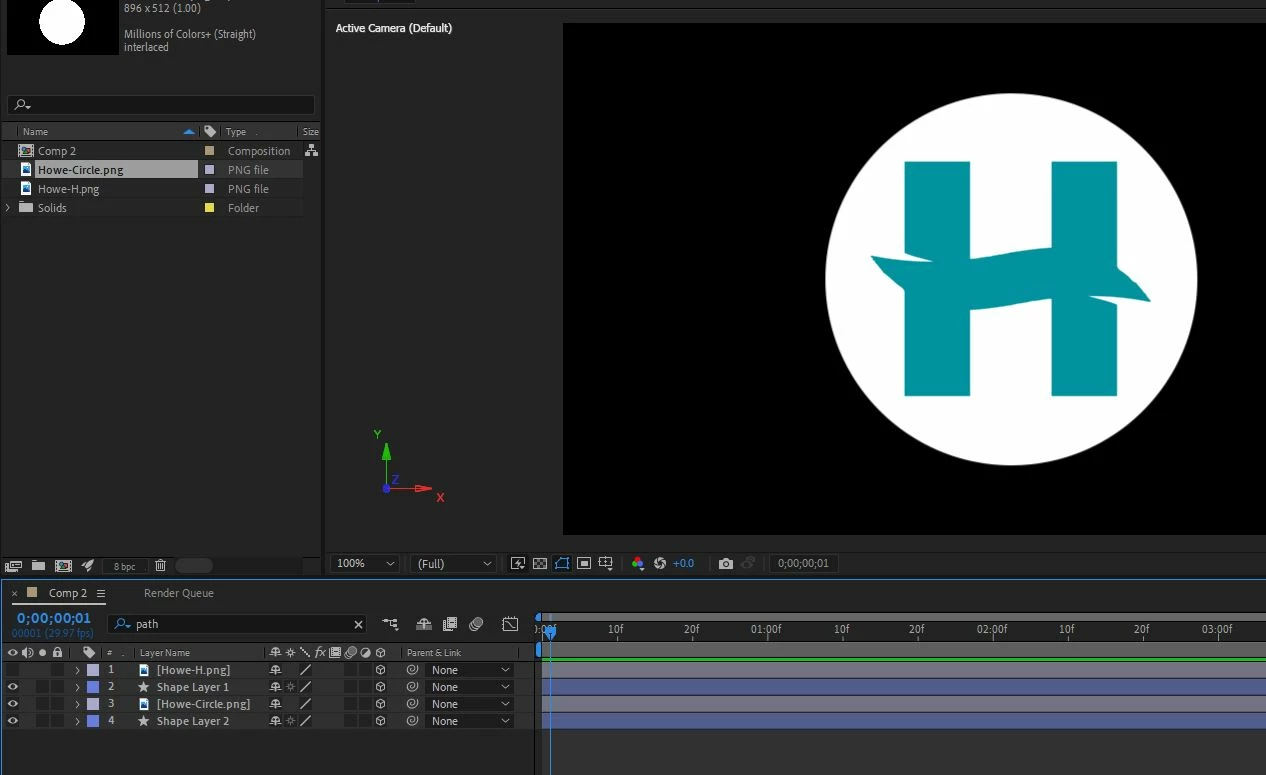
I am trying to animate two shapes in a comp. When the top image layer is turned on it causes the bottom shapelayer to become transparent (or maybe it just doesnt showup) What is causing this?

 

Dieses Thema wurde für Antworten geschlossen.

3 Antworten

Community Expert
October 2, 2021

We can't see the modified properties of the layers so maybe they are all at 0, 0, 0. You did not solo the bottom shape layer (Layer 4) so we have no idea what it looks like. We also don't know if you are using the Classic 3D or C4D rendering engine. 


My first guess is that Layer 4 is behind Layer 1 by at least 1 pixel in Z space. My second guess is that you are using the C4D rendering engine and all of the layers are on the same plane. They usually just interact in a strange way if you are using the 4D rendering engine so my first guess is probably correct.

nishu_kush
Legend
October 2, 2021

Hi Neil,


Thanks for writing in.

Would you mind sharing a screen recording that demonstrates the issue? It'll help us to understand what's going on.

Looking forward to your response.


Thanks,

Nishu

Community Expert
October 1, 2021

Show both the Modes and Switches columns in the timeline by turning on the first two icons in the bottom right corner of the timeline and you will probably see that Layer 1 has been set as an Alpha Track matte for Layer 2. 

Participant
October 1, 2021

Thank you - this is what is showing.


ShiveringCactus
Community Expert
Community Expert
October 2, 2021

The reason I am trying to fix this is my previous comp my .pngs both became transparent above the shape layers, which of course made it impossible to shade the shape layers darker for definition.


I see you're using the Cinema4D renderer, so I'm wondering what happens if you go to Composition Settings > 3D Renderer and switch to Classic 3D.

Huge generalisation here, but C4D renderer is designed for more complex 3D objects and some elements of AE don't play that well it compared to Classic 3D.  But Classic 3D can't do the things C4D can.