
New Participant
January 26, 2016
Answered

trim path, reverse direction

  • January 26, 2016
  • 5 replies
  • 29680 views

I'm creating a line animation using trim path feature. the image was created in illustrator. for example. in the animation the line is growing/extendiing from left to right. is it possible to reverse the direction to have the animation go from right to left?? w/o going into illustrator and redraw the line in different way??

no matter what i do with the starting/ending point setting it ALWAYS goes from left to right...

any thoughts??

my illustration is actually a lot more complicated than just one line. so to redraw the whole thing would not be efficient...
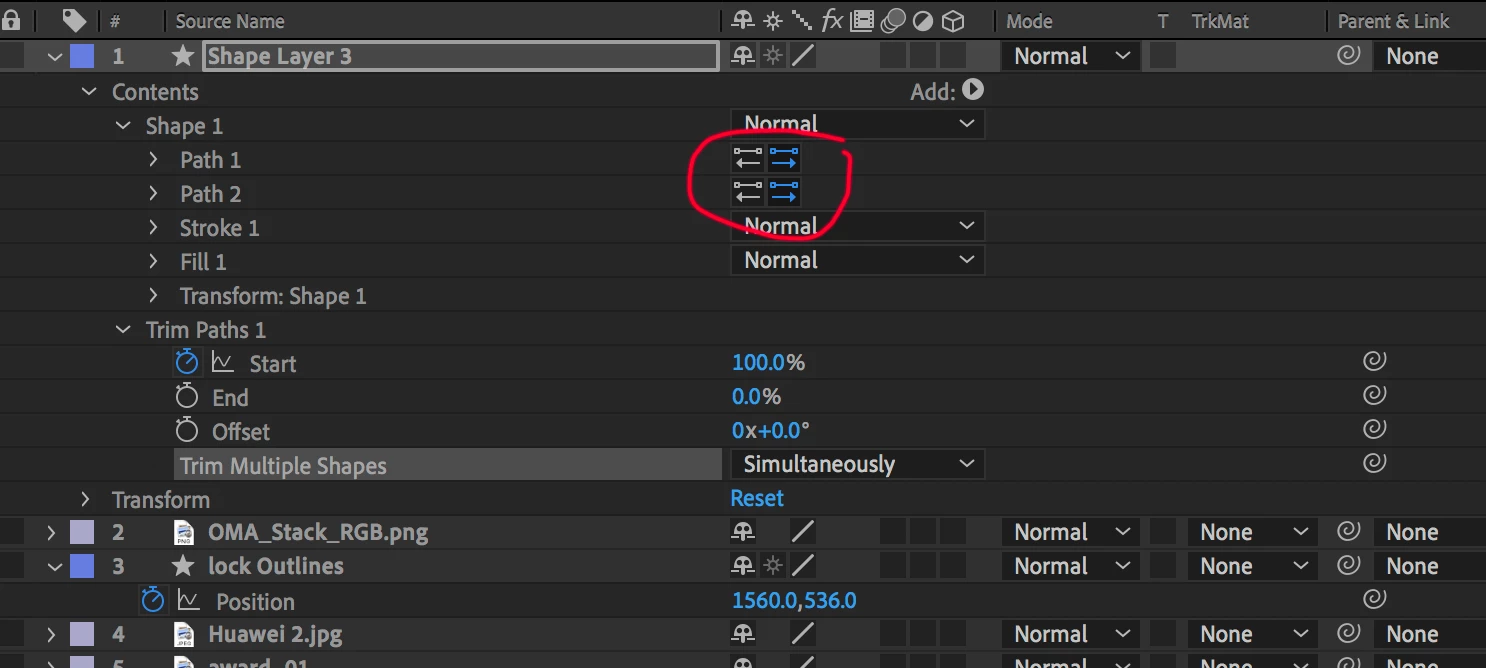
Correct answer graceful_Haven5CD8

By clicking on the direction on the stroke (as I have marked on the image), you will change the direction. It happens to me this issue constantly haha :)!

5 replies

graceful_Haven5CD8Correct answer
New Participant
March 31, 2020

By clicking on the direction on the stroke (as I have marked on the image), you will change the direction. It happens to me this issue constantly haha :)!

Known Participant
September 18, 2020

Amazing. I can't believe it took two years for someone to post such a simple, helpful answer. You rock!

P.M.B
Braniac
February 20, 2018

Contrary to popular belief, bananas stay fresh longer in the refrigerator.

~Gutterfish
Roland Kahlenberg
Braniac
February 20, 2018

In AE, just to the right of the Path Property are two buttons. These buttons allow you to reverse the path direction — use it.

Very Advanced After Effects Training | Adaptive & Responsive Toolkits | Intelligent Design Assets (IDAs) | MoGraph Design System DEV
New Participant
September 18, 2019
🙂 Tks!!!
New Participant
February 20, 2018

You have to rearrange Groups under Contents. Groups on bottom will be animated first.

Braniac
January 26, 2016

‌If you are animating start then animate end. You change direction by changing the way you animate properties of trim paths.

A quick search of "trim paths" in the search help field at the top right corner of AE  brings up this link: Trim Paths Tutorial: This After Effects feature will change your mograph life!