


- Home
- After Effects
- Discussions
- Re: Trimming audio file in AE composition
- Re: Trimming audio file in AE composition
Trimming audio file in AE composition

Copy link to clipboard
Copied
I have completed my first AE composition and need to trim the video layer. I tried opening the layer and dragging it to the current time indicator position but it still leaves behind the grayed out layer in the timeline. If I drag that to the current time indicator it changes when the music begins.
Is there no way to simply slice the layer then create a fade out?


 11
Replies
11
11
Replies
11



Copy link to clipboard
Copied
what you did is move the layer and you need to trim. if you cant see the start or end of the layer, you need to use the shortcuts for Trimming. Alt+ ] or Alt +[
more about it here:
Copy link to clipboard
Copied
Thanks, I'll try that.
Copy link to clipboard
Copied
The problem is the movie continues for a full minute and a half after the music has stopped because the layer still has the grayed out area in the timeline. How do I get rid of that?
Copy link to clipboard
Copied
I am not sure if you are referring to the work area. let's make it more clear to understand by providing a screenshot where the timeline is fully visible.
Copy link to clipboard
Copied

I can't figure out how to trim the grayed-out part of the audio layer. I want to end the video where the current time indicator is located.


Copy link to clipboard
Copied
You cannot trim layer length but you can't set it out point.
You could set your work area to the current time by pressing the n key or you could make note of the current time and edit the composition settings. The default for the render to the output is to render the work area or you can right-click in the work area and trim the composition to the work area.
These are very basic skills you need to know and could find by checking the help files. To figure out how to edit the composition settings type "composition settings" in the search help field at the top right corner of AE check out the community resources.
Copy link to clipboard
Copied
I just cut the unnecessary footage in Audition. Sure seems like there would be an easy way to do this in AE.
Copy link to clipboard
Copied
you did cut the unnecessary footage but as Rick said your work area is set to render the entire duration of your composition. you want to set the work area before you render and you do that by either dragging the Handles. every student Rick teaches would know these type of things in his first lesson  you can do this in two ways - either drag in manually
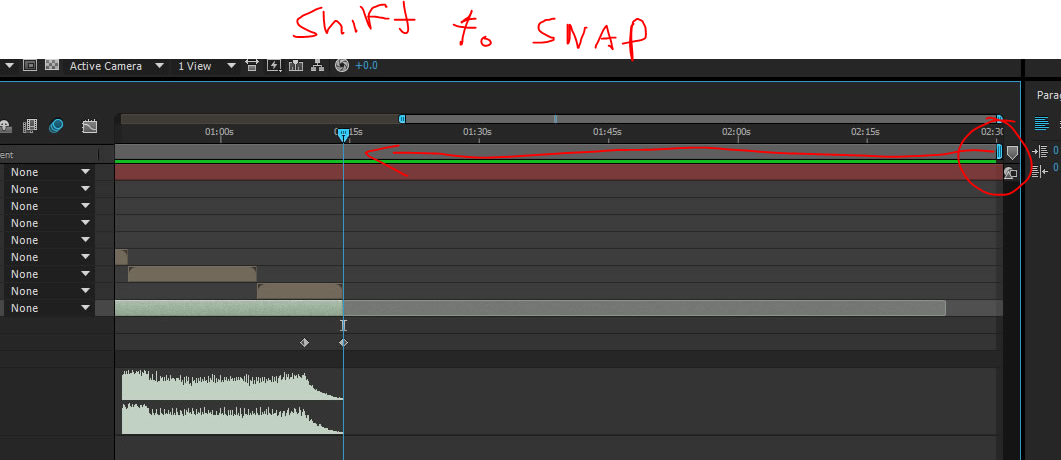
or pressing N when you are with the CTI in the end of the Work area. better read some more because working with Ae intuitively will only go so far ( you did not go very far...) more about the work area is here: Preview without rendering in After Effects
Copy link to clipboard
Copied
I shortened this from a 2:30 video. So you have to shorten the work area in order to stop the scrubber.
Copy link to clipboard
Copied
I finished the Premiere Pro manual but haven't yet finished the AE one. I was able to modify a web design portfolio video template I purchased at videohive.net in just a few hours with little to no training.
Copy link to clipboard
Copied
Very good. Ae is kinda weird. you sometimes can get things done with no training, because some of it is kind of intuitive but the moment you get stuck it can stop you on your feet and until you learn the basics your are stuck. can only go so far with little tips and shortcuts. hope this thread aspired you to learn more from the ground up.


Find more inspiration, events, and resources on the new Adobe Community
Explore Now
 AdChoices