
Dan_Vs_Himself
Inspiring
May 30, 2023
Answered

Trying to create transparent text over a solid color

  • May 30, 2023
  • 1 reply
  • 4184 views
I'm trying to create transparent text (so the transparent letters reveal the video beneath the solid color [see below]). I'm hoping to do this in after effects without having to go into photoshop. Does anyone know how to achieve this effect?
 
Any links to tutorials for this would be really helpful.  This seems like an easy thing but I can't figure out how to phrase the question correctly to find the correct tutorial for what I'm looking to do. Thanks for all your help!
This topic has been closed for replies.
Correct answer ShiveringCactus


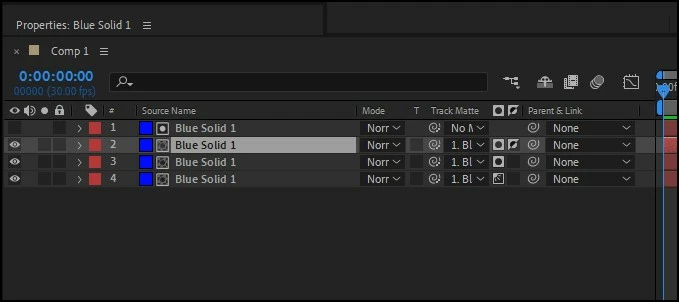
Hopefully you can see the attached image.

  • Layer 2 has an alpha matte (black circle in white square) which is inverted (checkbox next to it) meaning that whatever alpha channel layer 1 has will only show the invert of layer 2
  • Layer 3 has an alpha matte
  • Layer 4 has a luma matte (whatever black parts of Layer 1 will be transparent on layer 4, white will be solid)


1 reply

Participating Frequently
May 30, 2023

Hi Dan. What you are looking for is a "Track Matte", there are a ton of tuturials. At its simplest: place your text layer above the video. In the comp panel under the TrkMat heading at the top select the video's "None" and change it to "Alpha Matte ". If you can't see the TrkMat heading press the 'Toggle Switches/Modes' button at the bottom of your screen.

Dan_Vs_Himself
Inspiring
May 31, 2023

@Towerguy Thanks so much for your quick reply! I was able to see what you were talking about before with the previous versions of After Effects, but it seems like they've changed the setup (see the screenshots below). Do you know which symbols are the Alpha Matte? Thanks for your help!

Dan_Vs_Himself
Inspiring
June 2, 2023


Hopefully you can see the attached image.

  • Layer 2 has an alpha matte (black circle in white square) which is inverted (checkbox next to it) meaning that whatever alpha channel layer 1 has will only show the invert of layer 2
  • Layer 3 has an alpha matte
  • Layer 4 has a luma matte (whatever black parts of Layer 1 will be transparent on layer 4, white will be solid)


Thank you! I really appreciate it!