

TrellWest
Known Participant
April 1, 2020
Answered

Turning a countdown clock into a .MOGRT

  • April 1, 2020
  • 3 replies
  • 4005 views

Hi,

I've successfully made a countdown timer using various slider controls and source text.
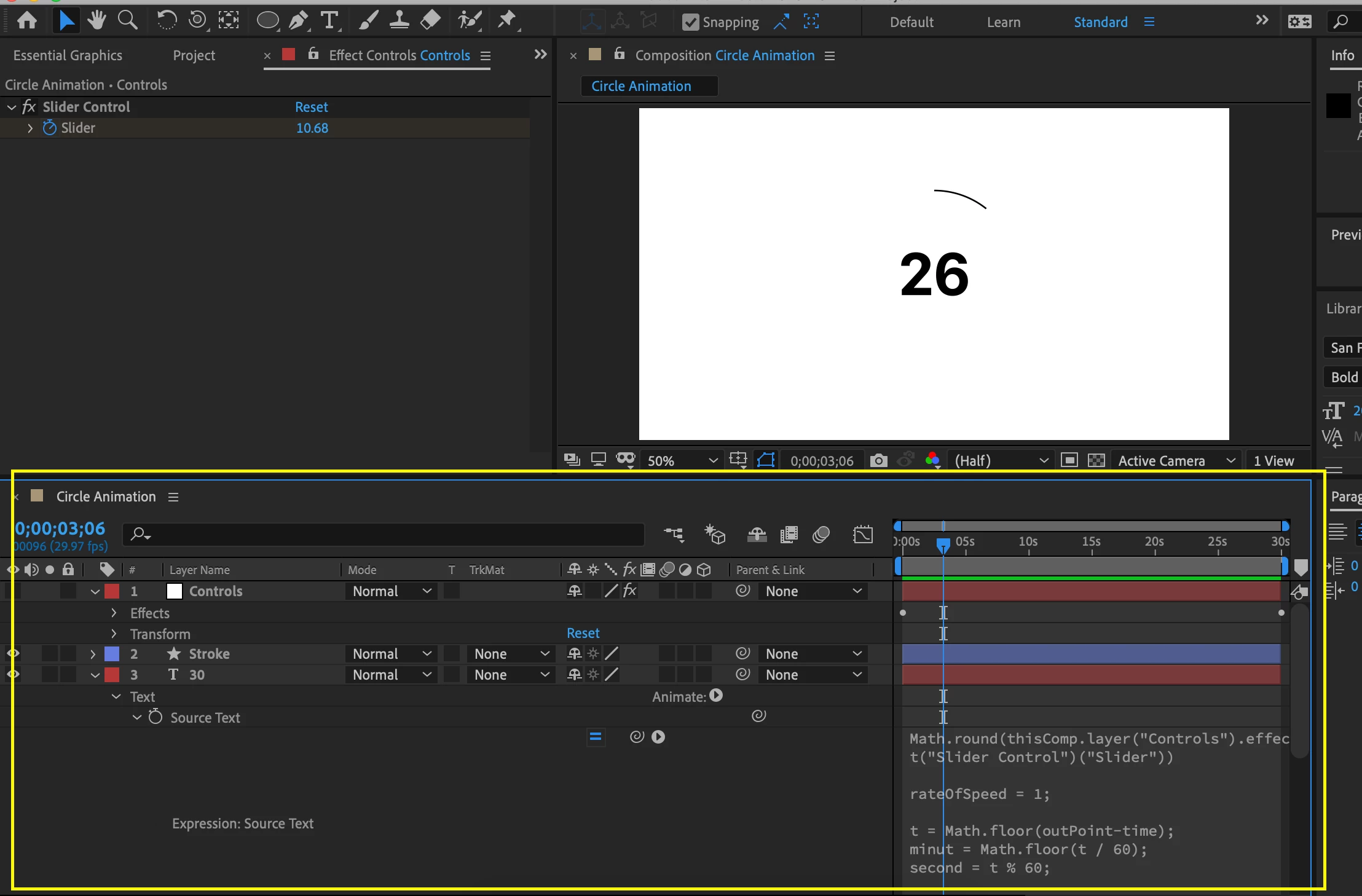


I am now trying to create a mogrt file that can adjust the time variable placed on the input so that I can re-use the template for different amounts of seconds. 


Does anyone have any insight on the expressions or controls needed to achieve this? I'm new to this and am running into a wall! 


Thanks! 

This topic has been closed for replies.
Correct answer Roland Kahlenberg

Ah. Sorry, I forgot about that.

Paste this Expression into Trim Path's End prop -

s=thisComp.layer("1").effect("Slider Control")(1);
linear(s,s.valueAtTime(inPoint),s.valueAtTime(outPoint),0,100)

3 replies

Roland Kahlenberg
Legend
April 10, 2020

Remove the keyframes from the Slider Control. Then, paste this Expression into the Slider Control -

StartValue=effect("Slider Control")(1);
linear(time,inPoint,outPoint-1*thisComp.frameDuration,StartValue,0)

HTH


Very Advanced After Effects Training | Adaptive & Responsive Toolkits | Intelligent Design Assets (IDAs) | MoGraph Design System DEV
TrellWest
TrellWestAuthor
Known Participant
April 10, 2020

That worked! How would I make it so the line trim path aspect of the timer is congruent with the seconds? Would I do the same?


Roland Kahlenberg
Roland KahlenbergCorrect answer
Legend
April 10, 2020

Ah. Sorry, I forgot about that.

Paste this Expression into Trim Path's End prop -

s=thisComp.layer("1").effect("Slider Control")(1);
linear(s,s.valueAtTime(inPoint),s.valueAtTime(outPoint),0,100)

Very Advanced After Effects Training | Adaptive & Responsive Toolkits | Intelligent Design Assets (IDAs) | MoGraph Design System DEV
Community Expert
April 1, 2020

I can't see the whole expression and you have not explained what the slider does but you should be able to add any of the controls that are available to the MOGRT  and have them accessible in Premiere Pro. The only thing you should have to do there would be to set the slider and adjust the out point of the MOGRT layer. 


 A little more detail about how this comp works and a look at the Essential Graphics Panel would help us point you in the right direction. 

TrellWest
TrellWestAuthor
Known Participant
April 10, 2020

Right now I have a countdown 'number-timer' keyframed to a 'trim-path' for the circle countdown.


Right now to adjust the settings I have to manually set the time based on keyframes and the number '10' set in the slider, which is attached to the trim path. Like Justin mentioned I am needing help animating this via expressions and not keyframes but I am unsure how to best do this without resulting in error so that I can make these values adjustable by Mogrt.  The Countdown timer I'm working with is the circle countdown timer provided here: https://blog.motionisland.com/after-effects-counter-templates-projects/#.XpCRCy-z3F0 


Ideally, I'd like to be able to create a mogrt that sets:

- trim path stroke

- countdown in seconds/duration

-font


Justin Taylor-Hyper Brew
Community Expert
Community Expert
April 1, 2020

If you want to adjust the start value in a MOGRT, you'll want to animate with expressions (linear, ease, etc), not keyframes, and set the start value with your slider. A setup like this will work:

res = linear(time, 0, 1, effect("Slider Control")("Slider"), 0);
Math.floor(res);


TrellWest
TrellWestAuthor
Known Participant
April 10, 2020

I understand animating with expressions and not keyframes but I'm having a little trouble following since the trim path is tied to the count-down number.  I tried putting your source txt in and it resulted in an error..


I wish there was an 'upwork' for Adobe After Effects, I've spent about 4 days trying to make a circle countdown timer 🙃