One method is to key frame the position movement in each range selector, and keyframe the next frame with the reverse positions (so, -199 become 199 and 20 becomes -20 etc), then slide the range select offset positions to the second position keyframe.
I'm sure it's not the correct method, but it does the trick for now. I shall have to investigate further. Thank you both for all your help!
Elliott
Here's an AEP which I think does what you want - use it as a guide to suit your needs. I've provided two comps with each showing a different route to get to your desired goal.
http://www.broadcastGEMs.com/mediaStreamer5/Reverse_TextAnimatorProperty_01.zip
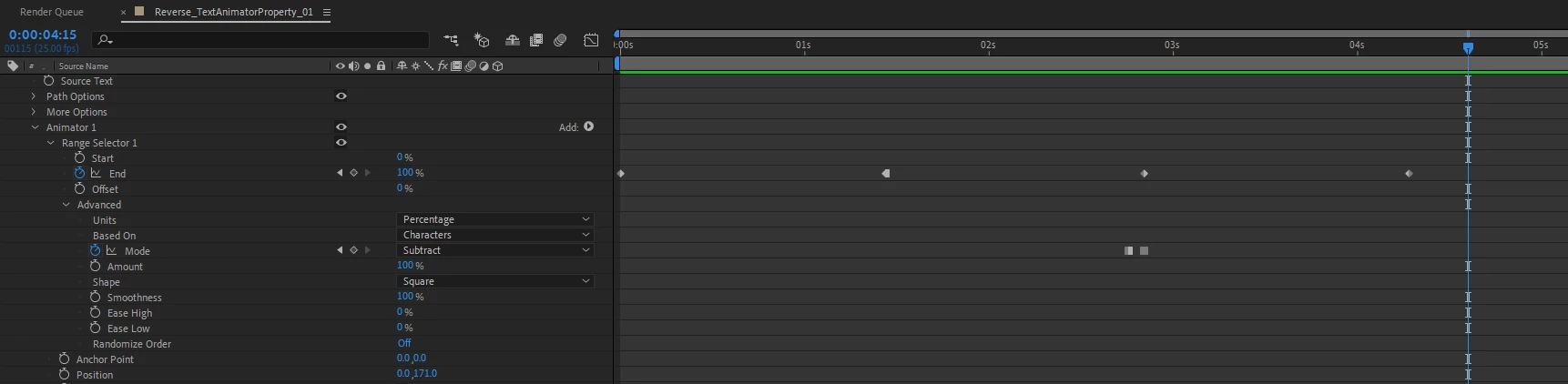
The screengrab below is from the AEP. There is no need to duplciate the Range Selector with this method. What you'll need to do is to copy and past the keyframes for the Range Selector and paste it further down the timeline, where you want the transition out to happen.
Then, you'll want to set the second KF for the Range Selector to a Hold KF. Lastly, you'll have to change the Mode from Add to Subtract and be mindful where the keyframe change occurs. Essentially, the Mode should be set to Subtract on the first frame where the transition out occurs.

 AdChoices