This topic has been closed for replies.
Correct answer nishu_kush

Hi there,


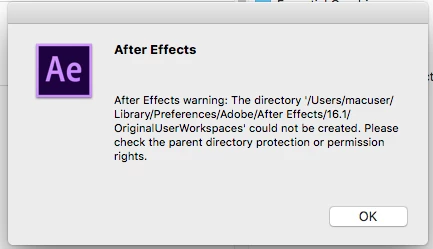
I agree with @ToolfarmJP, it seems to be permission related issue.

Here are the steps to locate the folder and provide permissions:

  1. Open a new Finder window. 
  2. Hold down the Option key, click the Go menu on the toolbar at the top of the screen, and then choose Library. (Library is hidden unless you hold down the Option key.)
  3. Once you are in Library, go to Preferences > Adobe > After Effects > and provide the Read & Write permissions to the 16.1 folder.

Let us know if it helps.


Thanks,

Nishu


1 reply

ToolfarmJP
Community Expert
Community Expert
April 15, 2020

The cause is the permission of the folder. You move to the folder the error message says and then hit command key + I. You change the setting of everyone to Read & Write.


Participant
April 15, 2020

Thank you, but which folder? I cant locate the path its referring to. There is no Library/Preferences in my MacUser folder?

Participant
April 15, 2020

Hi there,


I agree with @ToolfarmJP, it seems to be permission related issue.

Here are the steps to locate the folder and provide permissions:

  1. Open a new Finder window. 
  2. Hold down the Option key, click the Go menu on the toolbar at the top of the screen, and then choose Library. (Library is hidden unless you hold down the Option key.)
  3. Once you are in Library, go to Preferences > Adobe > After Effects > and provide the Read & Write permissions to the 16.1 folder.

Let us know if it helps.


Thanks,

Nishu


Thanks to both!

I actually unistalled 16 and reinstalled the latest 17 but was still getting the error. Then did what you said about changing permissions. But I did it to a number of other folders in the 17 folder. Then it finally worked.

Thanks again! Also, great tip about option key/Go menu to access Library, I didn't know that one.