
pvanCOLOR
Known Participant
April 5, 2021
Answered

using Arabic in After Effects 2021

  • April 5, 2021
  • 2 replies
  • 18771 views

I have all of my text translated and am trying to copy and paste into AEffects. It is reversing the order and not connecting the letters. I'm using the font Din Next LT Arabic. I've changed the language to South Asian and Middle Eastern under Preferences - Type. What am I missing?

I found a website that will flip the letters for me but that is an extra step that seems unnecessary.
Correct answer Ali Jaber

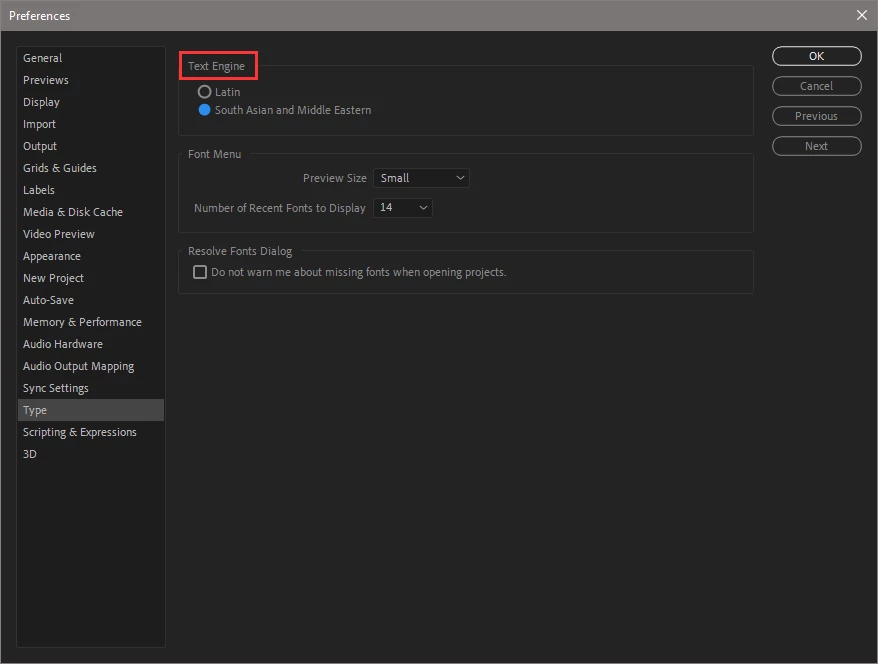
It's what you choose in type preferences:


So if you have a text layer that was created using the Latin text engine, you can't paste Arabic text into it, characters will be separated, that's why when you switch your text engine into Middle Eastern, you have to create a new text layer and paste Arabic text into it

2 replies

Participant
April 11, 2022

After placing arabic text click a "reset paragraph" option on Paragraph panel. It will change the order of arabic letters to the right one.

Participant
December 9, 2022

Thanks! That was the actual answer.

Community Expert
April 5, 2021

You have to create a new text layer when you switch the text engine, you can't use text layers created with the other engine to paste Arabic text. so, create a new text layer, choose an Arabic font, and paste.

pvanCOLOR
pvanCOLORAuthor
Known Participant
April 5, 2021

I'm not sure what you mean by text engine?

Ali JaberCommunity ExpertCorrect answer
Community Expert
April 6, 2021

It's what you choose in type preferences:


So if you have a text layer that was created using the Latin text engine, you can't paste Arabic text into it, characters will be separated, that's why when you switch your text engine into Middle Eastern, you have to create a new text layer and paste Arabic text into it