
Participating Frequently
April 25, 2019
Answered

Using JSON to change color.

  • April 25, 2019
  • 1 reply
  • 5033 views

I am attempting to use a JSON script to change the color of a solid. I have the solid hooked up to a color controller that uses the "Color Control" effect.

I got a text layer to hook up to my JSON using this expression:

eval("var practiceText=" + footage("bogus.json").sourceText);

practiceText[0].PracticeText;

I am trying to use a similar expression to change the color of that solid:

eval("var mainColor=" + footage("bogus.json").color);

mainColor[0].MainColor

However I keep getting the error "Error: TypeError: cannot read property of '0' of undefined"

Does anyone know what I would need to change to get it to read the color value in the JSON?

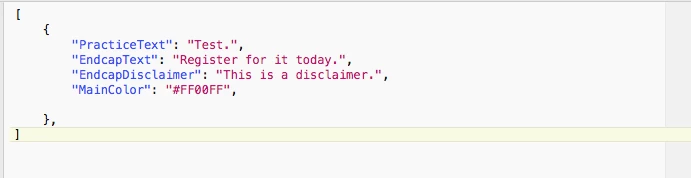
This is what my JSON script looks like.
This is a full picture of the expression on the color control

This topic has been closed for replies.
Correct answer Mathias Moehl

My free mamoworldJSON script can generate expressions that link to colors in JSON files.

https://aescripts.com/mamoworldjson/

See this tutorial for details:

1 reply

Mathias Moehl
Community Expert
Mathias MoehlCommunity ExpertCorrect answer
Community Expert
April 25, 2019

My free mamoworldJSON script can generate expressions that link to colors in JSON files.

https://aescripts.com/mamoworldjson/

See this tutorial for details:

Mathias Möhl - Developer of tools like BeatEdit and Automation Blocks for Premiere Pro and After Effects
Participating Frequently
April 25, 2019

Thank you, that works great! I also see that it has the ability to show or hide images. Is it possible to swap out an image completely using mamoworld? Possibly by entering a new file path in the JSON script?

Mathias Moehl
Community Expert
Community Expert
April 26, 2019

Expressions and the data-driven animation features of After Effects cannot replace footage, hence showing/hiding is the best you can  do with mamoworldJSON or any other approach that uses only expressions.

If you want to replace footage, you need a script instead of expressions. An automated (not free) solution that supports this is, for example, Templater

https://aescripts.com/templater/

Mathias Möhl - Developer of tools like BeatEdit and Automation Blocks for Premiere Pro and After Effects