
Participant
May 24, 2021
Question

Using Roto Brush With Animation Footage

  • May 24, 2021
  • 1 reply
  • 315 views

Hello,


I do post-production work with animation footage (ie, cartoons) and a lot of the work I do requires lots of Roto, which means LOTS of masking. (And before you ask, no, I do not have access to any of the animation production files. All we get to work with are the final -flat- video files.)


I've experimented with the new Roto Brush 2 and it is excellent except for one major flaw that makes it unusable for me: the border created by the Roto Brush shifts nearly every frame even when there's no animation. Most of the animation that we work with is on 2's or 3's, meaning there's motion every 2nd or 3rd frame at 24 fps. 


The example below hopefully illustrates the problem. (Disclaimer: I do not work on Spider-Man or for Marvel Animation. I simply downloaded this image from The Interwebs and it's provided here as a visual aid to further explain the problem I'm having.) 
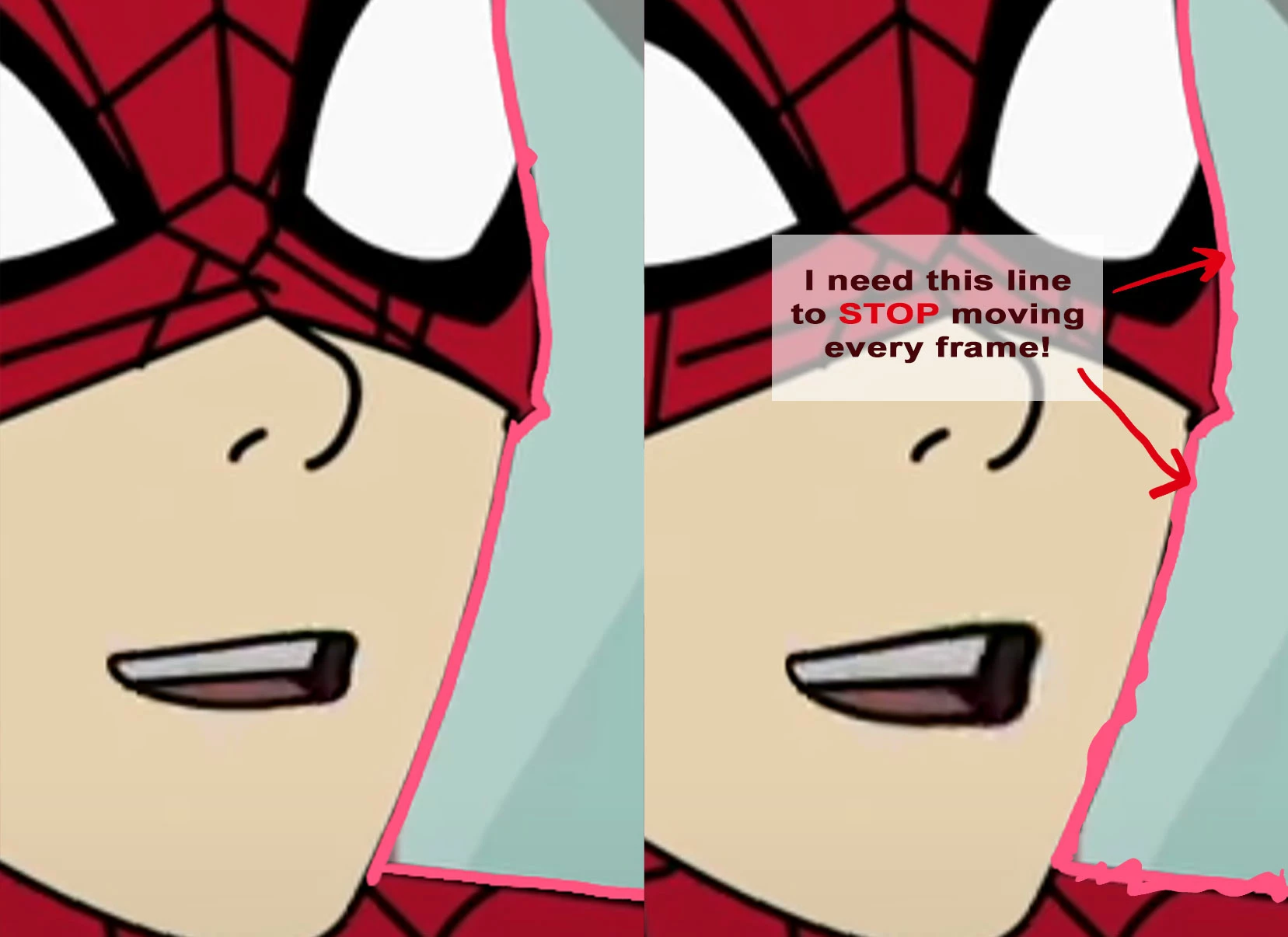
My question: Is there a way to get the Roto Brush mask to STOP moving every single frame? The "Freeze" button does not get the line to actually...well, freeze. 


I need the line to stop moving/propogating during the frozen frames or it's completely useless to me because otherwise the Mask will be moving while nothing else does. I hope this is clear and that there's some way to do this. Thanks in advance. 


-Not Spidey

This topic has been closed for replies.

1 reply

Mylenium
Legend
May 25, 2021

Long and short: No. It's inherent in how the tool works under the hood. It synthesizes a motion vector analysis and mangles it through some threshold and smoothing operations, trying to determine the direction based on averaging values. And since the sources almost always has already little glitches and artifacts be that simple noise in the luminance, compression artifacts or actual "hard" glitches, there are simply limits to how that can work. Or in other words: Contrary to what the general public assumes, it's not just tracking edges. Hence why it also does not work that well with stylized footage - it simply assumes it needs to smooth out something to clean up the contour, which in such cases works against what people want. I'm afraid you have to stick with your workflow or at least expand it in such a way that you use better mask tracking tools like mocha or Silhouette Roto for the prep work.


Mylenium

Big GrumpAuthor
Participant
May 25, 2021

Thank you very much for the quick and detailed explanation. It's so agonizingly close to doing the job perfectly but such is the way of technology sometimes. I also have access to Mocha and Silhouette so I'll limit my focus to those two plugins. Thanks again.