Atte J.
Inspiring
June 8, 2021
Answered

Viewport controls missing

  • June 8, 2021
  • 2 replies
  • 1378 views

AE 18.2

Mac OS 10.15.7


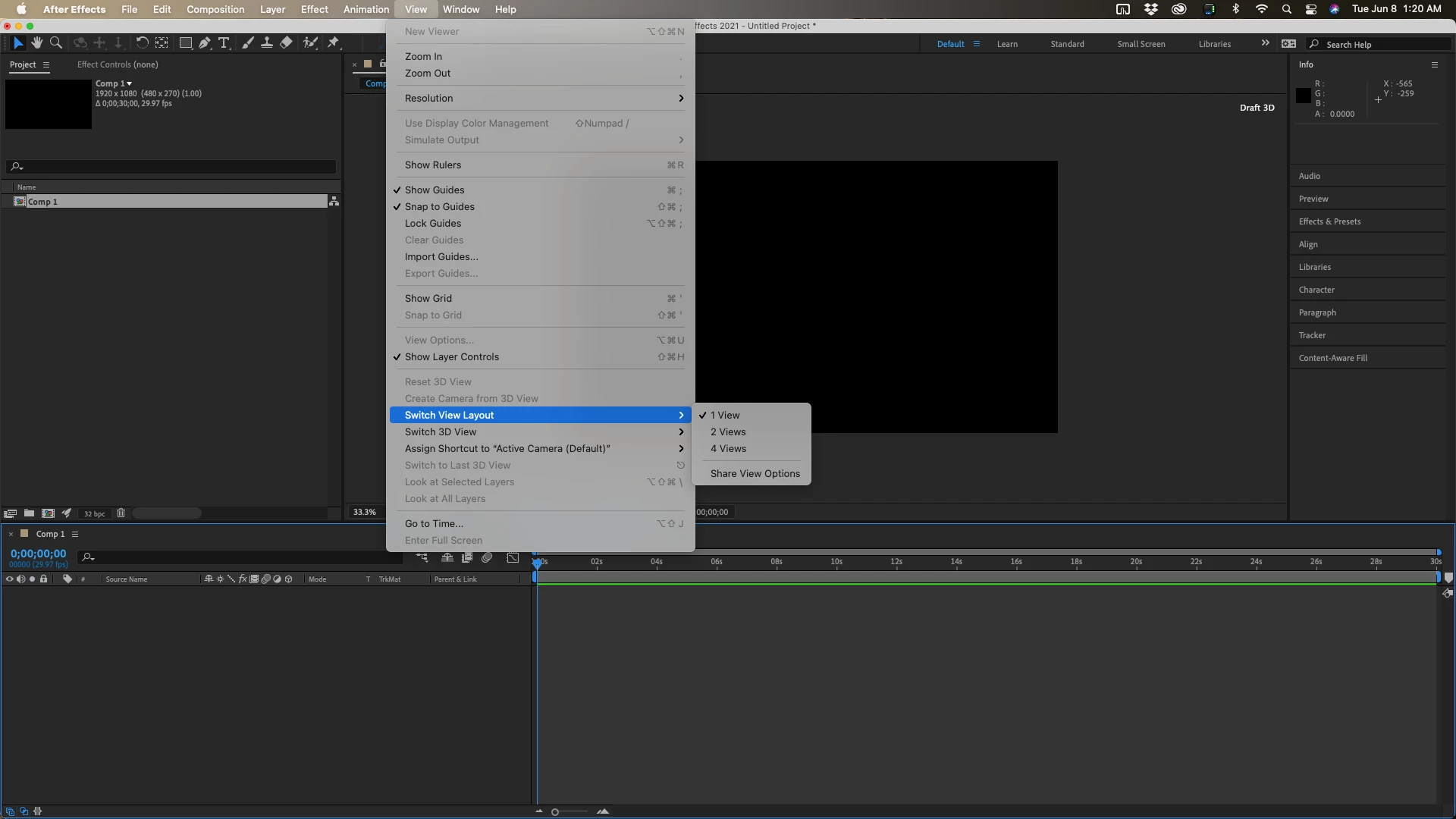
See the image. I have two views open and I cannot change that. A new projects opens this way. The controls are missing. Old projects that used to be fine are still ok. This is annoying. Is there some menu where I can reset this? A layout reset won't help.

This topic has been closed for replies.
Correct answer Rick Gerard

Try the View/Switch View Layout menu or add or change any 2D layer to a 3D layer. It's in the release notes.
2 replies

OussK
Community Expert
Community Expert
June 8, 2021

It will automatically appear once you create a 3D layer or camera 

Rick GerardCommunity ExpertCorrect answer
Community Expert
June 8, 2021

Try the View/Switch View Layout menu or add or change any 2D layer to a 3D layer. It's in the release notes.

Atte J.
Atte J.Author
Inspiring
June 8, 2021

Ah yes, there it is! An irritating bug anyway. Thank you!
