
Sutton Bay Media
Inspiring
March 1, 2020
Answered

Wanting Illustrator Transparency>Lighten option to work in AE

  • March 1, 2020
  • 2 replies
  • 1548 views

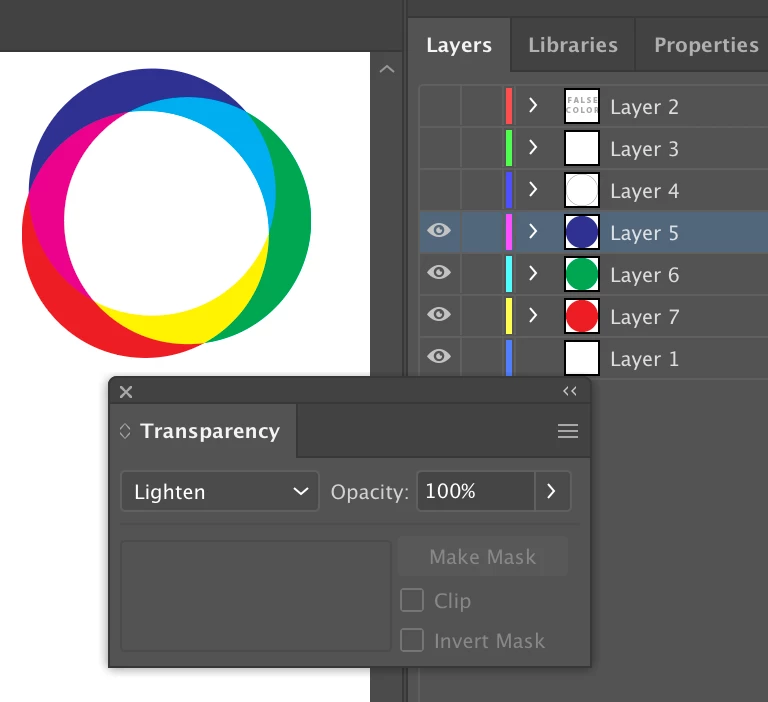
My student made these three shapes, than put transparency on and they blend with a white center. As you can see I released layers to sequence and take this into After Effects as an AI project. It won't hold the transparency. Interpret footage in AE doesn't work either. Any ideas how I can revolve these circles around themselves and hold their blend and white center? 
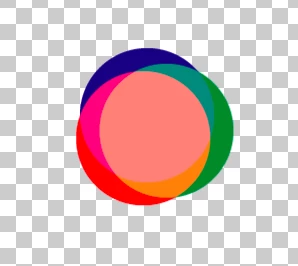
I tried Blending Mode>Lighten in AE but it does this - 
This topic has been closed for replies.
Correct answer Kyle Hamrick

AH you are a genius. The AI project is a CMYK. But you gave me a lot more options now to look at going into the Color Project settings in AE. Thank you!


Recommendation - change the colors in Illustrator for this one, and have your student make sure to work in RGB within Illustrator when creating elements for video.

To change the colors in Illustrator for the existing artwork:
File > Document Color Mode > RGB
Sometimes that File command isn't enough to get things perfect, if that's the case, also try:
Edit > Edit Colors > Convert to RGB

2 replies

Kyle Hamrick
Community Expert
Community Expert
March 1, 2020

Unfortunately, this is a limitation (one of many) on the AI > AE import workflow. 
You'll need to set those properties manually after importing into After Effects. If I have changed blending modes or Transparency within Illustrator, I typically add those to my layer name within Ai, so it's easy to keep straight.

Sutton Bay Media
Inspiring
March 1, 2020

I did set it separately in AE, using the same blending options and it didn't add the white center. There isn't anything on the shapes in AI except a transparency>lighten over the top. Do I have to make a clipping mask on each one? That wouldn't blend the color layers. 

Kyle Hamrick
Community Expert
Community Expert
March 1, 2020

Aha - apologies, I guess I misread the main point of the question.

Important distinction - what color space was used when creating this in Ai? Remember that AE is an RGB-based program. If it's converting the colors as it's importing (which is what happens if the Ai document was created in CMYK), those colors probably aren't going to be exactly pure red/green/blue anymore, which is why they're not adding up to pure white.

Community Expert
March 1, 2020

Are you importing it into AE as a composition and not footage?

Sutton Bay Media
Inspiring
March 1, 2020

Yes, as a composition. Another tutorial said an Eps file wouldn't work either.