
Wave Warp *along* a path?
I was curious if theres anyway to have the Wave Warp (or collection of effects that work like it) work along a path, rather than one specific radial direction? I have a project I'm struggling with that having this would solve a lot of issues. I've found a few solutions to vaguely similar issues, but applying them to my project results in less than ideal results.
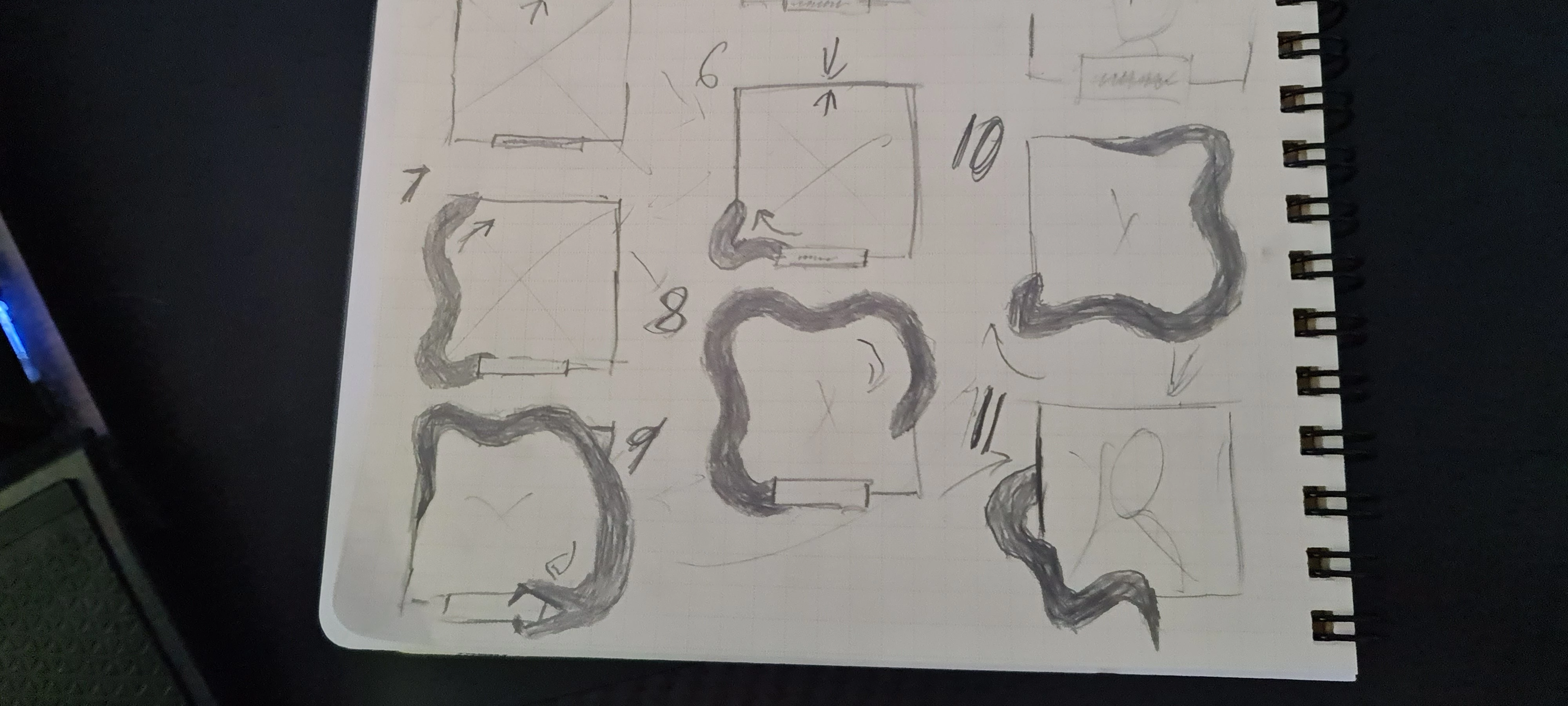
To be more specific on what I'm trying to do, I want to warp a stroke around a given shape to give an appearance of a snake slithering about its edge (even more specifically, the body of it, the head is a separate thing I have pinned to the front edge of a trim paths which I have controls to animate, so its literally just the slither). the most I want to do to the original given object is round the corners.
In my head, Wave Warp would just have a checkbox when applied to a shape or path that says "affect along path" and it would either grey out the radial direction dial or add it to the path info. Conceptionally this seems easy, things that seem easy rarely are.
For things I've tried:
- Obviously just applying Wave Warp to the shape affects it in one radial direction, screwing up any path not exactly perpendicular to the warp direction.
- Wave under the Stroke settings in the Shape settings would work, if there was any option to differ the inner and outer edges' offset. As the current version stands, they come in and out together, making the stroke vary in width along it's path rather than staying consistent.
- Just drawing a wavy path around a shape. This mostly works, but has very little versatility. The goal of the project is to be able to broaden the series of project to a number of base things. Having to redraw the path on every single one would be tedious. (though a square can be broadened to other rectangles and I think all parallelograms via standard stretch, scale, and/or skew, but I haven't tried).
- animate the whole thing going around the edge very clean and then Bezier warping the whole thing to to undulate. Unfortunately this is pretty inexact and leads to issues where the path is thicker when its stretched out from the original path and thinner when inside. Also no simple way about going how it might do wave offset.
- Constructing the base 'snake' body out of its edges made of shapes with wave warp on them. Any curve would then just have also Bezier Warp in it as well. This is the most tedious, less versatile version that also runs in to a wall when trying to animate it along the shape as there then would require a load of puppet pin work. Extremely not ideal
- what I have in Ae right now is similar to above, but instead of constructing the snake body edges out of the Wave Warp'd shapes, I have the path it should take around the base shape. That with find edges gives me a line it could follow.... if it was made up of path information. And even if I knew how to make it follow that, the waves don't 'bend around' the corners like I need them to, but clash in to sharp wavy points. I could blur and levels sharpen them to round the edge, but its still not "bending around" the corner, it's just a less harsh turn.
below is the sketch I did when I conceptualized this if you have a tough idea visualizing what the slithering snake was like (the parts where it eats an element and then goes behind the frame can be ignored).
Any help is greatly appreciated!
 AdChoices