
Zealous_critic5CAE
Participant
January 14, 2020
Question

When video plays, After Effects freezes

  • January 14, 2020
  • 13 replies
  • 10507 views

I just got After Effects 2020 and when I preview my comp, it will play, but AE will freeze. I can't stop it unless I force close it. I can also close the window and it will give me the option to save my changes or cancel. I can press cancel and it will stop playing, but when I play it again, it will do it all over again. I am working on a EVOO Ultra Thin (11.6).

These are my preview settings: 
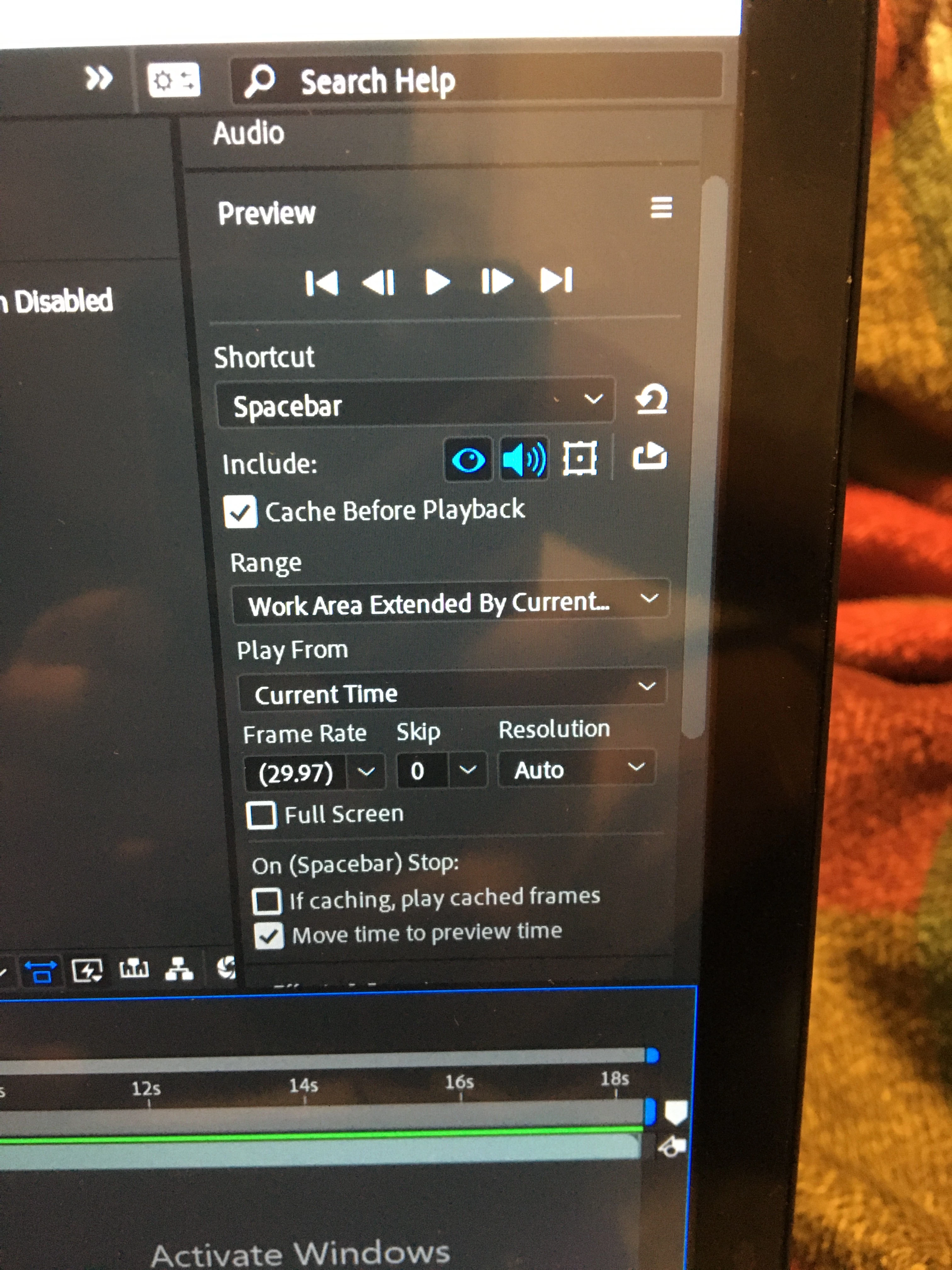
 

Any solution you have will be helpful, thanks 🙂


This topic has been closed for replies.

13 replies

Participant
September 9, 2021

Ok so I dont have all the tehnical details behind this but my solution was to convert my video to a diferent format. The Preview in adobe after effects is still a player that is limited by codecs that can read the video so it can either be missing codecs, missmatch of frame rate( I converted my video with the 29.97 fps as I use in my AE project) and so on. So if its just one video giving you the problem try converting it to a diferent format with a stable fps if you want to completly fix the problem try to get the necesarry codecs for adobe preview to be able to play it. Hope this helped 🙂

Participant
May 30, 2021

I'm having the same issue. This is EXACTLY why rental software is a huge liability in a professional environment. Unwanted updates introduces anomolies. $10k edit suites with pro hardware and drivers require a perfect coctail of versions and drivers to work. No pro shops upgrade anything if it works. We could care less about the latest preset because thats consumer marketing. One unwanted update and a required driver version later...you are down a day. Pay attention that not one Adobe support rep will help anyone in these forums.

Participant
May 31, 2021

Maybe you already tried this, but I was struggling with the same problem. I found out it was my audio driver that wasn't working properly. I work on an external sound card. I reconnected it and for some reason, the problem dissolved. 

Participant
April 29, 2021

I faced a slightly different problem. But I'm talking about this here thinking what if the solutions end up working because no one has a proper solution.


Every time I do a RAM preview the composition screen/preview freezes. I tried a lot of things. Working with smaller files thinking my laptop couldn't handle high quality video files. Did the purge thing several times. But nothing worked. 


So while I was looking around for a solution I came across another thread which said that my problem is caused because of some audio hardware settings. They said that if after effects is using else that you have plugged on instead of your default pc/laptop speakers, it causes this problem. And you had to select the default speakers in PREFERENCES > AUDIO HARDWARE. But this didn't work for me. This didn't make sense either because it worked fine using my Bluetooth speakers before.


I was thinking the few things that changed for me since my normally functioning after effects was that I got a windows 10 update and I installed the plug in ease copy. In the other thread someone said that sometimes windows updates causes audio driver conflict. Even if everything else is functioning normally this audio driver conflict might cause problems in AE. You might try uninstalling your plug ins. I didn't get a chance to do that yet. And I don't know what's the solution to the driver conflict. And I'm not sure of how to check if it has a driver conflict in the first place. Will let you know if that results in anything. 


Peace. 

Participant
April 5, 2021

Same problem here.. AE doesn't seem to have any problem scrolling through the frames, but when I hit play AE freezes as a whole. I hope there is a more stable solution for this.. I lost a lot of time already..  

Participant
July 6, 2020

Has anyone solved this yet? I've tried all of the suggestions thus far and it's still freezing up when I try to preview the video in the composition video, it still plays the video but all buttons stop responding and I can't pause the video, have to force stop ae every time. 

VollmerS
Participating Frequently
July 16, 2020

I removed AE including any left over folders from the uninstall. I then installed version 16.1.3. So far it hasn't frozen on me but I've not used AE as much since doing that so i guess time will tell if this has solved it.


Just to add I tried installing older / newer versions starting 17 eg. 17.0.6 but still got the freeze problem. 


Not an ideal solution as I'd rather keep adobe up to date but with a long list of projects to get started on its better than dealing with restarting AE every time I want to preview and hit the space bar without thinking. 

Participant
September 5, 2020

I've got the same issue. Tried all the stuff suggested on this thread, but nothing.


But, I've got a crazy workaround solution that keeps me from having to force quit each time. And yes, it's crazy. But it works. Here it is:


I set a hot spot for my screensaver; it triggers the screensaver when I push my mouse pointer into the top right corner of my screen. It takes my system a few seconds to unfreeze and start the screensaver, but when I ESC out of it, Afx has stopped playing. 


See? Crazy. But I'm not force quitting each time.

anders_hattne
Inspiring
June 19, 2020

My system seems to go to on vacation when I import a h264 mp4 file.
Didn't use to be this bad. Seems to be the latest AE version

m_seroka
Participant
June 19, 2020

I'm currently experiencing the same issue and have yet to find a solution, extremely frustrating! This is also the only thread I've come across where this bug has been mentioned. Deadlines at work are being pushed back because of this..as others have mentioned, it doesn't matter how many versions back I go, the problem persists. Cache is clear, running Win10 ver. 1909, machine specs are more than capable: Intel Core i9-7900X, 128GB RAM, GeForce GTX 1080Ti. 

Participant
June 19, 2020

Hi! I was also having this issue, luckily I found a nice easy way around it!


Instead of hitting the play button on the preview tab, I go to 'Composition' - 'Preview' - 'Play Current Preview' and this works for me every time! You can use the stop button in the Preview tab and it will stop without any freezes!


I hope this works for anyone else having this issue. ❤️

Participant
June 13, 2020

Try clicking the box "If caching, play cache frames"


I thought my AE was freezing but the spacebar was technically turned off. So everytime I hit space nothing happened. I couldn't even click anything else. Weird. But it now works. I re-installed and cleared my cache so many times. And all it was, was checking that box 

Participant
June 13, 2020

Also make sure your framerate is matching your video. Mine was one 120fps when I shot in 24fps. 

Participant
January 17, 2021

omgggg tysm !!

VollmerS
Participating Frequently
May 26, 2020

I'm  also having the same problem I last used AE a couple of weeks ago and in that time had a few window updates so wondered if that was the problem. It is happening on new projects and old, I have tried rolling back to previous version of AE and reinstalling the most recent. So far nothing has worked. 

VollmerS
Participating Frequently
May 26, 2020

Still having the same issue thought I'd come up with a solution changing the loop on the play preview but whatever I did didnt stick and the problem was happening again the next day. 

Participant
June 8, 2020

Im having the same issue as well. did you get it rectified?  I have no solutions whatsoever