

Danny Luksa
Known Participant
March 31, 2021
Answered

Where are my bezier curve handles in the graph editor?

  • March 31, 2021
  • 1 reply
  • 8435 views

Since updating to After Effects 18.0.1, I can not seem to activate my bezier curve handles in the Graph Editor.
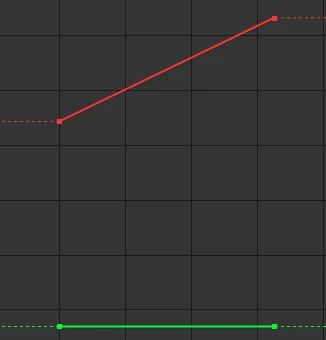
 

I tried changing the Time Interpolation to Bezier but no luck. I need those little yellow handles! Thoughts/ideas?


Thanks.


Correct answer Jose Panadero

Is not possible. After Effects does not allows you to have individual controls over the anchor point using bezier handles for the value curve, this is not a problem of this version. You can edit handles (influence) if you change to the Speed Graph. What you can do is to link anchor point x & y dimensions to position parameter in a null object with separate dimensions to control value graph with bezier handles.

1 reply

Jose Panadero
Community Expert
Community Expert
March 31, 2021

You must separate dimensions to get bezier handles. Right-click over position parameter and choose Separate Dimensions

Danny Luksa
Known Participant
March 31, 2021

I am adjusting an anchor point and am unable to separate the dimmensions. I've been able to use thecurve handles on anchor points before with no problem. 

Jose Panadero
Community Expert
Jose PanaderoCommunity ExpertCorrect answer
Community Expert
March 31, 2021

Is not possible. After Effects does not allows you to have individual controls over the anchor point using bezier handles for the value curve, this is not a problem of this version. You can edit handles (influence) if you change to the Speed Graph. What you can do is to link anchor point x & y dimensions to position parameter in a null object with separate dimensions to control value graph with bezier handles.