

eBridget
Participant
November 1, 2017
Answered

Where is "Trim Path" in After Effects?

  • November 1, 2017
  • 4 replies
  • 67225 views

I was trying to follow a tutorial elsewhere for animating the drawing of a circle using a trim path on a hand-drawn vector circle I drew. The tutorial only says, "add a Trim Path from the Add menu." I typed in "trim path" into the help search bar in AE, and I cannot find any "Trim Path" option anywhere. Can someone help me find this? I'm using After Effects version 14.2.1.34 on a Macbook Pro running OS X El Capitan.
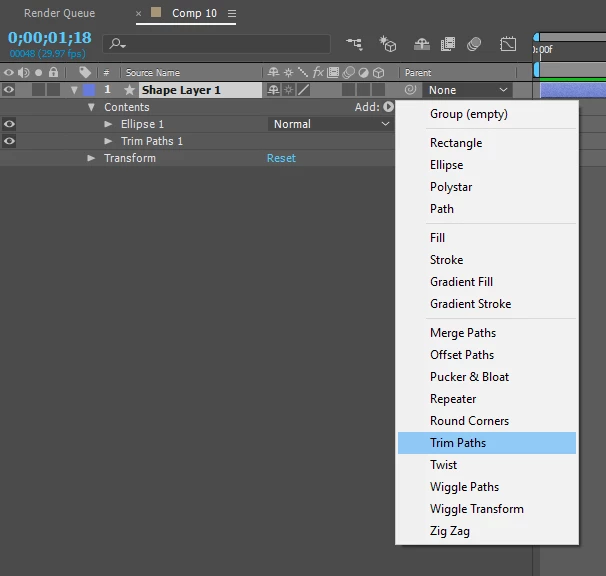
Correct answer Tolstoy

Here's a visual cue:

4 replies

Participant
September 11, 2025

Hi,

I'm having troubles with my After Effects 2025. Trim paths is not working.
Can anybody help me with my issues. Thank you.

nishu_kush
Community Manager
Community Manager
September 11, 2025

There's no animation in the Start or End parameter of the Trim Paths. You need to have at least 2 keyframes with different values to create an animation.


Thanks,
Nishu

agências82284655
Participant
February 7, 2021

- Select a shape layer.
-
Go to the ADD MENU on the layer contents;

- Select TRIM PATHS;


Tolstoy
TolstoyCorrect answer
Participant
November 1, 2017

Here's a visual cue:

Participating Frequently
April 1, 2018

Thanks everyone for the helpful commentary on the importance of 'not poking around to learn' of 'searching for help before asking'.

I always start with a search... guess what? That's how I ended up on this thread. Guess what else? I've been using AE for 18 years and this is the first time I've needed trim path. So, there's that.

BIG hats off to Tolstoy. Thanks for the answer, which is kind what we wanted to begin with.

P.M.B
Legend
April 2, 2018

Nobody said search for help,  they said search THE Help, doing so will turn up step by step instruction, which is true.

Truth is it's just easier to ask on the forums....as long as you don't mind people telling you that you can search the help.

So it's a choice really:

Search THE help which can require exposure to things other than what you're looking for and a little time to pin down the relevant data.

Or ask on the forum and suffer the indignity of people suggesting you make use of the THE help.

The amount of time you've been using After Effects without needing trim paths is not relevant to anything.

However the fact that you've been using it for 18 years and have not yet worked out how to effectively utilize THE help is interesting.

~Gutterfish
Community Expert
November 1, 2017

To find instructions on how to use trim paths or any path animator simply type Trim Paths in the search help field and read the instructions. You will remember it better that way.

Just as with Text animators, shape animators are found in under the Add button in the Modes or Switches column.

eBridget
eBridgetAuthor
Participant
November 1, 2017

Unfortunately, I tried this, as I described in my original post.

For example, even when just typing in the basic term, "Trim," yields no options, as does "Trim Path:

Results for searching only, "Trim" :

Results for searching, "Trim Path" :

Community Expert
November 1, 2017

Ust the search help field at the top right corner of AE not the Help menu.

Create a shape layer, press the U key twice to reveal the modified properties of the layer, just to the right of the Contents row in the Switches or Modes column you will find the Add button.

When you have done that spend a little time here learning the UI: Basic AE. You will waste months if not years trying to learn AE by just poking around in the app and asking questions on forums.