
Inspiring
January 3, 2022
Answered

Why corner pin can not be added to corner of shape layer

  • January 3, 2022
  • 1 reply
  • 632 views

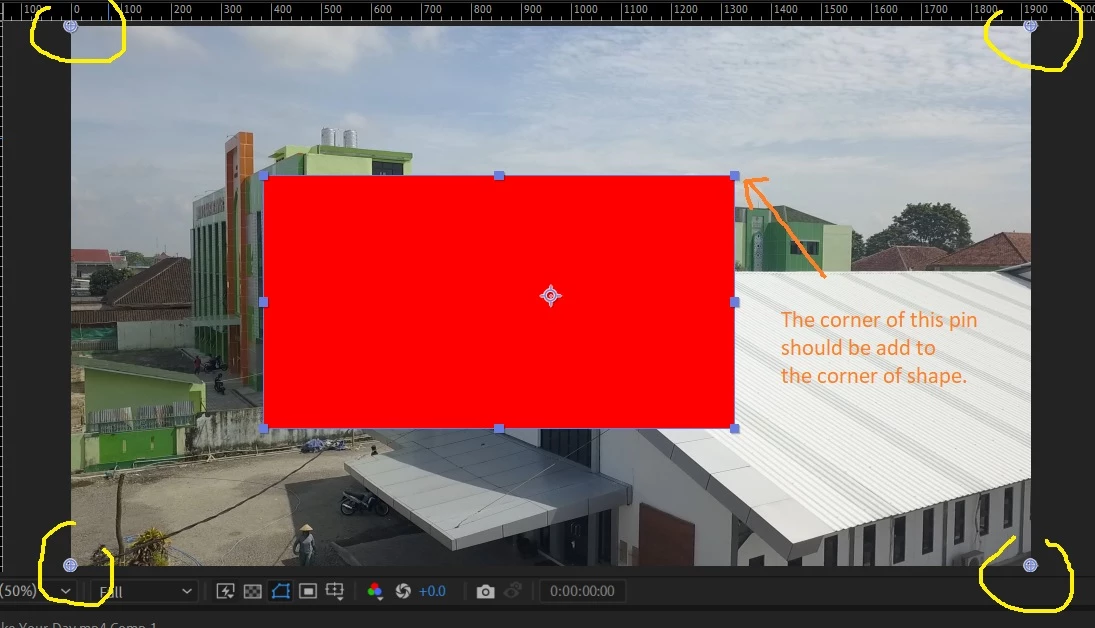
I all, have created a rectangle shape layer, whenever i add a corner pin effect, the "corner point" of corner pin can not be added to the corner of shape, it added it self to corner of composition. Is it normal?

Preview :
This topic has been closed for replies.
Correct answer Rick Gerard

Corner Pin works on comp size.  Corner Pin always ignores transparency and effects that resize the layer.


What are you trying to do? If you want to distort the shape layer to make it fill some geometry in the shot, make the shape layer the same size as the comp by simply double-clicking the rectangle tool. If you need to apply Corner Pin to a layer that is not the same size as the composition, pre-compose the layer and make sure you move all attributes to the new composition before applying Corner Pin.

1 reply

Rick GerardCommunity ExpertCorrect answer
Community Expert
January 3, 2022

Corner Pin works on comp size.  Corner Pin always ignores transparency and effects that resize the layer.


What are you trying to do? If you want to distort the shape layer to make it fill some geometry in the shot, make the shape layer the same size as the comp by simply double-clicking the rectangle tool. If you need to apply Corner Pin to a layer that is not the same size as the composition, pre-compose the layer and make sure you move all attributes to the new composition before applying Corner Pin.

Inspiring
January 3, 2022

Thanks so much @Rick Gerard 

######Raizen 7, 40Gb Ram, RTX 3060, Win 11 -- All of Software in the world are just tools. Buy it if it works for you :)