Participant
August 28, 2025
Answered

Why do my graphs look like this

  • August 28, 2025
  • 5 replies
  • 734 views

So any clip i use position keyframes that are easy eased or seperated keyframes aswell, or anything like that it shows a very glitched graph like this, I reinstalled after effects, tried to do a new project etc but i dont know how to fix it, and it was normal before.

Correct answer David.Arbor

What you're seeing is call the Graph Editor Set. You can enable the curves for any non-selected properties, which is a very powerful feature. The reason reinstalling AE didn't change anything is because this is a project-level setting.

There are two ways to disable it:

1. Go to each property that's visible and deselect the little "chart" icon next to the "stopwatch" icon. 

2. If you want to leave these properties in the Graph Editor set, but temporarily disable it, you can click the "eyeball" icon at the bottom of the Graph Editor and uncheck "Show Graph Editor Set."

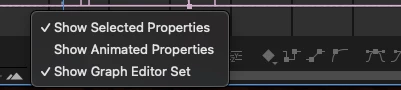
 

Thanks,
- David, After Effects Engineering Team

 

5 replies

Roland Kahlenberg
Legend
August 30, 2025

Here's a good tutorial on using the Speed Graph Editor - 

Unfortunately, it doesn't go in-depth nor cover different property types but it provides a decent beginner's foundation. And this Youtube Channel has some good Creative Uses of After Effects.


Very Advanced After Effects Training | Adaptive & Responsive Toolkits | Intelligent Design Assets (IDAs) | MoGraph Design System DEV
Roland Kahlenberg
Legend
August 30, 2025

That's the VALUE Graph Editor. If it was a Speed Graph, you would see the px/sec suffix for the numbers in the Vertical Axis.

As a general rule, if you're not creating character animations or complex animations, it's best to use the Speed Graph as they SHOULD BE more easily understood and controlled for Motion Design type of work - essentially moving/animating from Point/Value A to Point/Value B. 

HTH


Very Advanced After Effects Training | Adaptive & Responsive Toolkits | Intelligent Design Assets (IDAs) | MoGraph Design System DEV
David.Arbor
Community Manager
Community Manager
August 28, 2025

I agree with @nishu_kush that everything looks normal here. Here's a School of Motion tutorial giving a solid introduction to the Graph Editor: https://www.schoolofmotion.com/blog/intro-to-the-graph-editor-in-after-effects


The Speed Graph and Value Graph are both incredibly powerful and equally useful when crafting animation.


We also have introduction to After Effects course on our new Adobe Video Training platform: https://adobevideotraining.com/after-effects/introductory-courses/


Thanks,
- David, After Effects Engineering Team

Community Expert
August 28, 2025

Here's the best workflow for accurately creating a motion path and adjusting the timing from my Quick Tips series:

nishu_kush
Legend
August 28, 2025

Thanks for writing in, lig_4250.


It looks good to me. How do you want it to look? Can you share any reference? Right now, you're working with the Speed Graph. You can try switching to the Value Graph (please refer to the screenshot.)

Let me know how it goes. Moving this thread from Bugs to Discussions for troubleshooting.


Thanks,
Nishu

lig_4250Author
Participant
August 28, 2025

Whenever I create keyframes, for example using s_blurmocurves, all the graphs appear together and the numbers are color-coded. I only want the graph for the property I selected to be visible, like in this screenshot.

David.Arbor
Community Manager
David.ArborCommunity ManagerCorrect answer
Community Manager
August 28, 2025

What you're seeing is call the Graph Editor Set. You can enable the curves for any non-selected properties, which is a very powerful feature. The reason reinstalling AE didn't change anything is because this is a project-level setting.

There are two ways to disable it:

1. Go to each property that's visible and deselect the little "chart" icon next to the "stopwatch" icon. 

2. If you want to leave these properties in the Graph Editor set, but temporarily disable it, you can click the "eyeball" icon at the bottom of the Graph Editor and uncheck "Show Graph Editor Set."


Thanks,
- David, After Effects Engineering Team