
Hyperbeast
Participant
April 11, 2019
Answered

Why does my clip go into slow motion every time I play the clip back?

  • April 11, 2019
  • 8 replies
  • 72770 views

Hello, I am a new user of Adobe After Effects and I am experiencing and issue where whenever I try to playback my clip, it plays back at normal speed for a few seconds but then it just randomly goes into slow motion. It wasn't like that at first. I figured it might be something to do with the time stamp? I am not quite sure how to fix it and it is very annoying to have to keep pausing and playing it again to get it back to normal speed. But it doesn't matter what I do because it goes back into slow motion. Any ideas on might be happening? Help would be appreciated!
    Correct answer Warren Heaton

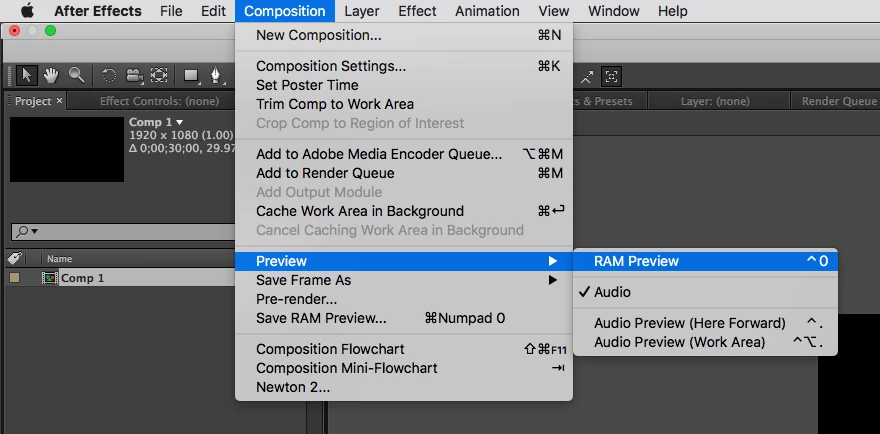
    For clarification, "RAM Preview" is the old name for Preview, last used in After Effects version 13 (CC2014).

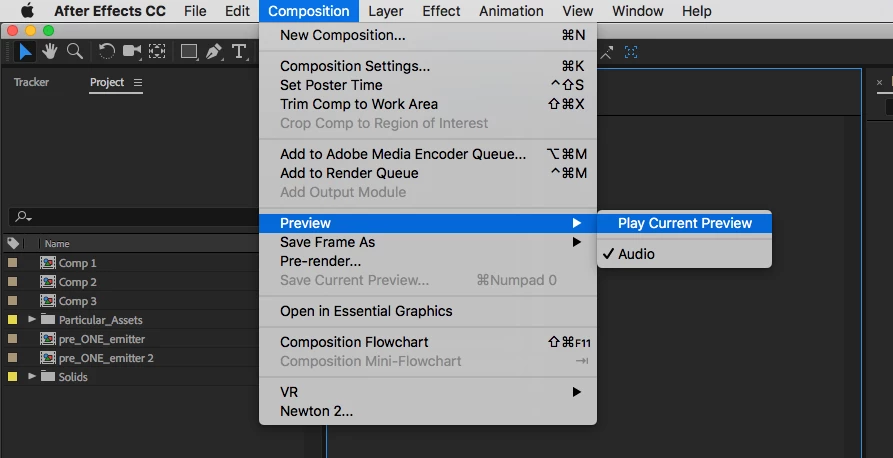
    Since AE version 14 (CC2015), it's just called Preview.

    AE version 13: Composition > Preview > Ram Preview

    AE version 16: Composition > Preview > Play Current Preview

    If a Preview is not realtime (as appears to be the case here), the first thing to try is a lower Comp Resolution setting (View > Resolution > Full, Half, Third, Quarter, Custom).  If at Full, try Half.  If at Half, try Quarter.  Another option (although not ideal) is to render a movie at settings that will play back well on the workstation being used.

    8 replies

    Participant
    May 27, 2022

    Hey I know this is old but I'm having the same issue but nothings working. Checked on RAM, everything's closed, reducing the resolution, reducing the quality, restarting AE afterwards -- still nothing. The video remains to go slow and I can barely get past 2 seconds without it repeating itself, lagging forever. Please is there any updates answer?

    Participant
    December 11, 2022

    Bro this is literally me! like i'm trying to edit but it's so slow like i don’t want that, i don’t have any apps in the playback or anything it's all ok but it's slow like bro i need help 😂💔

    Participant
    November 10, 2020

    genius with the resolution trick 


    Participant
    May 11, 2020

    I tried that. But it didn't work. 

    Hyperbeast
    Participant
    April 13, 2019

    I think I found the fix. Thanks for the suggestions/tips!

    Participant
    October 3, 2019
    He bro , i have the same problem.When i add effects it becomes really choppy and slow really enoyying. How did you manage too fix this? really curious 🙂
    Hyperbeast
    Participant
    April 13, 2019

    Oh okay, that makes sense. That's probably why I couldn't find the option. I didn't know that they changed the name in the update. As well as I have 8gb of RAM.

    Conrad_C
    Community Expert
    Community Expert
    April 12, 2019

    How much RAM is in your computer, and do you have other applications open?


    I'm wondering if After Effects is having to toss out preview frames it cached in RAM, if the preview duration is longer than there is RAM to store all the frames. That would cause it to slow down to re-render the tossed frames on the next preview playback pass.


    If that's the problem, try closing all other open applications so that After Effects can have access to as much RAM as possible. Or try reducing the preview options (size, frame skipping) to reduce the total RAM requirement of each frame and/or the number of frames to preview. Or shorten the Work Area as much as is practical and then make sure the Preview panel is set up to preview only the Work Area, again to reduce the number of frames to keep in RAM.

    Participant
    October 3, 2019

    He man, i have the same problem and gived adobe acces for all the ram i have , dont have any programs open or anything else. Tried this but no results, when i add one effect like reflection or distortion becomse really choppy and slow. I have a i74790k and gtx1080ti 16gb ram, and using ssd

    Warren Heaton
    Community Expert
    Warren HeatonCommunity ExpertCorrect answer
    Community Expert
    April 12, 2019

    For clarification, "RAM Preview" is the old name for Preview, last used in After Effects version 13 (CC2014).

    Since AE version 14 (CC2015), it's just called Preview.

    AE version 13: Composition > Preview > Ram Preview

    AE version 16: Composition > Preview > Play Current Preview

    If a Preview is not realtime (as appears to be the case here), the first thing to try is a lower Comp Resolution setting (View > Resolution > Full, Half, Third, Quarter, Custom).  If at Full, try Half.  If at Half, try Quarter.  Another option (although not ideal) is to render a movie at settings that will play back well on the workstation being used.

    Justin Taylor-Hyper Brew
    Community Expert
    Community Expert
    April 11, 2019

    Depending on the footage, you may need to ram preview before playing back in real-time. If you find yourself doing this a lot with raw footage, you're probably better off editing in Premiere first, and then bringing the edited clips into AE. Also, you may want to consider transcoding to a better format for comping (ProRes, Cineform, or DNxHD)

    Hyperbeast
    Participant
    April 12, 2019

    Oh okay thank you. I also noticed that I don't have a ram preview option. Is there a way to enable that? Because normally it should come up by default which I've noticed on video tutorials.

    OussK
    Community Expert
    Community Expert
    April 12, 2019

    Go to window/preview and try to set this settings in the preview panel