
omer47
Inspiring
January 6, 2019
Answered

Why transparent background is shown as black ?

  • January 6, 2019
  • 10 replies
  • 33205 views

Hi !


I've created a clip on character animator in which my character is speaking solely, with no background on other puppet.

My plan was to take it to After effects and add any background behind it.

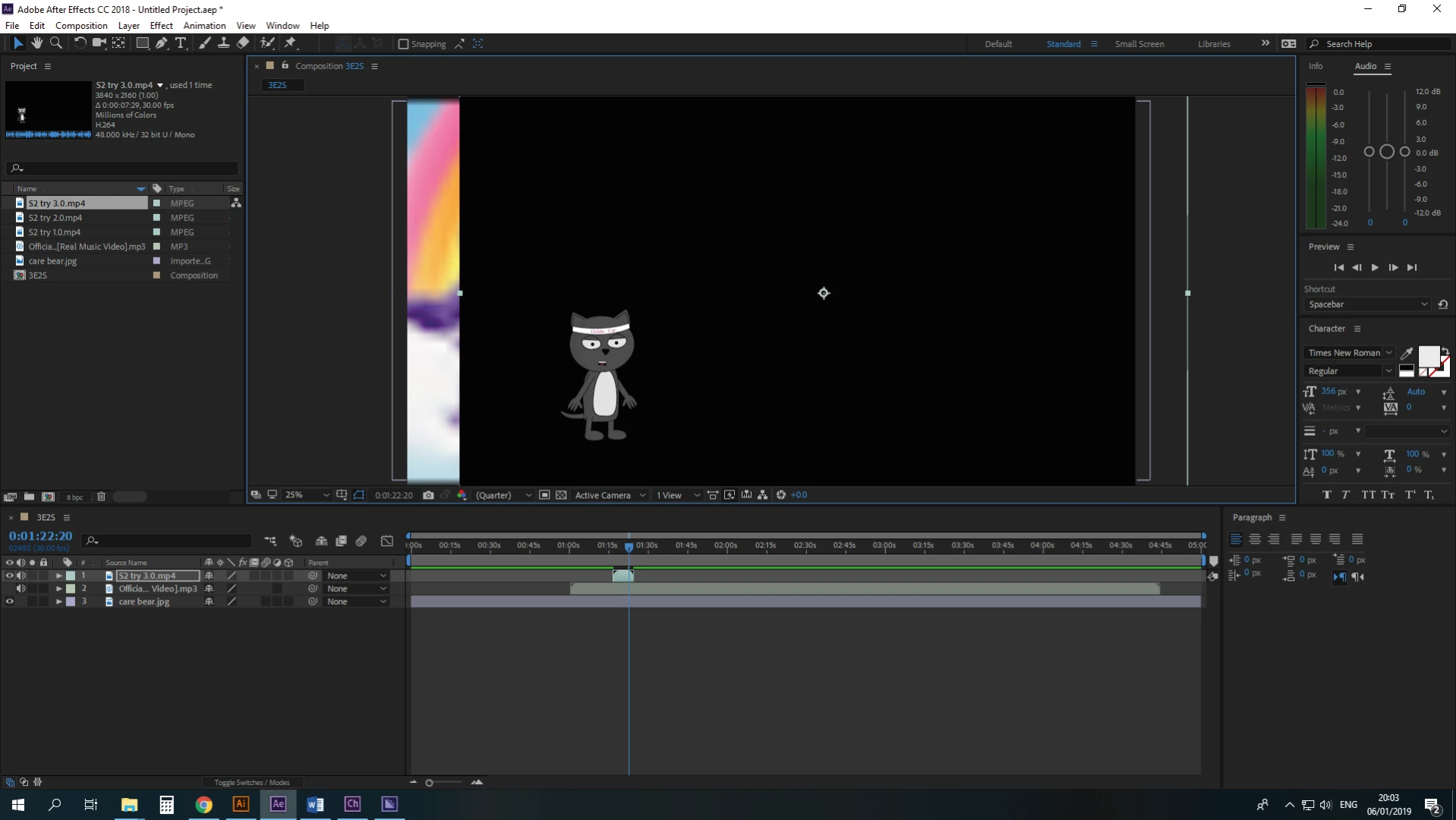
but, for some reason, it seems like my puppet has a black background that block any other background layer I wish to put under it on Ae.

Is there something to do here ?
    Correct answer Andrew Yoole

    But it works, Mr.


    Pushing your car instead of driving it gets you to the same destination, but it's a lot slower.  :-)

    Take Rick's advice and read some of the support material on which video formats to use that contain alpha channels.

    exporting video with an alpha channel (transparency) | Adobe Blog

    10 replies

    Todd_Morgan
    Legend
    May 10, 2024

    Why are you not using it as a dynamic layer import into AE?

    Warren Heaton
    Community Expert
    Community Expert
    May 10, 2024

    If you import the Character Animator project into your After Effects project, as long as the background is empty in CA then it should be transparent in AE.

    Participant
    September 14, 2022

    https://www.youtube.com/watch?v=vKAtgsXG0_4

    Here's the answer for if you are exporting your character from Photoshop.

    In a nutshell: it needs to be Quicktime (.mov), not H.264, and you need to select "Straight - Unmatted" in the Alpha Channel selection box. I believe this is because H.264 does not support Alpha Channels (aka transparencies).


    Participating Frequently
    July 28, 2021

    So, the correct answer is "Go somewhere and learn stuff?" 

    Community Expert
    July 29, 2021

    The correct answer is clearly given. The admonishment to go and learn stuff so you understand the process and can solve your own problems in the future is just friendly advice is given by folks that donate their time to help solve problems. Two minutes with the user guide or just taking the default lossless with alpha preset when rendering the animation would have solved the problem. 

    Participant
    February 1, 2019

    There are not an alpha channel for AE.

    Solution in Photoshop Export/Quick Export as PNG

    It works.

    If the batch command in Automate doesn´t work and you got a lot of images, then use a batch exporter for PNG with alpha channel. You can use Preview in Mac, open all the images, select all the Images in the sider bar, and an output folder. EDIT/Export (16bytes, alpha channel).

    Don´t forget check "alpha channel"

    Community Expert
    February 1, 2019

    rubenmontecinos  wrote


    There are not an alpha channel for AE.

    Sorry, you don't know what you are talking about. You just have to pick the right settings. Using Photoshop will work for some things but it's a huge waste of time.


    Please study the User Guide and take a little time to learn something about video formats and compression.

    Participant
    February 2, 2019

    But it works, Mr.

    Community Expert
    January 6, 2019

    You need to spend some time studying video formats and standards. I would suggest spending some time with the User Guide. Rendering to suitable production formats is a basic production skill you should have. Your only problem is that you did not spend any time learning how transparency works in a video so you picked the wrong format.

    Known Participant
    April 10, 2022

    Super humble dude.

    Participant
    October 27, 2022

    Boomers, please take your arrogance in another platform, this a community for helping. It was built especially for people who are trying to learn from those who knows better. 

    Mohammad.Harb
    Community Expert
    Community Expert
    January 6, 2019

    Please post a screenshot

    Mohammad.Harb
    Community Expert
    Community Expert
    January 6, 2019

    just import one image onto after effects, you will notice that AE will turn on image sequence by default

    then all PNG sequence will be imported as one video footage.

    omer47
    omer47Author
    Inspiring
    January 6, 2019

    So I did that and it uploaded a single png photo to Ae. :/

    Andrew Yoole
    Inspiring
    January 6, 2019

    Did you check the "PNG Sequence" checkbox when you imported?

    Also, use the checkerboard transparency view to determine if you have transparent elements in your composition.

    Legend
    January 6, 2019

    You exported to H.264/MP4, which cannot have an alpha channel.

    omer47
    omer47Author
    Inspiring
    January 6, 2019

    So what should I do ? how to export this differently ?

    Mohammad.Harb
    Community Expert
    Community Expert
    January 6, 2019

    How did you render it from character animator?

    you need to export it with a file format that supports alpha channel, I would suggest export it as PNG sequence

    then reimport the sequence into after effects

    omer47
    omer47Author
    Inspiring
    January 6, 2019

    So I did it and got many many many PNG files.

    How do I turn them into a clip whom I can take to Ae ?