
Inspiring
June 21, 2021
Answered

Xcode version for AE SDK CC 2015

  • June 21, 2021
  • 1 reply
  • 464 views

Hi. I get the following error building the Skeleton project.


/clang:-1: linker command failed with exit code 1 (use -v to see invocation)


I am using XCode 10.1 on High Sierra 10.13.6 with CC 2015 AE SDK.


What is the correct version of XCode to use for the Skeleton build ?
This topic has been closed for replies.
Correct answer AnmolM

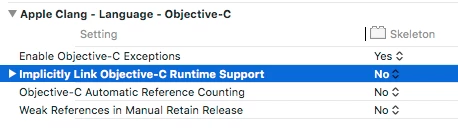
Solved by turning off the build setting called "Implicitly Link Objective-C Runtime Support"

1 reply

AnmolMAuthor
Inspiring
June 21, 2021

This is the complete error.


Ld /Applications/Adobe\ After\ Effects\ 2020/Plug-ins/Prosya\
/Applications/Adobe\ After\ Effects\ 2020/Plug-ins/Prosya\
/Skeleton.plugin/Contents/MacOS/Skeleton normal x86_64 (in target: Skeleton)
    cd /Users/anmolmishra/Documents/Adobe\ After\ Effects\ CC\ 2015\ Mac\ SDK/Examples/Template/Skeleton/Mac
    export MACOSX_DEPLOYMENT_TARGET=10.9
    /Applications/Xcode.app/Contents/Developer/Toolchains/XcodeDefault.xctoolchain/usr/bin/clang++ -arch x86_64 -bundle -isysroot /Applications/Xcode.app/Contents/Developer/Platforms/MacOSX.platform/Developer/SDKs/MacOSX10.9.sdk -L/Applications/Adobe\ After\ Effects\ 2020/Plug-ins/Prosya\
/Applications/Adobe\ After\ Effects\ 2020/Plug-ins/Prosya\
 -F/Applications/Adobe\ After\ Effects\ 2020/Plug-ins/Prosya\
/Applications/Adobe\ After\ Effects\ 2020/Plug-ins/Prosya\
 -filelist /Users/anmolmishra/Library/Developer/Xcode/DerivedData/Skeleton-eoaphzrnzbjubveksepazyziwfvk/Build/Intermediates.noindex/Skeleton.build/Debug/Skeleton.build/Objects-normal/x86_64/Skeleton.LinkFileList -mmacosx-version-min=10.9 -Xlinker -object_path_lto -Xlinker /Users/anmolmishra/Library/Developer/Xcode/DerivedData/Skeleton-eoaphzrnzbjubveksepazyziwfvk/Build/Intermediates.noindex/Skeleton.build/Debug/Skeleton.build/Objects-normal/x86_64/Skeleton_lto.o -Xlinker -no_deduplicate -fobjc-link-runtime -framework Cocoa -Xlinker -dependency_info -Xlinker /Users/anmolmishra/Library/Developer/Xcode/DerivedData/Skeleton-eoaphzrnzbjubveksepazyziwfvk/Build/Intermediates.noindex/Skeleton.build/Debug/Skeleton.build/Objects-normal/x86_64/Skeleton_dependency_info.dat -o /Applications/Adobe\ After\ Effects\ 2020/Plug-ins/Prosya\
/Applications/Adobe\ After\ Effects\ 2020/Plug-ins/Prosya\
/Skeleton.plugin/Contents/MacOS/Skeleton

Undefined symbols for architecture x86_64:
  "_objc_readClassPair", referenced from:
      __ARCLite__load() in libarclite_macosx.a(arclite.o)
ld: symbol(s) not found for architecture x86_64
clang: error: linker command failed with exit code 1 (use -v to see invocation)
AnmolMAuthorCorrect answer
Inspiring
June 21, 2021

Solved by turning off the build setting called "Implicitly Link Objective-C Runtime Support"