

Stitching 10gb+ Photoshop CC • Which Mac Pro 6.1 to buy?
I am ramping up to stitch high-resolution 16-bit TIF medium format captures of famous murals for output in the 96" x 180” range on Bamboo paper from Hahnemühle; then framed and for permanent installation in a federal building. These are reproductions of vintage New Deal Era Murals - nearly 1:1 (see sample below)
My current Mac Pro just won’t cut it, no new MacPro exists, I do not want to shift to windows, and the iMacPro is well…too pricey.
Therefore my query is Which Mac Pro 6.1 to buy and from whom?
Use Case: stitching captures from a Pentax 645z medium format (8250x6250 pixels each) to create legacy files of original WPA era murals. (up to 30 captures each 297mb each TIFF-16). Resolution to future-proof final result for 1:1 output.
Assembled in 16 bit RGB the files > 10 gigs after flattening and prior to adjustment layers
Questions to resolve
- Core: Research shows Photoshop CC 2018 optimizes at 6 cores 3.5mhz and diminishing returns if not slower results come at 8-10-12 cores.
- RAM: faster and less or more and slower?
- OWC believe that 128GB of RAM at 1333 Mgz, (which only then runs at 1033 in a MacPro 6.1 due to bus limitation) will be better, less chance of going to scratch whereas Apple (biased as they do not sell 128 option) believes 64gb RAM 1866 mgz (per OWC will run full speed in 6.1 bus) sufficient and “probably be fine”.
- Who is one to believe?
- Boot/program drive/work drive:
- 1T or 2T or 4T SSD.
- 1T should work but perhaps future proofing may mean investing in a larger capacity is more logical
- Video Card: 3gb v500 dual is more common, and perhaps sufficient or is it worth investing in the v700 with 6 gigs only available from Apple or Ebay sellers?
- Who to purchase from?
- Apple:
- warranty: per Apple, merely adding RAM voids Apple Care. (Yes we could save the old RAM and cheat the system if it came to that)
- Buy their overpriced RAM and suck up, and limit to 64gb
- or forget about Apple Care and buy entry level and swap out with 128GB OWC RAM
- OWC: qualified advisors. Used-refurbs, will configure. Has warranty options. No v700 video cards.
- Apple:
- What have I missed?
Findings so far are as follows from research:
- iMac Pro: Per Apple etc. the new iMac Pro while capable, and terrific for VR/AR and video would be a waste of money for these applications.
- Cores: More than 6 cores in Photoshop is not productive used and may even reduce productivity; likely choice, Mac Pro 6.1 3.5 MHZ, research indicates faster speed is better in PS
- RAM: more the better, of course, 64 minimum.
- SSD boot/program and work drive - of course
- Display: planning also to upgrade to a 30+” 4K monitor to better be able to view large-scale output. Second monitor Ben Q IPS
- Video Card: presuming v500 minimum with 3 GB of VRAM.
- External storage: TBD - thunderbolt 8T-12T RAID 5 - OWC or others, or stop-gap with 6T basic drives and time-machine
- Back up: We have fiber - and could move to the cloud, or just time machine and sneakernet it to the off-site location
Workflow
- Pentax captures: 8250 x 6250 pixels processed into Lightroom CC classic output to Tiff-16 bit
- Photoshop CC for assembly into master files. Flatten after adjustments
- Non-destructive adjustments; test printing
- Output to HP z3200, 12 color pigment, 96” height by left fall width, 200+ DPI at the output size
Thank you all in advance for any suggestions on my conundrum!
sample mural - 192" wide by 110" high
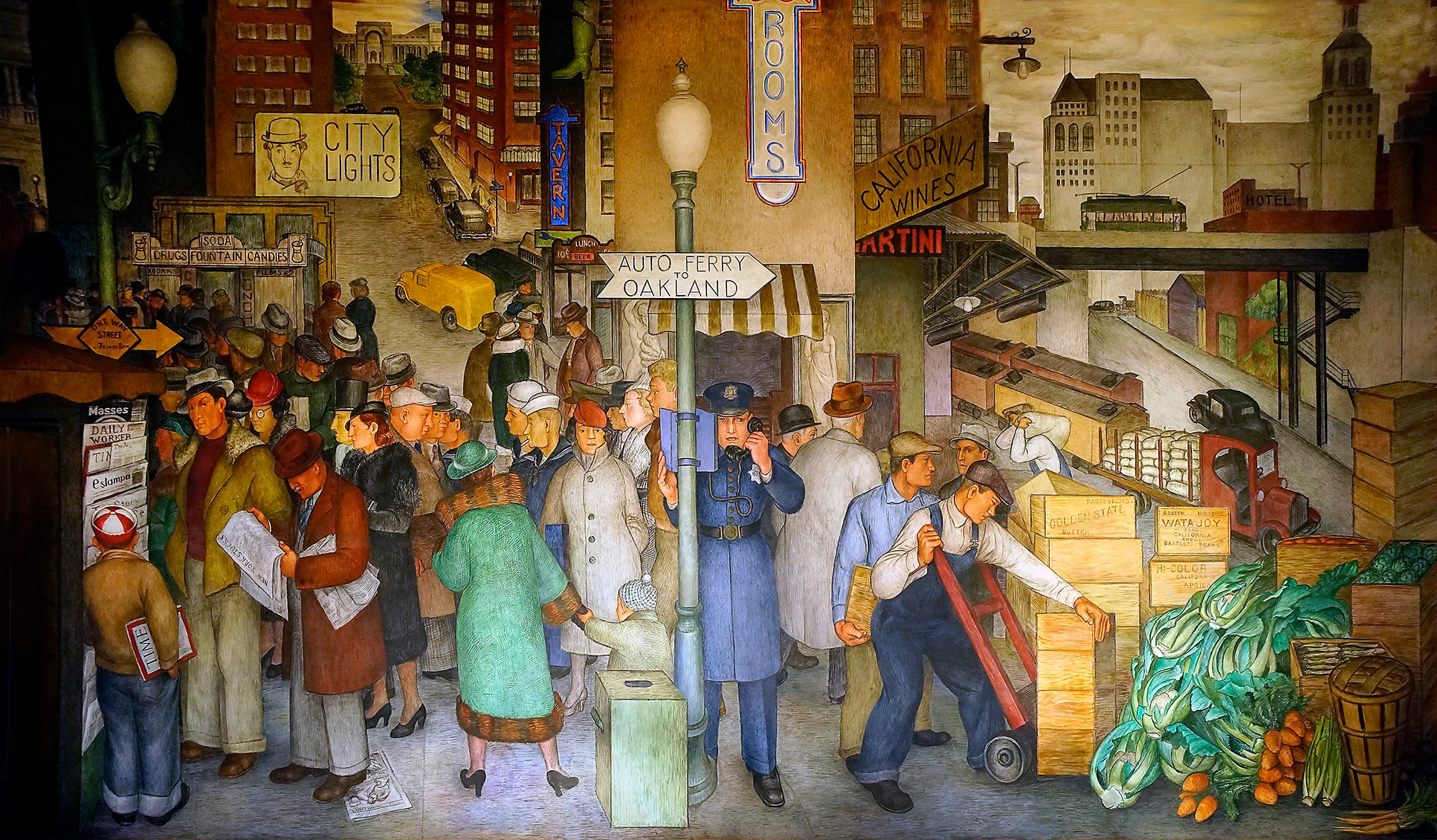
City Life, by Victor Arnautoff
mural displays a feel of organized chaos. The panoramic scene depicts the busy lives of city dwellers and how they can sometimes get wrapped up in moments without seeing what is in front of them. No one is noticing the traffic accident and instead are concerning themselves with their jobs and commute.
This 10′ x 36′ fresco “City Life” was painted by Victor Arnautoff with the help of Edward Hansen and Farwell Taylor with funding from the PWAP. The onsite plaque reads:
“Such familiar San Francisco buildings as City Hall, the Main Library, the Legion of Honor, and the Stock Exchange watch over the hectic urban scene, which includes an accident and a robbery.”
Arnautoff, who was a student of Diego Rivera’s, supervised the entire Coit Tower mural project.


 AdChoices