Participant
August 30, 2024
Open for Voting

Audio waveform displayed in timeline

  • August 30, 2024
  • 7 replies
  • 793 views

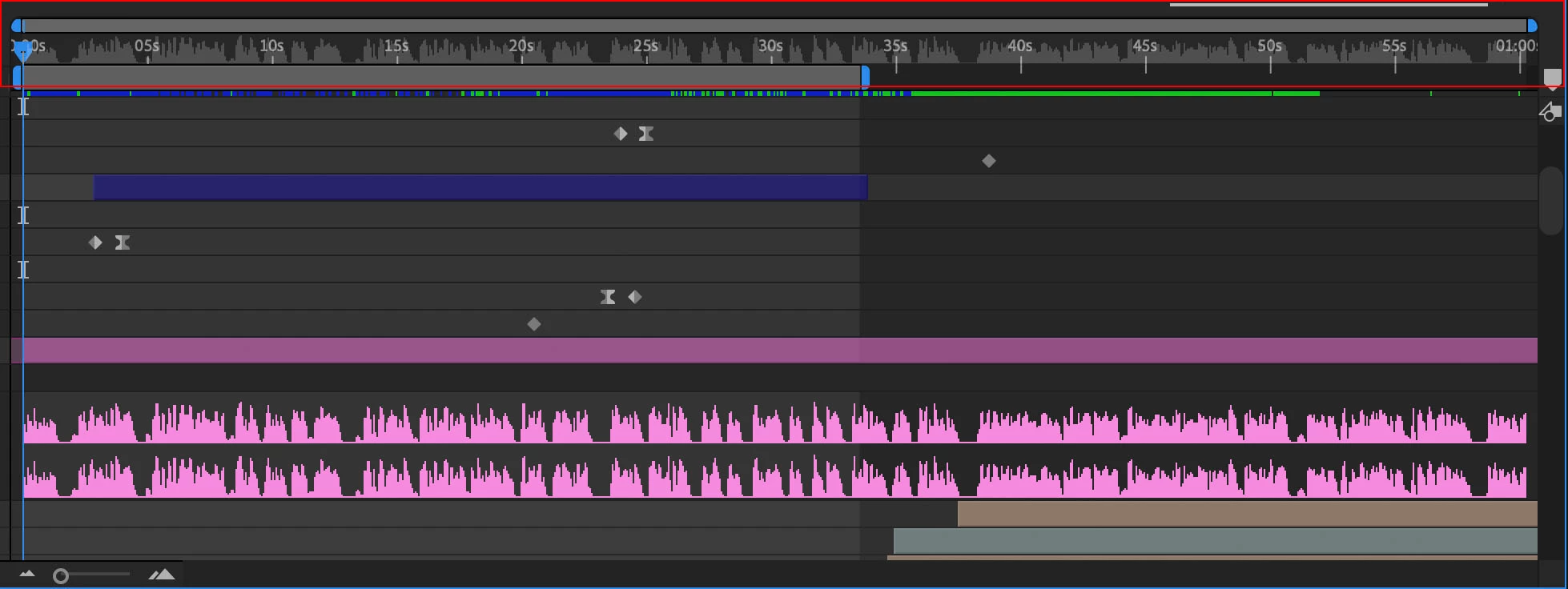
If we could visualise our audio waveforms in the timeline it would save sooooo much time scrolling and arranging layers to see it. Bonus points if you can get it to work in precomps to.
7 replies

Participant
December 2, 2024

Thanks Warren! I will eddit this thread to make it clear 🙂

Warren Heaton
Community Expert
Community Expert
December 2, 2024

Would "Show waveform of audio mix down in Time Ruler" be a more accurate description of what you are thinking?  

If so, I like it and think that it could be very helpful. 


thepixelsmith
Community Expert
Community Expert
December 1, 2024

I see what you mean in the image you uploaded.

That looks really distracting.

And how would it display when there are multiple layers with audio?

Participant
December 1, 2024

I think the reference image I uploaded did not clearly show the UI improvement I am suggesting.
If you look at the top of the timeline, I added a shadow of the wave form.
I thought this would be a good way keep audio always visible and cut down on the amount of navigation needed in the layer stack.

Participant
December 1, 2024

Like in the actual timeline, So you dont have to scroll around to find the audio layer for reference.

thepixelsmith
Community Expert
Community Expert
September 19, 2024

You mean like on the layer itself rather than the way it expands to take up space now?

Participant
September 19, 2024

Select audio layer, then press "L" twice. Then you have it visible 🙂
