
Known Participant
January 8, 2024
Not Prioritized

Make the duplicated (pre)compositions independent from the original ones.

  • January 8, 2024
  • 8 replies
  • 2802 views

When duplicating a (pre)composition and editing the duplicated (pre)composition, the original composition is also being edited for some reason.


Ways to reproduce:

1. Add some footage or add a shape to create a layer in the timeline.

2. Select the layer in the timeline and precompose it (⇧⌘C)

3. Duplicate the new composition (⌘D).

4. Double click the duplicated composition to open it.

5. Edit the duplicated composition.

6. Exit the duplicated composition.

7. The original composition is edited the same way as the duplicated one. 
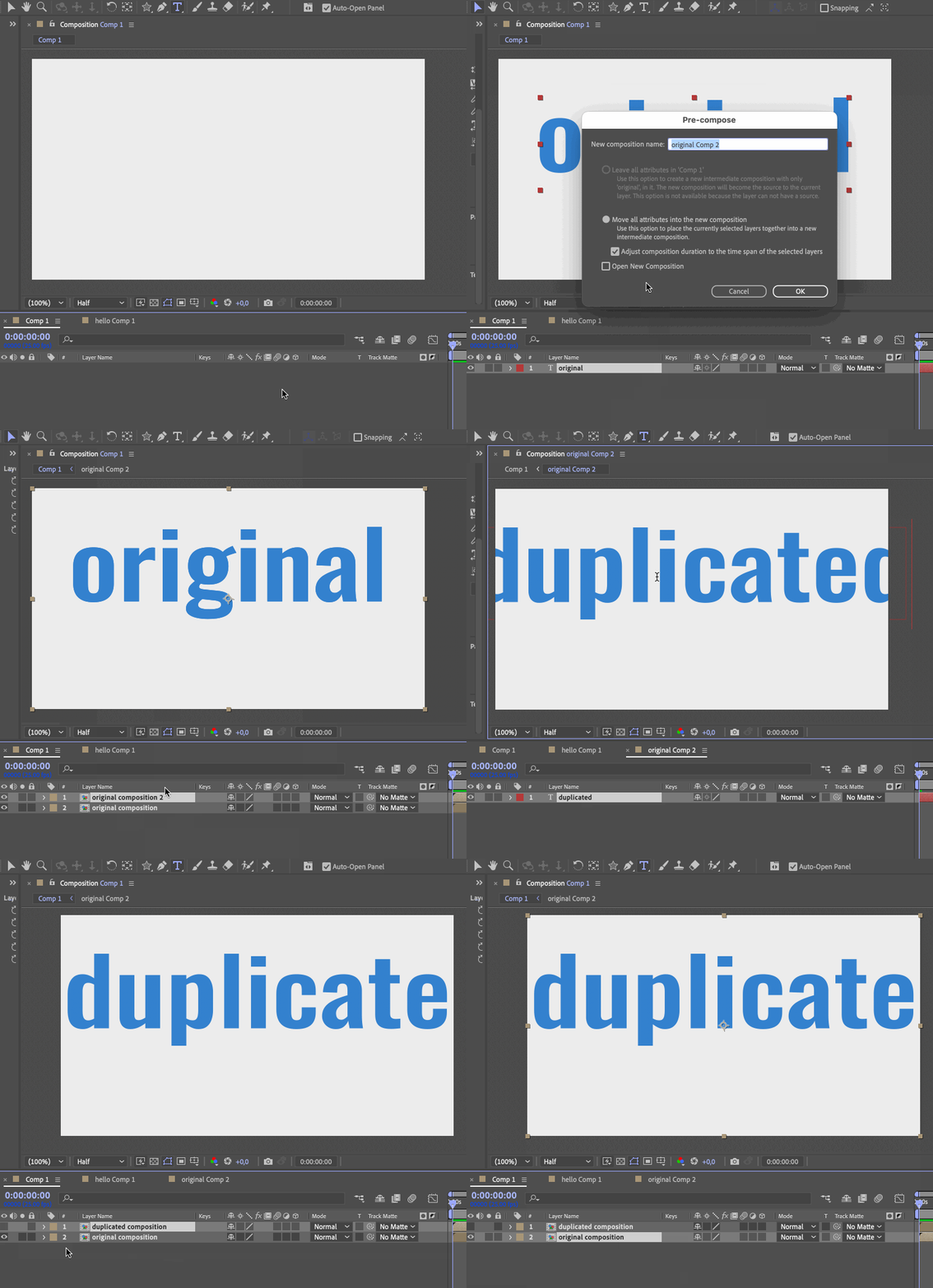


Please fix this issue or, at the very least, provide a command to duplicate a composition and make it independant (duplicate it in the project (source) panel as well).


Command

Shortcut

Duplicate

⌘D

Duplicate (make independant)

e.g. ⌃⌘D

8 replies

Community Manager
January 9, 2024

Than what is the use of the "Duplicate" command and the ⌘D shortcut when working with compositions? It's useless! Why would you want to have several instances of the same composition in the timeline which you can't even edit separately?


What you are describing is a frequently-used workflow. Different instances of the same precomp that are placed at different times or locations is extremely common as a way of reusing elements. It kind of just depends on what the precomp contains. 

And the functionality that you are asking for is possible, but not at the UI location that you want (the layer level vs the project level).


I have logged the feature request for a specific Duplicate Instance and Source command for further evaluation.

Community Expert
January 9, 2024

The only thing that makes sense at all is another keyboard shortcut (there is a script) that duplicates a nested comp in the timeline and makes a new copy in the Project Panel at the same time. The ability to Duplicate a layer is critical. Nested comps are the same as footage; something is inside the layer. Making a unique copy with a simple duplicate command does not make any sense at all. 

Known Participant
January 9, 2024
quote
Rick Gerard is correct. Duplicating a layer that has a Precomp as the source will always just duplicate the layer, including it's reference to the precomp. You can, however, select the precomp in the Project panel and duplicate there and then drag that duplicate into the timeline. 


That 

1) isn't obvious which increases the learning curve for new AE users and makes the interface confusing for them;

2) makes the "Duplicate" command and ⌘D shortcut useless when working with compositions in the timeline;

3) makes the workflow slightly more cumbersome as it necessitates switching from the timeline to the project panel in order to actually duplicate a composition;


My suggestion is to implement an additional command ("Duplicate (make unique)") which both duplicates the layer in the timeline and the actual composition in the project panel:


This additional command will fix all of the aforementioned issues.

Known Participant
January 9, 2024
quote

I'm sure there's a script on AE scripts.com....

By @Mylenium


Yes, there is one, but the existence of the script only serves as a proof of the existence of the issue. My post is a suggestion to eliminate the issue, so that new users won't get confused and annoyed, and there won't be a need for such scripts to be created.

Known Participant
January 9, 2024
quote

You have to duplicate compositions in the Project Panel. Duplicating in the Timeline does not create a unique copy. You also cannot duplicate footage in the timeline and make the footage unique. You can add other effects but can't change the original content of Images or Footage in the timeline. 


You can't do that in Nuke or Fusion either. It makes no sense.


By @Rick Gerard 


Than what is the use of the "Duplicate" command and the ⌘D shortcut when working with compositions? It's useless! Why would you want to have several instances of the same composition in the timeline which you can't even edit separately? 🤷‍♂

Moreover, this command ("Duplicate (⌘D)") confuses new After Effects users and increases the learning curve for them when working with compositions. I was confused and annoyed by this behavior for several days before discovering that it wasn't actually duplicating the composition, but rather only duplicating a link to it. There is no indication or clue provided to inform the user about this.

Implementing an additional command ("Duplicate (make unique)") could resolve this issue:


It would not slow down the workflow, as there would be no need to switch from the timeline to open the Project Panel to actually duplicate a composition. Additionally, it would provide a clue for new users, preventing them from becoming confused and frustrated by this problem.

Community Manager
January 9, 2024

Rick Gerard is correct. Duplicating a layer that has a Precomp as the source will always just duplicate the layer, including it's reference to the precomp. You can, however, select the precomp in the Project panel and duplicate there and then drag that duplicate into the timeline. 

Mylenium
Legend
January 8, 2024

I'm sure there's a script on AE scripts.com....


Mylenium 

Community Expert
January 8, 2024

You have to duplicate compositions in the Project Panel. Duplicating in the Timeline does not create a unique copy. You also cannot duplicate footage in the timeline and make the footage unique. You can add other effects but can't change the original content of Images or Footage in the timeline. 


You can't do that in Nuke or Fusion either. It makes no sense.