I guess it kinda depends on the bitrate too, right. I render alot of 1280x720 at a BR of 8,000. A 6min video will usually average about 1/2 hour in Media Encoder. So if I increased the res by 4 I would not be surprised if it took 4x longer. Then twice the length in a 12 minute video & then depending on the bitrate... Also, I don't know much about how Media Encoder utilizes CPUs but often times dual CPUs and or Dual GPUs can actually slow things down considerably depending on the software. Seems logical to think Two CPUs = 2x the speed but that's not always how it works in my experience.
Render times depend entirely on the composition specs and what's going on with the layers. Render time increases geometrically, as do the number of pixels, when you increase the comp size.
Here is a graph of the number of pixels that would need to be calculated if you started with a 10 X 10 comp and then just doubled the size.
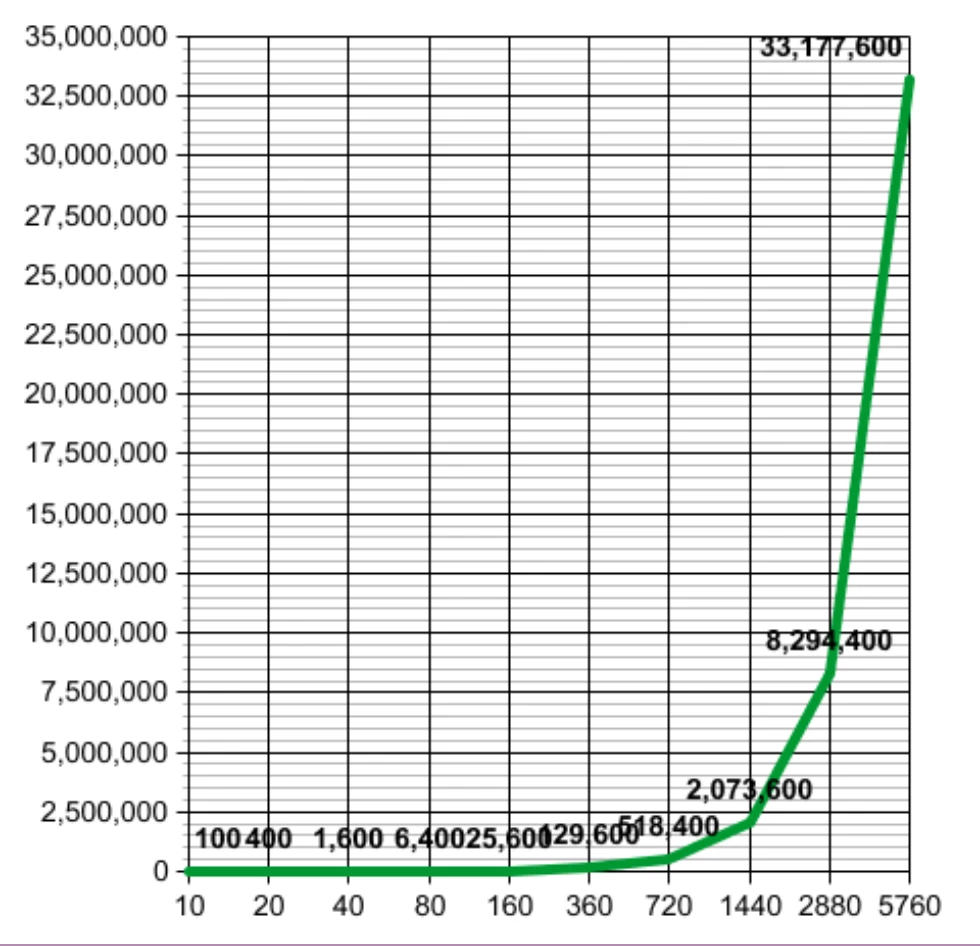
Note that the 1440 X comp has almost four times as many pixels as the 720 comp, about 550K to a little over 2 million, but when the comp size is doubled again the number of pixels goes from a little over 2 million to a little more than 8.24 million. That's why 4K comps take a lot longer to render than HD comps. It just gets worse when you go bigger. There's not much that can be done about the math.
Personally, I have a design limit of 5 or 6 minutes per frame based on the system I'm using at the time. I am working on a project right now that takes about 20 seconds to render a 1/4 rez frame of the most complex part with everything turned on. I'll check a couple of critical frames at full resolution, do my motion and timing tests with effects off at 1/2 resolution, then make my best guess at what I need to cut out or simplify to get the render time down to a reasonable number. If I can get a single full frame, full effects frame to preview in a scene like this in under 5 minutes I'm golden.
Then. When I'm done I'll make sure Render Garden is running, plant the seeds (you'll understand if you try Render Garden) and start a background render to a suitable production format of that comp, switch back to AE and continue working. I almost never wait for renders. If you get paid for your work, Render Garden will pay for its self in two or three small projects. It also works a lot faster, up to 6X faster on one of my systems, than just rendering in AE.
Most of my comps are a lot simpler than the one I'm working on right now, so most of my render times are a lot faster. Some projects in 4K will render at 7 or 8 frames a second, but when things get nuts and there are particles, simulations and temporal effects stacked on top of each other 5 or 6 minute a frame is my absolute limit.
BTW, the 92 frame comp that I was working on when I started writing on this post just finished rendering and the MP4 proof to send to the client and the DI to use in Premiere Pro is complete: Total render time:
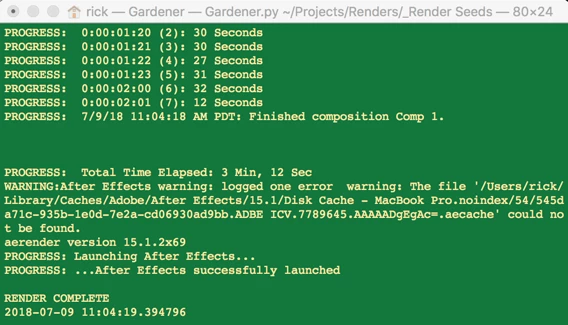
3:12 to complete the render, another minute and a half to do the MP4 proof for the client, 6 cores used to render and a bunch of time saved. If you are going to work in 4K or even higher, you owe it to yourself to optimize your toolbox. If you want to explore Render Garden you'll find it at ToolFarm.


 AdChoices