
Participant
June 18, 2018
Question

Adjustment layer not working

  • June 18, 2018
  • 3 replies
  • 8347 views

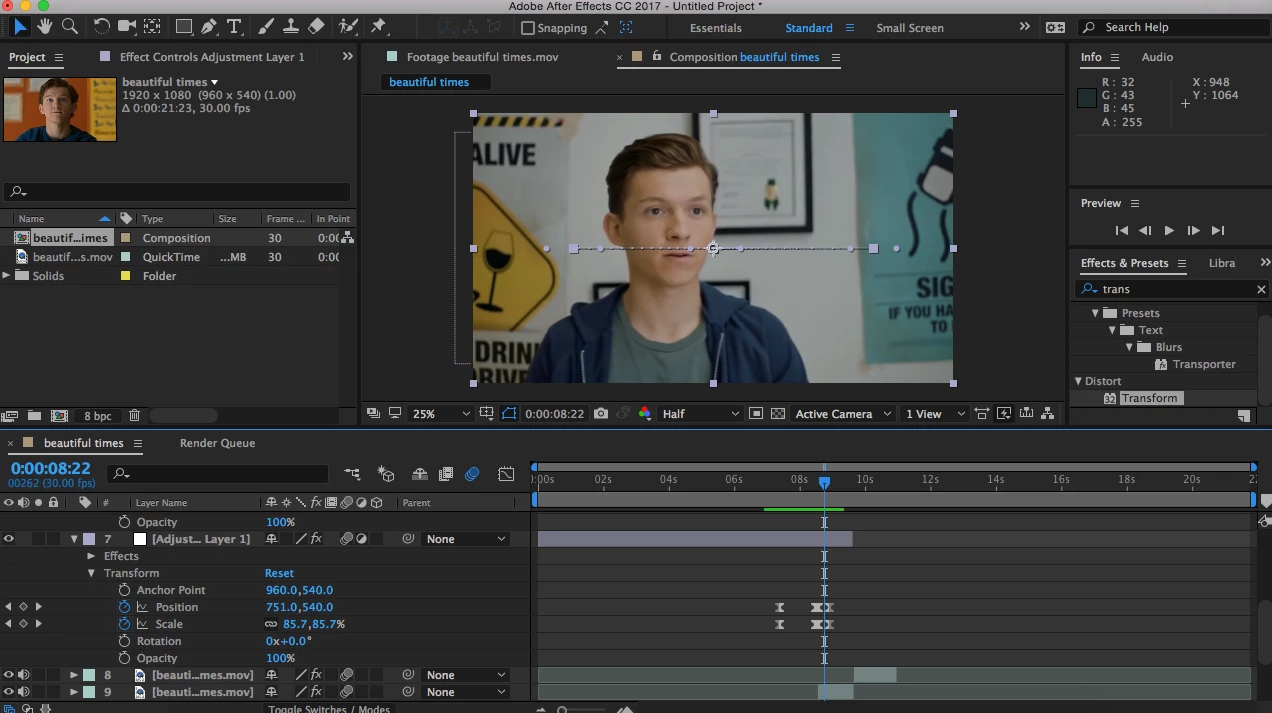
For some reason, my adjustment layer isn't working and I don't know why. I make edits on Instagram and I've done this transition plenty of times (it's called side zoom) but right now it's not working. I've re-done it twice and I've also closed and restarted ae but I just don't know why it's not working, can anyone tell me how to fix this??? Like it works but not on my clips.
This topic has been closed for replies.

3 replies

Dave_LaRonde
Inspiring
June 18, 2018

Looking at your screen grab, you're just sliding a layer onto the screen.  No need for an adjustment layer!

  • Make sure you can see the layer the way you want it to look when it's done moving. 
  • Put your timeline cursor at the point where you want the layer to stop.
  • Make a position keyframe.
  • Put your timeline cursor at the point where you want the layer to start moving on.
  • Shift-drag the layer off the screen.

Poof! You're done!

Community Expert
June 18, 2018

@Dave LaRonde this simply works for one layer, but from the screen shot, which is still

not showing all of the timeline, it seems the user wants the transition to start on a certain

point on the previous clip and continue on through to the next clip, so she has 2 clips

and that is way she wants to create an adjustment layer, I can interpret this from the

location of her keyframes, they start at a certain point way before the in point of the clip,

then go through to the next clip. So if that was the case (still not obviously clear) a

'Transform' EFFECT should be added to the adjustment layer to give it the ability to

affect the layers beneath, and not just keyframe the native transform properties of the

adjustment layer.

Dave_LaRonde
Inspiring
June 18, 2018

....or a null.  There are a couple of ways to skin this cat.

Community Expert
June 18, 2018

You are working on the properties of the native 'Transform' properties that come with the adjustment layer

by default. What you want is to add a 'Transform' EFFECT on the adjustment layer, and keyframe the

position and scale (and other) properties from inside the 'Transform' effect, after applying transform,

click the drop down arrow next to 'effects' and work on the transform effect properties from there, this

way they will affect all the layers under the adjustment layer.

Mylenium
Legend
June 18, 2018

Animating the adjustment layer itself will do nothing. You are mistaken. It doesn't work this way and it never did. Adjustment layers only propagate the effects processing, not the layer's transform. Any transform operation on the adjustment layer wil merely change the "masked" area affected by the processing, nothing more. You have to animate the actual layer you want to swipe away.

Mylenium