
ninose11
Inspiring
October 23, 2017
Answered

Afteer Effects CC 2018 magnification doesn't fit to 100% only 200%???

  • October 23, 2017
  • 2 replies
  • 2945 views

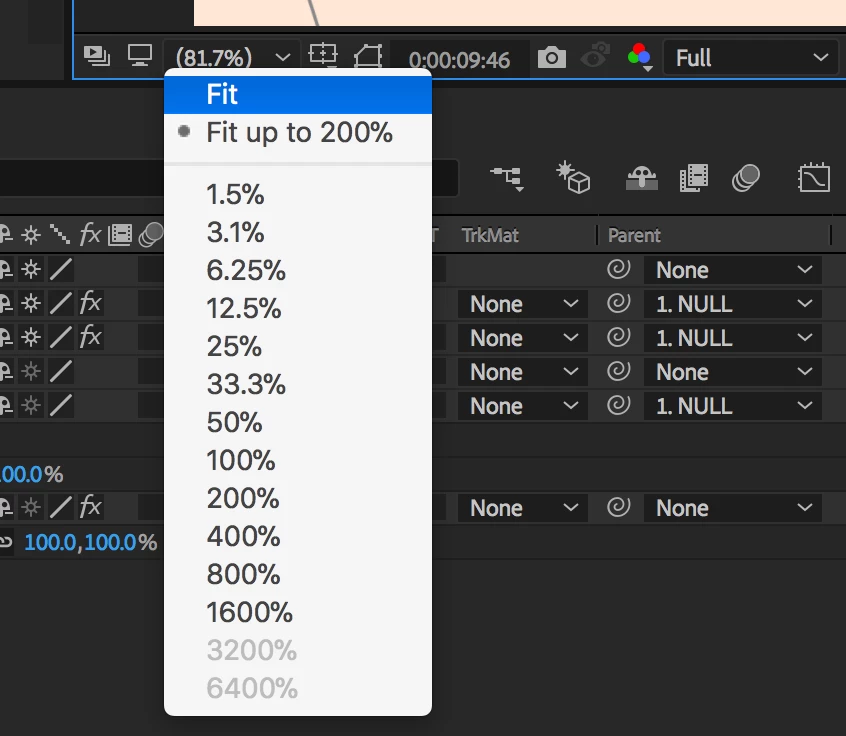
I was trying to create a keyboard shortcut for setting my magnification view to 100%, but for some reason After Effects CC 2018 wont fit to 100%, only to 200%.

Why doesn't the 100% option work via a keyboard shortcut, it always defaults to 200% when 100% is selected via the keyboard shortcut?

Is this a bug or am I doing something wrong???
    This topic has been closed for replies.
    Correct answer Rick Gerard

    Thank you again Rick. Is this one of the changes that came with CC 2018? Because with AE CC 2017 on my Macbook Pro Retina, I used to be able to zoom to 100% with a keyboard shortcut.    


    What keyboard shortcut? I also use a MacBook Pro R and as far as I remember / always has given you 200% Magnification Ratio. I still have the last 4 versions of AE installed and they all work the same.

    2 replies

    BrigitteRoars2
    Participating Frequently
    July 24, 2022

    In 2022 I too suddenly have this issue and it's such a shame. I like zooming to fit so I can see the whole stage, now I have to zoom to fit then zoom out, unnecessary extra steps in my workflow.

    prbmotion
    Participating Frequently
    January 11, 2024

    Having this exact issue in 2024. Functionality was giving 100% when I hit "/" but now it's 200%, which is wasting time when I do it 100 times a day

    Community Expert
    October 23, 2017

    Fit to 200% is what you want because that option is only available on a HR display like a Mac Retina display. That is the Magnification Factor you want to use to critically check each pixel in the frame. If you did not have a recognized HR display you would not get the option to fit to 200%. I know that it is confusing but that is the way it is.

    ninose11
    ninose11Author
    Inspiring
    October 23, 2017

    Thank you for your help Rick. But is there no way to create a keyboard shortcut to force AE to zoom to 100% even if it is less accurate than 200%???

    Community Expert
    October 23, 2017

    "Fit To" will always give you an unusual magnification factor unless your comp panel is wide enough to show the entire frame. Ctrl/Cmnd + = or - will change the magnification factor by the value increments you see in the Magnification Ratio popup. If you are at 82% and you press Ctrl/Cmnd + = you will be at 100%.

    BTW, you can't really see the individual pixels at 100%. They are there but because of the dot pitch, you would a magnifying glass to discern if things were properly lined up with the pixel grid anyway. That's why the default for an HR display is 200%. For example, a thin font like the one used on this website may be only 1 pixel wide on a standard display, but if you have an HR display the same font size will actually be twice as big and 2 pixels wide so you can read it. That is why Adobe and others like Microsoft decided to automatically scale things up with HR displays. Microsoft just calls 200% 100% when you are viewing a word doc on an HR display.