To follow up, I tryed liquify in a new proejct file and it worked fine. The project file with the issue had come from Pr "Replace with after effects comp..". Not sure why the issue happened, but I was able to work around it.
Having the exact same issue. Liquify Brushes suddenly stop being visible and just drag the layer around. Cannot shape or make adjustments to anything new.
I had the same problem but I figured it out. I had "View>Show Layer Control" (Shift+Ctrl+H) set to OFF. Try enabling it and the brush should appear and stop moving around the layer.
Do you have the Liquify effect selected in the Effects Control Panel or the Timeline? Did you turn on Show Grid in the View Options? Are you using the Selection tool (v)?
If the layer is moving it means that you do not have Luqify selected and you have not selected one of the Liquify tools.
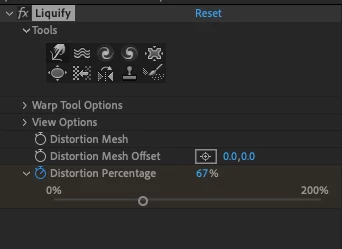
Same prob here. The toolset does work when trying to change the layer itself, but I want to use them on a composition in order to add keyframes and animate. In the composition however, when hovering over the toolset (e.g. warp/hand) the icons do turn yellow but it's not possible to activate the tools. You can click as much as you want, the icons stay gray/inactive, as above screenshot. No brushes appear when hovering over the composition, just the curvor , so the only thing happening when dragging is moving the position.
And what exactly? You need to be much more specific and explain what is actually going on. Just showing us a screenshot of the effect controls is not telling us anything.




 AdChoices