Participant
November 27, 2017
Answered

After Effects CC 2018 hang on startup

  • November 27, 2017
  • 7 replies
  • 10596 views

Hi Experts!
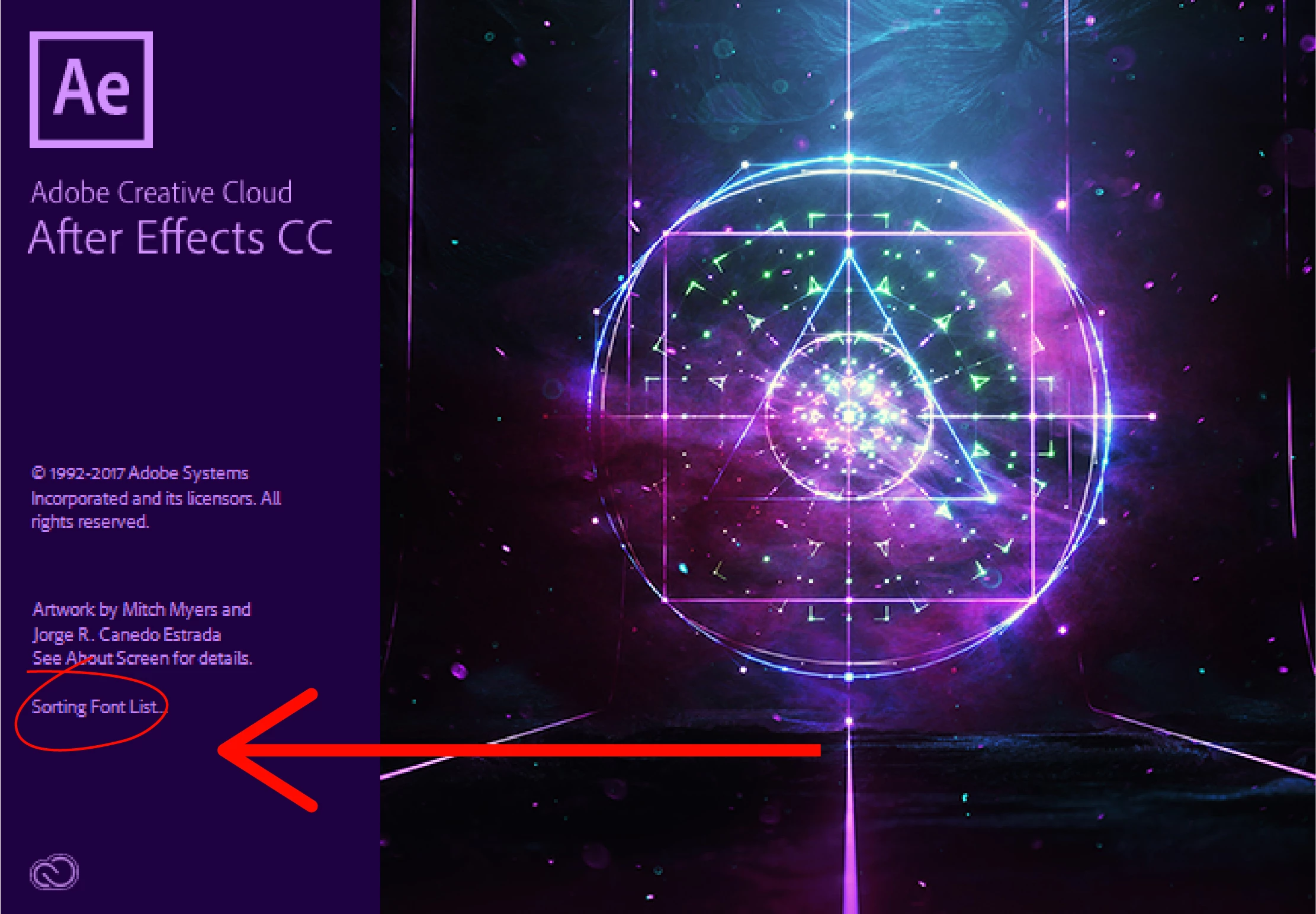
After Effects CC 2018 hang on startup screen at Sorting Font List

Solution plz
This topic has been closed for replies.
Correct answer dennisp4478397

I`m Having similar problem.

My AE stops there.  Tried reseting preferences, tried rebooting, tried uninstalling and re-installing.  Same thing.


It was working fine 2 weeks ago.

I`m using a Mac Pro with a NVidia GTX760
NVIDIA Web Driver: 346.03.15f12  (I updated it recently, but don`t remember if i used AE after the update)

Hope for a solution.

Thanks


UPDATE!

Just solved!
Rolled back my CUDA driver for the older version (9.0.222).
Works fine now

7 replies

Participant
October 19, 2020

I also had this issue but this did not work. I spent hours deleting tons of files, reinstalling Windows multiple times, and pulling my hair out. My technician at Puget Systems FINALLY figured it out for me. He had to run Premiere and After Effects as an Administrator. For some reason during the "Cleaning up _____" process on the splash screen, in my case "Cleaning up Anywhere" AE and Premiere were trying to draw or open files that were in and administrator only folder. This was quite possibly THE WORST AE glitch I've ever had as it rendered the programs unusable until my tech figured this out. I've now set all of my Adobe programs to run as Admin through their shortcuts on Windows. You get an elevation prompt before they open every time, but that's a small price to pay for them to actually freakin open.

Participant
February 5, 2021

Thank you for sharing this solution! It worked for me too!

Clonwerk 15
Participant
April 1, 2021

Thx man ... work for me too. run as administrator. now ae open in 5 seconds:!

Participant
October 23, 2018

Hello All,

I updated After Effect cc 2019 last week and when I application opens it hangs on startup (" initializing required components" )and not opening the application. Re-booted several times and uninstalled and again installed but the same issue happening.

After Effect cc 2018 is running with no issues.

Please help me to solve this issue!

Thanks.

Participant
November 15, 2018

Same Issue Here :/

dennisp4478397
Participating Frequently
March 3, 2018

I`m Having similar problem.

My AE stops there.  Tried reseting preferences, tried rebooting, tried uninstalling and re-installing.  Same thing.


It was working fine 2 weeks ago.

I`m using a Mac Pro with a NVidia GTX760
NVIDIA Web Driver: 346.03.15f12  (I updated it recently, but don`t remember if i used AE after the update)

Hope for a solution.

Thanks

Participant
November 28, 2017

I applied all of your methods but sorry..nothing happened

still hang up at sorting font list while startup
any one expert...???????????

Kevin-Monahan
Community Manager
Community Manager
December 12, 2017

Hi Mohsin Rasheed,

Still getting hangs on launch? Let us know.

Thanks,
Kevin

Kevin Monahan - Sr. Community and Engagement Strategist – Adobe Pro Video and Audio
dennisp4478397
Participating Frequently
March 3, 2018

I`m Having similar problem.

My AE stops there.  Tried reseting preferences, tried rebooting, tried uninstalling and re-installing.  Same thing.


It was working fine 2 weeks ago.

I`m using a Mac Pro with a NVidia GTX760
NVIDIA Web Driver: 346.03.15f12  (I updated it recently, but don`t remember if i used AE after the update)

Hope for a solution.

Thanks

Participant
November 27, 2017

This morning I came into work after a week off and my AE CC won't start. It hangs on "cleaning up".

Things I have tried that did not work:
Deleted preferences

Uninstalled/Reinstalled AE

UPDATE:

After the third time through this, I got a notice that Adobe needed to fix it and then proceeded to do just that. It's working fine now.

kirkeric
Inspiring
November 27, 2017

Great news!

Vishu_Aggarwal
Participating Frequently
November 27, 2017

Hi,

Did you try resetting the preferences of AE. If not please try once resetting the preferences as follow -

To restore the default preference settings, press and hold the following keys while the application is starting.

  • Ctrl+Alt+Shift (Windows)
  • Command+Option+Shift (Mac OS)

To restore default keyboard shortcuts, Alt-click (Windows) or Option-click (Mac OS) the OK button.

MacOS

  1. Go to your desktop and click GO on the menu bar.
  2. Select Go to Folder from the drop-down and type the following path: /library/application support/adobe/.
  3. Open Documents folder and select the folder named Adobe.
  4. Rename the After Effects folder as ’OldAfterEffects’.

Windows

  1. Access the path C:\Users\”username” \AppData\Roaming\Adobe. OR
  2. In the Run command (Win key+R) dialog, type %appdata%
  3. Open the folder named Adobe.
  4. In the folder, select the After Effects folder and rename it as ’OldAfterEffects’. OR
  5. Access the path C:\Users\”username”\Documents\Adobe and rename the After Effects folder as ’OldAfterEffects’.
Vishu AggarwalAdobe Certified Instructor, Professional and Expert
kirkeric
Inspiring
November 27, 2017

Are you saying that it get's to this point and then remains there? 

I haven't quite seen that exact hang up but generally, when I do see an occasional one, I go to task manager, shut down the process and give her another try.  Sometimes a reboot is in order, seems to clear many issues.

Eric
