
New Participant
April 1, 2020
Question

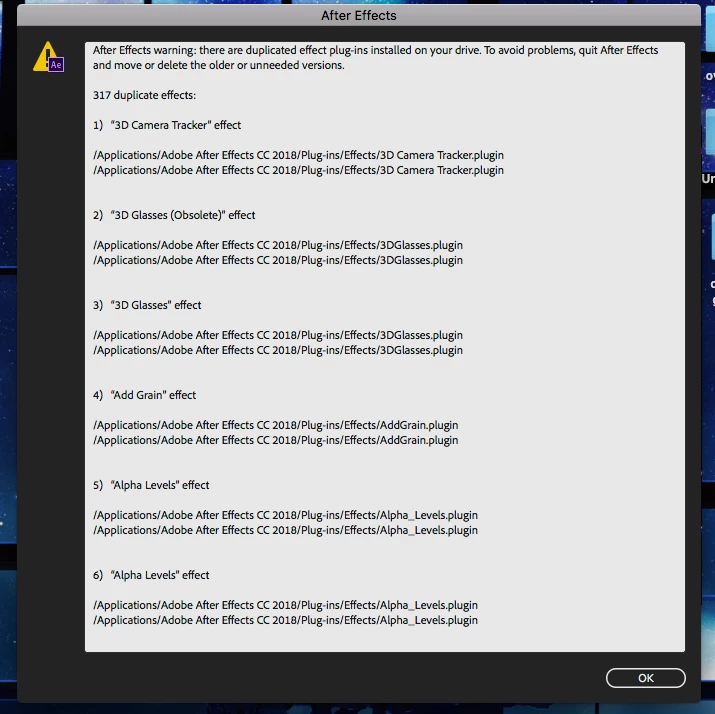
After Effects warning: there are duplicated effect plug-ins installed on your drive.

  • April 1, 2020
  • 4 replies
  • 4626 views

Hi i was trying to open AE when i suddenly get an error out of nowhere. its telling me that there are multiple copies of a plugin in my drive?? (actually it duplicated every single effect).. i dont know why or how that happened. my AE was working perfectly two days ago. ive searched for a solution everywhere and nothings working:/ 

ive restarted my computer, checked for the duplicates by going on the mediacore folder but theyre nowhere to be found. 

please if anyone could help me find a solution.. 

also i dont really wanna uninstall after effects as it'd delete everything and ive downloaded a lot of plugins/presets etc and i dont think i can find everything ive downloaded anywhere 😞

ps. i have AE 2018

ps. 2 i also have AE 2017 but its never given me any issues before.. idk 
4 replies

New Participant
March 30, 2024

the solution is you have to remove a shortcut to your plugins of ae or ae folder, just go into your ae folder wherever its installed in file explorer and search for .lnk files which are shortcut files and delete the one on the date the bug started happening

New Participant
February 28, 2025

THANK YOU SOOOO MUCH BROOO YOU SAVED MY LIFE! THANK YOU 

New Participant
January 16, 2022

I currently have the same problem has anyone found the solution yet?

dougd72903349
New Participant
September 23, 2020

i installed the latest version today and got the same error. Unistalled and removed any preferences and then reinstalled and got the same error. Is there a fix for this yet?

Roland Kahlenberg
Brainiac
September 24, 2020

It's strange that the reported two folders for each displayed duplicate displays the same location. I think this may be due to an AE Prefs error or perhaps a lower level issue with your harddrive.

If your AE Preferences files have errors it's pointless doing a new install IF you select to migrate Previous Settings during the installation process.


I suggest you delete AE's Prefs to see if the message appears.

Very Advanced After Effects Training | Adaptive & Responsive Toolkits | Intelligent Design Assets (IDAs) | MoGraph Design System DEV
nishu_kush
Community Manager
Community Manager
April 1, 2020

Hi there,


Welcome to the community and sorry for your issue.

Did you check for the duplicated plug-ins at the locations mentioned in the screenshot?

Let us know if deleting them helps.


Thanks,

Nishu

diabbyyAuthor
New Participant
April 3, 2020

Yes, i did. The duplicates are not there either...