
Participant
March 11, 2019
Answered

After effects won't update past 15.1.2

  • March 11, 2019
  • 5 replies
  • 3249 views

I have files which were created at work in AE 16.0. My software will only update to 15.1.2 and claims it's up to date.

The original file was created on an iMac and I'm using a Macbook Pro 2014. 16.0 isn't just for iMacs is it or something?

If I can't update my software, is there a way for me to convert the file to an older format, like how Indesign does, or is the file unusable?
This topic has been closed for replies.
Correct answer OussK

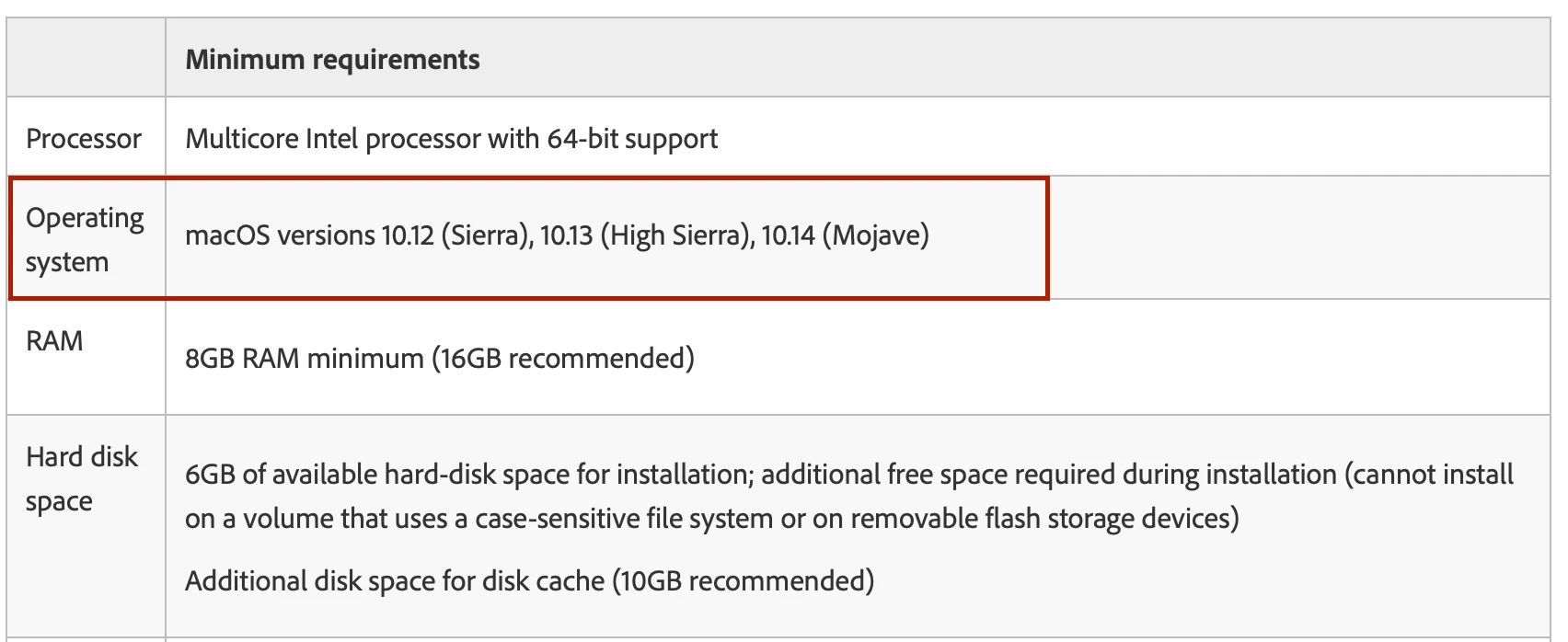
So as i told you in my first reply you must have the system requirement to be able to get the latest adobe software,, and specially the OS version

so upgrade to Mojave, and you will see the new CC2019 in your application list

5 replies

Community Expert
March 11, 2019

Do you have at least 8GB of RAM? if you do not have them then that may be the issue.

Byron.
Inspiring
March 11, 2019

Ah, are you using an OS that's earlier than 10.12, Sierra?

Participant
March 11, 2019

Yes I am! I'm on 10.11.6 since I had problems updating it long ago. I'll try updating to Mojave and seeing if they appear in my Creative Cloud after that. I'll just need to buy an external HDD tomorrow for the Time Machine backup and we'll see how it goes.

Thanks

Calum

Inspiring
March 11, 2019

I think upgrading your OS should do the trick. Adobe, like Apple and Microsoft, only support a few versions back, so that would mean 10.12, 10.13, and 10.14. Hopefully Mojave will do the trick, let us know!

OussK
Community Expert
Community Expert
March 11, 2019

be sure you have all the system requirement specially the OS version

After Effects System Requirement

For your's second question you can save as the project you have to open on CC15.x version

but this step must done from CC 16.x version

Inspiring
March 11, 2019

That version of After Effects is up-to-date. You need to "upgrade" After Effects to 16.0 (16.0.1 is the latest version) because it's a new major release. If you go to the CC App you should see a second version of After Effects that either tells you to "Install" or "Upgrade." If not, then follow the screenshots above, but all of the "CC 2019" apps should be available as additional install options in the main list of apps.

Participant
March 11, 2019

Hi David, thanks for the reply

I actually don't have anything listed "CC 2019" anywhere in my list of apps, and I've checked for updates. If my laptop didn't meet the system requirements would that stop them from showing up on the list?

Michael Bullo
Community Expert
Community Expert
March 11, 2019

From the Creative Cloud App click the down arrow next to the After Effects Open button. Choose Manage and then Other Versions. What versions do you see?

Also, is your Creative Cloud App up to date? Clicking the 3 dots in the upper right corner opens up a menu which includes "Check for App Updates". If you are able to update it then do so and check if you now have access to the latest version of After Effects.

Participant
March 11, 2019

Hi Michael, thanks for the reply

I've checked for app updates and nothing changes. I've also tried logging out and back in, and restarting my laptop. This is what other versions I see:

Thanks

Calum