
Participant
September 17, 2019
Question

Alpha Matte on Illustrator layer

  • September 17, 2019
  • 2 replies
  • 3650 views

Hi there, relatively new to After effects, so sorry if this has been posted before;


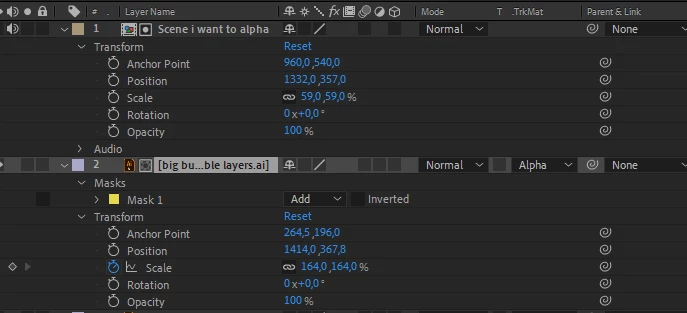
I´m trying to get my composition in the bubble by using Alpha on the Illustrator layer that is the bubble , but it seems that the only TrcMat that gives somewhat wanted result is the Luma Matte.



When I try to use Alpha the bubble is all white, and not showing the comp. I´ve tried changing the mask from Add to subtract, with and without inverteded.


What the duck am I doing wrong? These are my settings. 
 

    This topic has been closed for replies.

    2 replies

    Roland Kahlenberg
    Legend
    September 17, 2019

    Other than Jose's instruction, you may want to look at using Effect>Channel>Set Matte. The Set Matte effect doesn't require the two involved layers to be in precise, relative positions in the Timeline.

    Very Advanced After Effects Training | Adaptive & Responsive Toolkits | Intelligent Design Assets (IDAs) | MoGraph Design System DEV
    Jose Panadero
    Community Expert
    Community Expert
    September 17, 2019

    I think the layer order is incorrect. Track mattes need to be always over the layers that will be masked. So the correct order is Bubble on top and the "Scene I want to alpha" below, and select the alpha matte option for the "Scene I want to alpha".

    Participant
    September 17, 2019
    Now I feel like a total noob, it was as simple as that, thank you!