
Inspiring
June 7, 2018
Answered

Animation codec not supported in 15.1

  • June 7, 2018
  • 5 replies
  • 7817 views

I could use an assist here. All my AE projects from the last decade are not working. I tracked it down to the lossless alpha channel codec "Animation". I don't want to spend the rest of the month tracking down every 3D graphic and re-rendering and re-linking the hundred of commercial projects. So I am stuck on 15.0.1 for now until they reconsider.

I use Cinema 4D to create 3D graphics. I have used the Apple Animation Codec with 32 bit Alpha channel support for many years. In the latest update to After Effects CC 2018 V15.1 Adobe has removed support for animation codec which is contrary to this statement on the Adobe website:

Dropped support for QuickTime 7 era formats and codecs
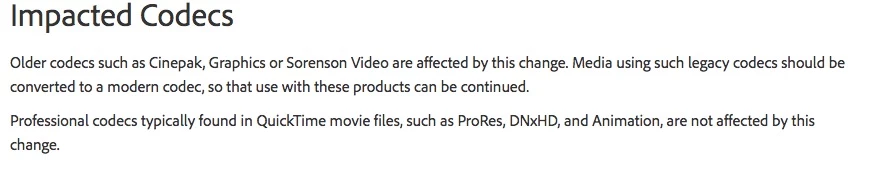
"Animation are not affected by this change."

But now all my 3D animations with Alpha channel will no longer work with AE 15.1 and beyond? Why?

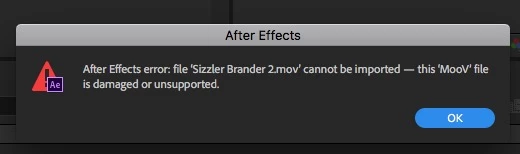
This shows me opening a 15.0.1 Project in 15.1 - all movies are un-importable.
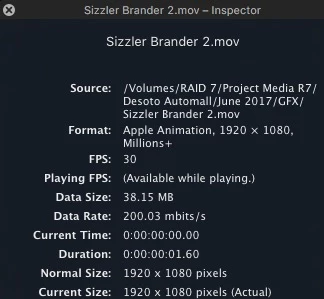
Looking at Quicktime inspector, you can see it is an Apple Animation format with Millions + 1920 X 1080.
Perhaps I missed the updated notice that they changed their minds and now chose to add Animation codec to the "Impacted Codecs""

    This topic has been closed for replies.
    Correct answer Dave Merchant

    That Adobe KB says clearly that AE can only import QT Animation without delta frames.

    If you have deltas (i.e. keyframe intervals greater than 1) then it's no longer compatible. Your only options are transcoding everything, permanently downgrading After Effects, or switching to another vendor for your compositing software.

    5 replies

    Participating Frequently
    September 17, 2018

    Where I'm lost is that I am teaching my class how rendering works where I render from the AE Render Queue using the default QT Animation "Lossless" template and then I can't import the rendered file back into AE or AME. WHAT?

    I'm using AE 15.1.2 under Sierra 10.12.2 working with basic HDV 720p 29.97 comps.

    dbeaty2Author
    Inspiring
    July 3, 2018

    I found the other forum! This is the Feature Product improvement page. Vote for the idea! I created a new idea here Restore the full support of the Animation Codec – Adobe video & audio apps

    dbeaty2Author
    Inspiring
    June 7, 2018

    Indeed the trick is to uncheck the Keyframe option in the export dialog. Wish it was the default since everything I've ever rendered in Cinema 4D in the last decade is now not liking AE. I wonder why that matters. Delta Frames....hmmm.

    Participant
    July 3, 2018

    It's inexcusable. Why take away a feature that has been used for years. I've used the Animation codec for years. It's a the best way to render out a lossless version. They had to go out of their way to remove this feature.

    Shame on you Adobe. Ill have to downgrade.

    dbeaty2Author
    Inspiring
    July 3, 2018

    It does work if you uncheck the Keyframe option in the codec window. Of course all of your previously rendered Animation codec videos will not work unless you transcode them. The problem is that the codec default to the delta keyframe and most users simply hit the codec choice and go! Can't explain why they'd take out JUST the delta frame option support of the codec and leave the rest.

    Dave MerchantCorrect answer
    Legend
    June 7, 2018

    That Adobe KB says clearly that AE can only import QT Animation without delta frames.

    If you have deltas (i.e. keyframe intervals greater than 1) then it's no longer compatible. Your only options are transcoding everything, permanently downgrading After Effects, or switching to another vendor for your compositing software.

    Community Expert
    June 7, 2018

    Try exporting to Quicktime, Apple ProRes 4444 codec with Millions+ from QuickTime 7 Pro. Or re-export to the same Animation codec. Maybe your files are too old because it says "MooV" is damaged or unsupported.

    Byron.
    dbeaty2Author
    Inspiring
    June 7, 2018

    You know, it's interesting. I created that .mov perhaps 8 months ago. Whenever I use the Animation  in C4D.  I just go with what ever the default is for keyframe. So if the default is "with delta frames" then that's what I have. In fact I don't recall that option.  Never touched that setting. This is the default, I just change the color to Millions +. Perhaps they support this same codec but you have to edit keyframes to no check box? or change 30 to 1? I'll test both ways and see if it helps.

    Here's a funny one, I can open them in Quicktime 7 and export to any new codec, but if I want to Batch convert all of my old Animation codec to Pro Res 444, Adobe Media Encoder will not open them either.