
Participant
March 20, 2019
Answered

Auto Trace Is Driving Me Bonkers

  • March 20, 2019
  • 2 replies
  • 2339 views

Hello!

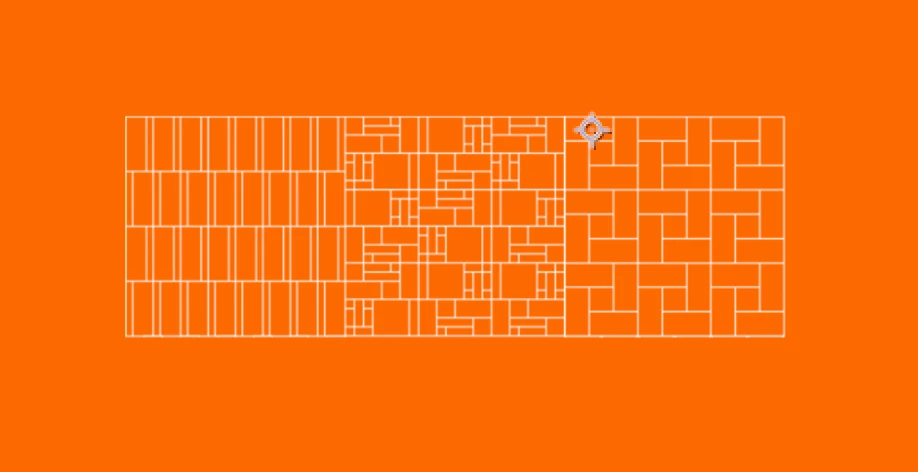
I am trying to animate a masonry pattern (photo of the pattern below - exported from photoshop as a single PNG image) but when I go to auto trace the pattern, it returns with 100+ mask paths. In order to morph the pattern into the logo, I would like to have this trace as one mask or just one path if that's possible? The only alternative to the auto trace would be to literally trace the entire thing with the pen tool.

I am happy to provide any screenshots, etc. if any help can be provided. Thank you in advance!
This topic has been closed for replies.
Correct answer Mohammad.Harb

better to use illustrator, if All lines are vector and  stroke without any fill, you can convert the illustrator file to shape Layers in After effects and you can use trim path to animate the lines

2 replies

Mylenium
Legend
March 21, 2019

Long and short: No. This is nothing that will ever work properly with any auto-tracing in any program. You have to make an effort and spend the time re-drawing it either in illustrator or directly by manually creating shape layers and masks in AE. Even then it won't be one contiguous compound path. That's just not how this stuff works. You will always have multiple paths, but at least manualyl drawing them will reduce their number considerably. You need to work up a basic understanding of vector graphics and then structure your work suitably. Even things like the first vertex/ start point of a path matter, especially when animating their shape and/ or "morphing" them.

Mylenium

Mohammad.Harb
Community Expert
Mohammad.HarbCommunity ExpertCorrect answer
Community Expert
March 20, 2019

better to use illustrator, if All lines are vector and  stroke without any fill, you can convert the illustrator file to shape Layers in After effects and you can use trim path to animate the lines