
Participating Frequently
July 20, 2020
Question

Can't get video composition transparency working with AVI format. Help please.
  • July 20, 2020
  • 1 reply
  • 5329 views

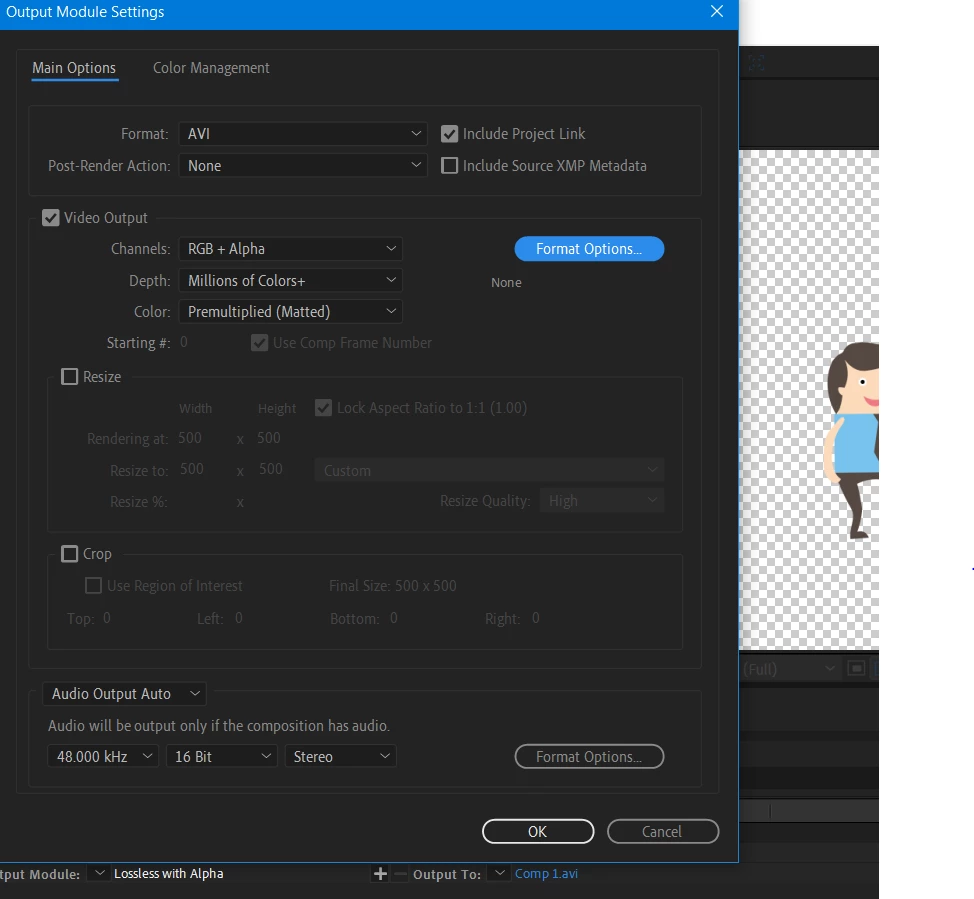
Can someone please assist.  I've been using after effects on and off for a few years but have never experimented much in the exporting/rendering options.  I can get the transparent background working with Quicktime format, but I need this in AVI format.  I have tried Lossless with Alpha in the output module but it still has the comp colour in the background.  You can see that toggling the transparency grid on the comp shows the transparent background.  
Thanks in advance, 

Jen

This topic has been closed for replies.

1 reply

Mylenium
Legend
July 20, 2020

You seem to have several misunderstandings here.


a) Transparency is not an automatic thing. In fact very few CoDecs even support it, in particular in AVI-Land. You need to check the "Format Options" and verify that it's set to RLE or Uncompressed. Since many AVI-CoDecs also limit color range drastically or are heavily compressed, you may want to switch to other formats. Ultimately the lack of suitable CoDecs is why Quicktime was so popular for a while. these days your options include e.G. ProRes or image sequences, naturally.


b) Transparent stuff will always have a fill. Transparency is about interpretation just as much as how it's generated. Viewing images or videos outside apps/ viewers that support transparency is therefore pointless and no way to verify your output. Likewise, depending on the format you may still need to enable transparency in professional processing programs and set the interpretation accordingly. Or in simple terms: Transparency generated in AE may ultimately only show up in AE, Premiere, Photoshop or other such programs, but not on your desktop.


Double- and triple-check all these things and draw your conclusions. If that doesn'tz fix it, some info about your project and your workflow might clarify matters and allow people to advise specifically.


Mylenium

Participating Frequently
July 20, 2020

You are making presumptions.   I am checking the transparency by reimporting the footage into After Effects.  Of course I am not checking the footage on my desktop. I specified that I can get transparency working with Quicktime used with the RLE codec for transparency so it should be obvious that I am aware of the transparency working or not.  


The format options were already set to AVI none which supports the alpha channel.  What am I supposed to triple check and draw conclusions from?  The only advice you specified was to change the format options to uncompressed.  And what is this exactly?  All video codec options for AVI except 'None' do not support 4 channels, well some support only alpha without the RGB which is not what I need.


There is no complex project going on.  It's an imported png illustrator file using the usual keyframed options with some puppet pin tools usage with no solid background layer which would clearly impede transparency..  I don't see how this is relevant to what codecs and exact settings support transparency.  You can clearly see from the screenshot that the transparency grid is on, meaning, the composition supports transparency, or should do given the settings specified in the render queue.

Mylenium
Legend
July 20, 2020

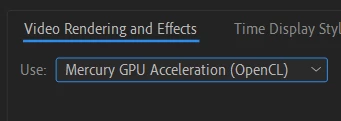
Apologies if I jumped ahead in my thinking then. Have you tried to play around with hardware-acceleration settings, i.e. reverting to software-only mode? Could be your graphics hardware being unable to support off-screen buffers correctly and/ or a conflict in the system's acceleration for media formats quietly disabling these things. also, since it's a PNG, try another format. There's some weird bug in one of the image libraries that disable PNG transparency at random. Also happens in PS and AI itself at times.


Mylenium