Inspiring
November 14, 2018
Answered

Cant find "camera shake" effect? Some effects wont go.

  • November 14, 2018
  • 3 replies
  • 4551 views

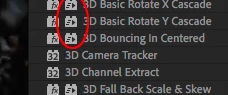
And certain effects wont go into the composition, ones with this insignia on them:
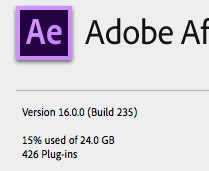
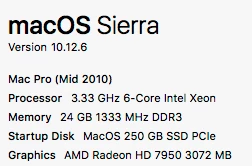
original footage is iPhone 6.
    This topic has been closed for replies.
    Correct answer Kyle Hamrick

    There's no effect named Camera Shake, and the others you have circled are presets, not effects. They're specifically text animation presets, so they can only be applied to text layers.

    Effects and animation presets in After Effects

    If you click on the "hamburger menu" (3 horizontal lines) just to the right of the tab name, you can uncheck "Show Animation Presets" if it's easier for you not to see them.

    3 replies

    Inspiring
    November 15, 2018

    A couple of years ago I added a camera shake effect.

    What could I have possibly been using?

    What can I use for that?
    I thought that was a pretty standard effect?

    ​thanks

    OussK
    Community Expert
    Community Expert
    November 15, 2018

    Try this link you will find a good camera shak presets also video tutorial included 15 FREE Camera Shake Presets for After Effects and Premiere Pro

    Inspiring
    November 15, 2018

    Ok I'll try that out thanks !

    OussK
    Community Expert
    Community Expert
    November 15, 2018

    Yes as Kyle say, it's a preset and it look like you update your after effects and you presets is still on the old version so you can simply go to presets folder in you old AE and copy the missing presets to the presets folder of AE CC2019.

    Kyle Hamrick
    Community Expert
    Kyle HamrickCommunity ExpertCorrect answer
    Community Expert
    November 15, 2018

    There's no effect named Camera Shake, and the others you have circled are presets, not effects. They're specifically text animation presets, so they can only be applied to text layers.

    Effects and animation presets in After Effects

    If you click on the "hamburger menu" (3 horizontal lines) just to the right of the tab name, you can uncheck "Show Animation Presets" if it's easier for you not to see them.
