Participant
July 3, 2018
Answered

Changing the color of specific words in Arabic text paragraph?

  • July 3, 2018
  • 1 reply
  • 3973 views

Hi,

I am working on a project, in which I have to highlight some keywords in text paragraphs.

When I select a word and change the fill color in the character panel, it doesn't affect the selected area of the text, it seems to be affecting random areas of the text, sometimes it doesn't at all.

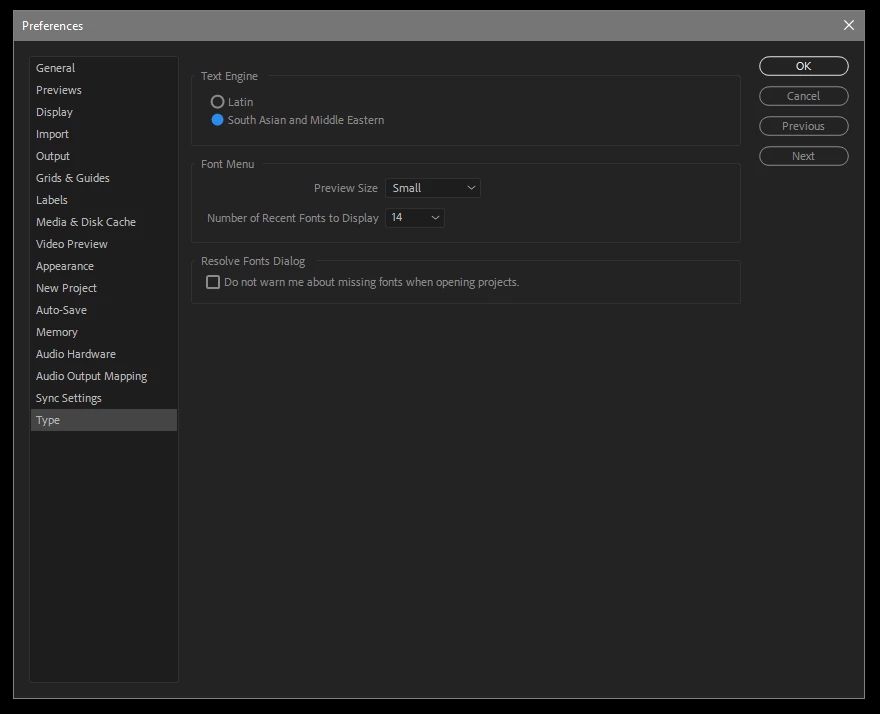
I am not sure but the issue seems to be with the Arabic text, here's a preview as well as my current app settings.

This topic has been closed for replies.
Correct answer Roei Tzoref

As I told you above, I tried reversing x scale trick within the same file you shared and sadly it did not work


As I told you above, I tried reversing x scale trick within the same file you shared and sadly it did not work

in the files you uploaded, you are using the MENA type engine. you have to use the Latin if you want this to work. if you copy paste the text from a MENA type engine text layer to a Latin type engine text layer it will retain the engine. you have to copy from an unformatted source (like from your browser or something). copy the text to some source that will remove the formatting (like you web browser address field). so this does work but only partially because I see now I do have problem with the Ligatures and looking online I see you need this script too:

ArabicText - aescripts + aeplugins - aescripts.com

trying it I see you do not need the reverse x scale method but to just use this script and it will fix this. so your workaround is this script and use Latin text engine (create a new layer and make sure from the preferences you are using the Latin Engine).

here's the project file made with the script:

Arabic_v2.aep - Google Drive

1 reply

Roei Tzoref
Legend
July 3, 2018

RTL Text in Recent release (CC 2018) is buggy. in CC 2017 it works fine.

I now see there is also a selection/hightlight problem with multi lined arabic text. in hebrew it's only if you add numbers, english, or change weight/font in the same text layer.

please add your vote here and specify your case in the comments:

RTL support (right to left languages) is not completed, Hebrew (and possibly other MENA) issues – Adobe video & audio ap…

Participant
July 3, 2018

Thank you for the reply Roei Tzoref​,

I am looking for a working solution with the current AE build due to the tight project deadline.@

Roei Tzoref
Legend
July 3, 2018

the solution would be to work "the old way" as in before CC2017 there was not RTL support at all. what we did was (make sure you set your type to Latin in the preferences first because you are using CC 2017+ version) inverse the x scale of the text layer transform, and add a scale animator and invert it's x scale as well. this works fine, unless you add numbers or english which will be reversed.

I see you voted for that feature so let me spoil you with a project file:

Arabic.aep - Google Drive