athelas
Participant
August 7, 2019
Question

Color glitches error in mp4 rendered video

  • August 7, 2019
  • 3 replies
  • 1401 views

Hi,

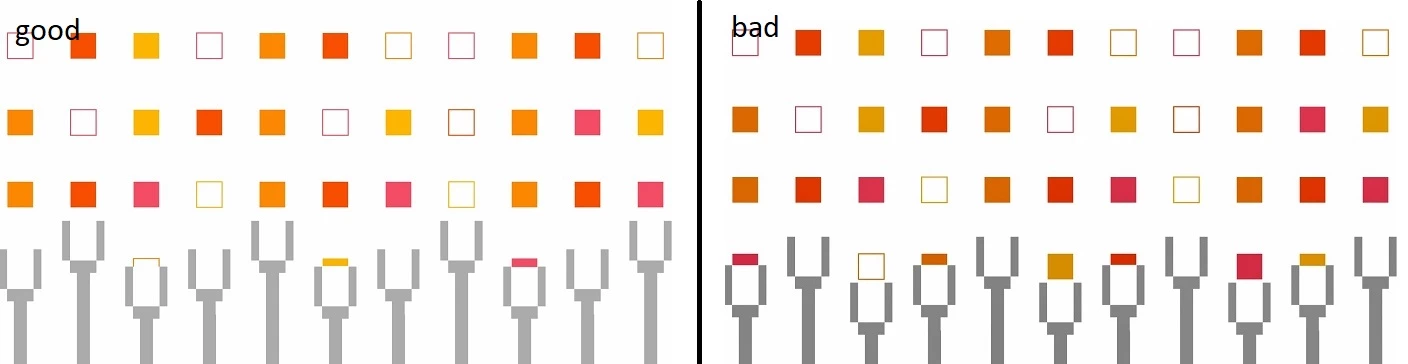
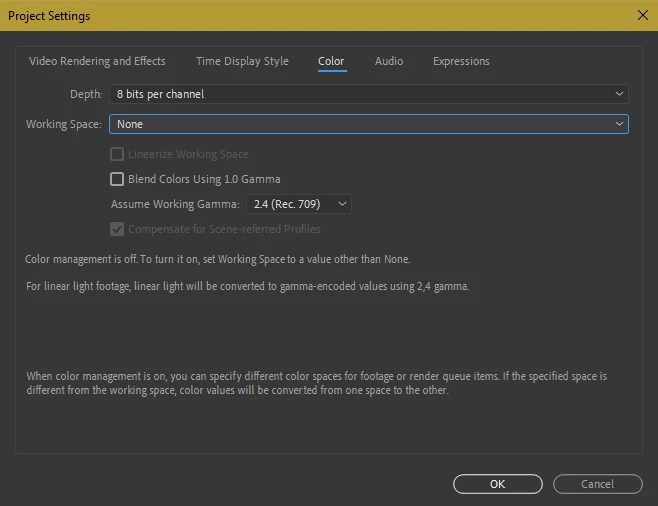
I have a problem with colors in the animation - the colors glitch and change to darker while I watch the rendered video in Windows Media Player. The animation in AE is only made of vectors from AI, the video is rendered in Adobe Media Encoder with H.264 format, preset: Match source - high bitrate. It's not the matter of the monitor, because I checked the video also on the other type of the monitor and the problem still occurs. I attach the screens and my project settings. I really hope for help Thank you.

This topic has been closed for replies.

3 replies

athelas
athelasAuthor
Participant
August 9, 2019

Thanks. I set a working space to sRGB IEC61966-2.1 but it didn't help. But the video has no errors when played in Quicktime so I guess this must stay as a solution.

Dave_LaRonde
Inspiring
August 9, 2019

You should also know that EVERY media player displays colors differently.

You'd drive yourself nuts trying to make a file that looks the same on all of them.

Mylenium
Legend
August 7, 2019

Nothing wrong here. You need to educate yourself on how compressed formats work, how their color ranges and Gamma affect the output and so on and then counteract these inherent limitations by tweaking your colors suitably.

Mylenium

Mohammad.Harb
Community Expert
Community Expert
August 7, 2019

Try to play it back on quicktime