
Inspiring
December 3, 2018
Question

Color gradients in an animated gif

  • December 3, 2018
  • 1 reply
  • 8461 views

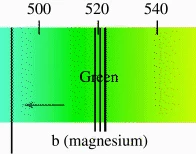
Does anyone have any experience optimizing image quality with text and a color gradient when exporting an animated gif?  So far I keep getting some artifacting in the color gradient.  The color gradient itself doesn't move, but the lines that go over the spectrum do.  Is there a way that I can clean this up?  I haven't tried exporting a png sequence and importing that into Photoshop yet, but that might be my next move unless one of y'all know of a handy setting I haven't thought to try yet.
This topic has been closed for replies.

1 reply

Community Expert
December 3, 2018

There are only 256 colors available in a GIF. The best way to optimize the colors is to render a lossless movie of your gif using the Lossless Output Module preset in the render cue and then open that movie in Photoshop. You can also eliminate any duplicated frames, adjust the timing of each individual frame, and further optimize the Animated Gif in Photoshop. None of those options are available in After Effects. If you are producing a lot of these files on a regular basis I would look into a tool specifically designed for that format. You will be a lot more productive and end up with a better product.

If your project is destined for the web I strongly suggest that you consider using SVG instead of Animated GIF. The file sizes are considerably smaller, you have a lot more design flexibility, and you will be using cutting-edge tech for your clients instead of 20-year-old tech that never was a designers friend.

Inspiring
December 3, 2018

Thanks.  I'll bother taking this into Photoshop.  The whole thing, is half 3D animation using renders from Cinema 4D, so I don't know how practical the SVG solution would be with this particular one, but it's not a bad reminder to have as other projects come up with different parameters.