
New Participant
March 4, 2020
Answered

Composition screen frozen and not displaying timeline

  • March 4, 2020
  • 6 replies
  • 18846 views

Very odd and stuck from many people on our video team with this one. Preview is flat out not working in the Composition panel.


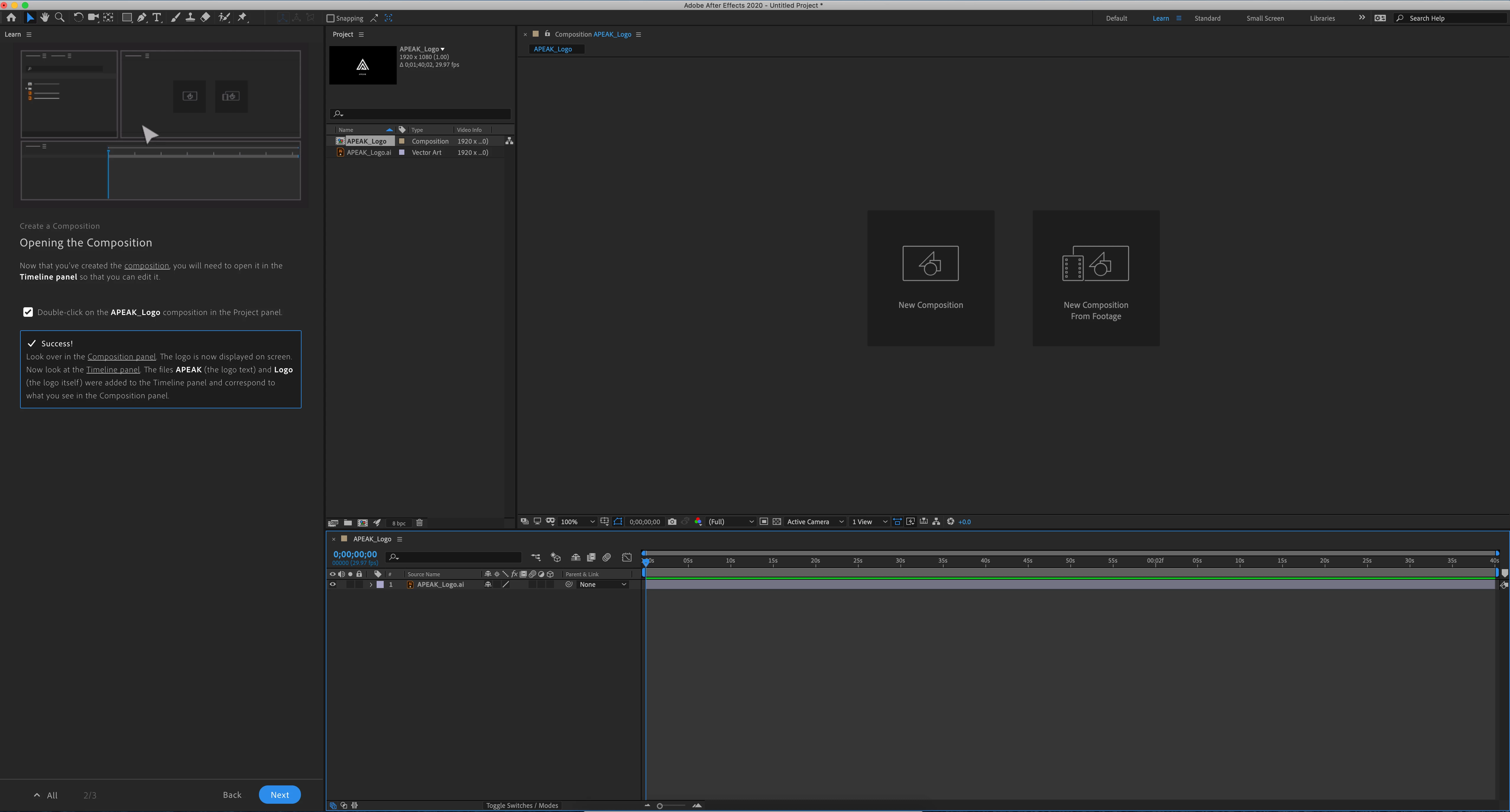
The screen shot attached shows the beginning screen when you start the AF, loaded with the trainging demo program from Adode. Composition panel should be showing an APEAK logo. When I load any project, there is no longer anything shown in preview. We have tried closing the panel, chaning workspace, restarting the program, uninstalling AF, and uninstalling Adobe cloud completely. 


This is on a brand new Mac Pro with a Radeon Pro II GPU. 


Yet the projects all work fine on my laptop. Hope someone can help quickly something that is amazing dumb and simple fix. Prove me an idiot please. 
This topic has been closed for replies.
Correct answer Leosrd

Hi Rameez and eppoerickson


I did some of the steps the ones that applied to my system.


I found a clue.

It seems to have something to do with folders and files access for video cache and previews.

Disabling the video cache finally solved the issue. 

also, I'm a Win10 Pro user and I'm finding a bug with the Windows Defender and the Ransomware Protection part that is getting somewhat too much overprotective with the access to some folders in C:

that's a temporary solution but at least I can still working for now.


thank you!

6 replies

xandragnis
New Participant
November 5, 2020

Alright human people..


I've had this issue for many months myself - actually even from the beginning I've had this problem and today I actually decided to get to what was causing it [for me and likely you..].


I didn't go into immense detail to find the specific calls which caused the issue but I can say, if it's as what I've experienced, it has nothing to do with drivers and only to do with file access.


After effects [and Premiere] are getting hung up with a call or modification to a file or directory because of anti-ransomware protection in my case.


Specifically I was using Acronis Active Protection [have been using it since 2018 without issue until the installation of AE and Premiere...].


Today I disabled it after having the issue and found that I didn't have to reset preferences or delete temp files in order to continue working on my projects.


I had to disable the service "anti_ransomeware_service.exe" located [for me] "C:\Program Files (x86)\Common Files\Acronis\ActiveProtection".


Hope this helps someone - - I noticed others mention antivirus protection could be the culprit so I decided to try Aconis first.


Be Well!

-Jonathan

Rameez_Khan
Brainiac
November 9, 2020

Thanks for letting us know, xandragnis.


-Rameez


New Participant
January 18, 2021

Really? I use a work computer and cannot disable any antivirus protection. Since the last update I cannot use AE and I am supposed to be creating 5 - 10 short videos a day. I have gone through this thread, done everything except disable the anti virus and am now flying with only one wing using an older version of Premiere because I am afraid to update it. A good point - why are we paying for AE if we cannot use it? Please, please Adobe, get this fixed!

July 6, 2020

I tried all of the above, no joy!


Win 10 2004 build 19041.329 with 3x 2080ti (2 are using nvlink) , geforce driver 451.48


- Changed disk cache dir, disabled
- Disabled ransomware and defender
- wiped the prefs
- manually went in and wiped all temp files
- removed all workspaces

In the end what worked was setting a custom Nvidia application profile, disabling SLI and specifying the single GPU (not either GPU in the NVLINK). Not ideal as I would LOVE for AFX to use all that GPU power and not just a third of it!!


After turning Win10 ransomware protection back on, After Effects cannot start up due to issues reading user documents dir. Had to disable it again just to even load AFX.


Leosrd
Participating Frequently
July 7, 2020
I think is time for Adobe to take this seriously.
It has been months and now sometimes it happens with Adobe Premiere.
It has been disrupting the workflow and production times for me and I am
sure every other user who is experiencing this issue. I have to restart
several times, install uninstall... I even have a new copy of windows
installed, the first thing installed was the latest version of the Adobe
Suite, nothing, it didn't do a thing.
This cannot keep going.
July 13, 2020

I just noticed I couldn't preview any video in Premiere too. It would play but i'd only get audio. I set specific settings as above for Premiere in the Nvidia settings and it came straight back.

New Participant
July 4, 2020

The composition pannel didnt appear to me since I have installed the software. Can someone please help!?

New Participant
May 15, 2020

Has anyone been able to find another fix because none of this is working for me

Rameez_Khan
Brainiac
May 19, 2020

Hi yusufm75,


Are you on Windows or Mac? If you have a Windows+Nvidia combo, make sure your Nvidia driver is not 442.92.


Thanks,

Rameez

Vini.A
New Participant
March 30, 2020

For me none of these worked, even Disabling Disk Cache or changing the directory. 
The only thing that helps me is unistalling and installing it again.
I'm getting crazy, I'm doing this like 10 times a day or even more. 

Win 10 PRO

AMD Ryzen 7 3800x
RAM 32GB DDR4 3600mhz

GeForce GTX 1080 Ti
All drivers updated

Leosrd
Participating Frequently
April 22, 2020

The issue is back

The same solution is not working anymore.

Any news on this matter?

Leosrd
Participating Frequently
April 23, 2020

Disabled Windows Defender and everything works again this is temporal I cannot be without antivirus just bc After effects and Windows Defender don't work together.

Please Help!

Rameez_Khan
Brainiac
March 6, 2020

Hi eppoerickson,


I've seen other people reporting this as well. I was talking to some of the After Effects engineers about this. Please follow these steps and let us know if any of them help:


If these steps don't help, check whether the Composition panel is responsive by clicking the New Composition and New Composition from Footage buttons. This should give us an idea whether the Composition panel has rendering issues.


  • What is the make, model and resolution of the monitor that you're using?
  • Do you see the preview in the Footage panel if you double-click the file from the Project panel?


Thanks,

Rameez

koert@projectmtg.com
New Participant
August 9, 2020

Rameez,


I would greatly appreciate your assistance as well. I'm having the same issue. My composition window only shows as you've indicated above. Here is my system information:


  • OS Name Microsoft Windows 10 Home
  • Version 10.0.18362 Build 18362
  • OS Manufacturer Microsoft Corporation
  • System Manufacturer Dell Inc.
  • System Model OptiPlex 7010
  • System Type x64-based PC
  • Processor Intel(R) Core(TM) i5-3470 CPU @ 3.20GHz, 3201 Mhz, 4 Core(s), 4 Logical Processor(s)
  • BIOS Version/Date Dell Inc. A13, 3/25/2013
  • SMBIOS Version 2.7
  • Embedded Controller Version 255.255
  • BIOS Mode UEFI
  • BaseBoard Manufacturer Dell Inc.
  • BaseBoard Product 0GY6Y8
  • BaseBoard Version A00
  • Platform Role Desktop
  • Secure Boot State On
  • PCR7 Configuration Elevation Required to View
  • Windows Directory C:\WINDOWS
  • System Directory C:\WINDOWS\system32
  • Boot Device \Device\HarddiskVolume2
  • Hardware Abstraction Layer Version = "10.0.18362.752"
  • User Name DESKTOP-3RIFLLR\Project MTG
  • Time Zone Pacific Daylight Time
  • Installed Physical Memory (RAM) 16.0 GB
  • Total Physical Memory 16.0 GB
  • Available Physical Memory 13.0 GB
  • Total Virtual Memory 27.5 GB
  • Available Virtual Memory 22.4 GB
  • Page File Space 11.5 GB
  • Page File C:\pagefile.sys
  • Kernel DMA Protection Off
  • Virtualization-based security Not enabled
  • Device Encryption Support Elevation Required to View
  • Hyper-V - VM Monitor Mode Extensions Yes
  • Hyper-V - Second Level Address Translation Extensions Yes
  • Hyper-V - Virtualization Enabled in Firmware Yes
  • Hyper-V - Data Execution Protection Yes


Graphics (there are two of these, with a monitor connected to each one):

  • Name AMD Radeon HD 7000 series
  • PNP Device ID PCI\VEN_1002&DEV_6778&SUBSYS_21201028&REV_00\4&45EF1DB&0&0008
  • Adapter Type AMD Radeon Graphics Processor (0x6778), Advanced Micro Devices, Inc. compatible
  • Adapter Description AMD Radeon HD 7000 series
  • Adapter RAM 1.00 GB (1,073,741,824 bytes)
  • Installed Drivers aticfx64.dll,aticfx64.dll,aticfx64.dll,amdxc64.dll
  • Driver Version 15.201.1151.1008
  • INF File oem8.inf (ati2mtag_NI section)
  • Color Planes Not Available
  • Color Table Entries 4294967296
  • Resolution 1920 x 1080 x 60 hertz
  • Bits/Pixel 32
  • Memory Address 0xE0000000-0xEFFFFFFF
  • Memory Address 0xF7E20000-0xF7E3FFFF
  • I/O Port 0x0000E000-0x0000E0FF
  • IRQ Channel IRQ 4294967292
  • Driver C:\WINDOWS\SYSTEM32\DRIVERS\ATIKMPAG.SYS (8.14.1.6463, 658.48 KB (674,288 bytes), 12/16/2015 8:07 PM)


I've already tried the following troubleshooting steps:

  1. Turn off Hardware Accelerate Composition, Layer, and Footage Panels in Preferences > Display
  2. If you're using multiple monitors, turn off Enable Mercury Transmit under Preferences > Video Preview
  3. Reset preferences: https://community.adobe.com/t5/after-effects/faq-how-to-reset-trash-preferences-in-after-effects/td-...
  4. Uninstall and re-install Adobe After Effects


Nothing has worked and I would appreciate if someone could assist me in tracking down the issue. As you noted above to another user, when I try and click in the Composition Window to either create or open composition, nothing happens. What's even more weird, is I installed AE on another Desktop with similar specifications, only with half the RAM, and everything works just fine.


Thank you,


Koert

koert@projectmtg.com
New Participant
August 12, 2020

Hi Koert,


Thanks for your detailed post and sorry for your issue!

My guess is that the app is not able to draw any content in the Composition window or take input from the mouse, thereby making the panel unresponsive. Taking a closer look at the Libraries panel, it seems that the panel shows nothing but a black screen. This could turn out to an issue with the workspace too. Please try the following steps:

  • Switch to a different workspace
  • If that doesn't help, double-click any media file in the Project panel to open it in the Footage panel. Let's see if the Footage panel is able to draw the content on the screen
  • If that doesn't help either, disconnect your secondary monitor


Get back to me with the results so that I can help you further.


Best!

Rameez


Hi Rameez,

I believe that you're correct, AE is not able to draw anything in the footage panel:


This is with my second monitor unplugged from the computer before even turning it on and trying to navigate through one of the AE Tutorials.


Really at a loss here.


Thank you,


--
Koert