Participant
October 21, 2020
解決済み

Create composition markers not working after update

  • October 21, 2020
  • 返信数 3.
  • 12118 ビュー

I can't use shortcuts to create composition markers after update program


Shift + a number key (0-9) not working.


Please help me 

このトピックへの返信は締め切られました。
解決に役立った回答 Roland Kahlenberg

This issue arises with the installation of the lastest AE build, 17.5.0 x40 and it only arises if you use the Default Keyboard shortcuts set as selected in the Keyboard Shortcuts Visualizer. If you have a Personalised Keyboard Shortcuts set active and it was created prior to  the latest release, you should be fine with the old Marker shortcuts.


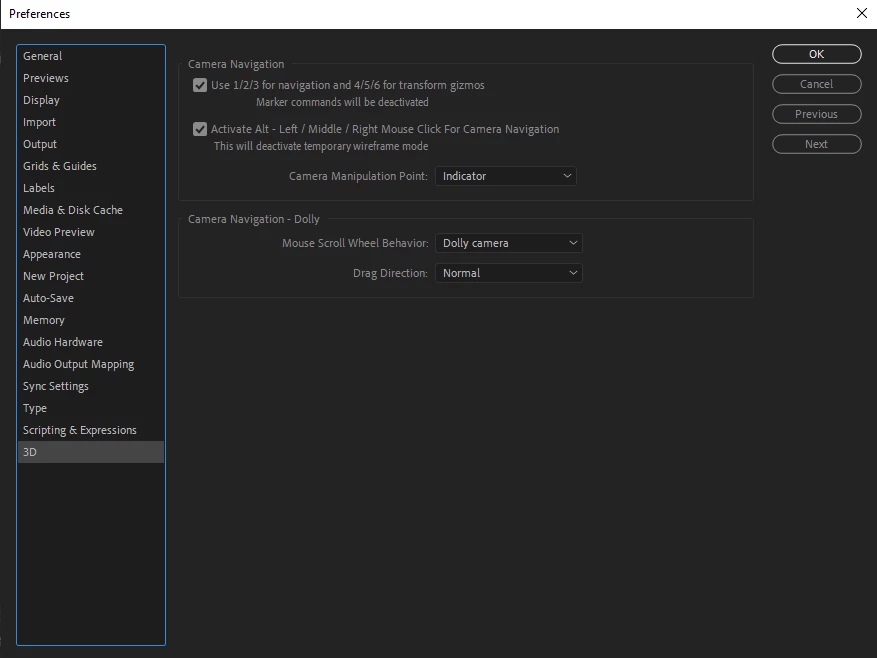
The reason for this new behavior is that the shortcuts previously assigned to creating Comp Markers and jumping to these markers have been reassigned to select the new Camera Gizmo thingy. You can override these new, default shortcuts by going to the new 3D section in AE's Preferences Dialog Window and deselecting the checkbox which assigns the numbers to the new Cam Gizmo.


See image below -


返信数 3

Participant
April 19, 2021

This is very helpful... Does anyone have issues trying to label the markers?

Roland Kahlenberg
Legend
April 20, 2021

No issues with labelling the Comp or Layer Markers.

Very Advanced After Effects Training | Adaptive & Responsive Toolkits | Intelligent Design Assets (IDAs) | MoGraph Design System DEV
Inspiring
January 24, 2021

Is there an actual fix for this bug, yet?

Am I missing something? The camera gizmo controls are standard press/hold to activate; no modifier keys are necessary for the gizmo controls. Adding markers requires the shift modifier: shift+number. I don't understand why these can't co-exist?

Roland Kahlenberg
Legend
January 26, 2021

The new 3D preferences should help you out if you prefer the previous mechanics/shortcuts.
And, the SHIFT+Number creates a Comp Numbered Marker BUT you require a single keypress of a Number Key to reach the Numbered Markers and this is where the conflict occurs.

Very Advanced After Effects Training | Adaptive & Responsive Toolkits | Intelligent Design Assets (IDAs) | MoGraph Design System DEV
Roland Kahlenberg
Legend
October 22, 2020

This issue arises with the installation of the lastest AE build, 17.5.0 x40 and it only arises if you use the Default Keyboard shortcuts set as selected in the Keyboard Shortcuts Visualizer. If you have a Personalised Keyboard Shortcuts set active and it was created prior to  the latest release, you should be fine with the old Marker shortcuts.


The reason for this new behavior is that the shortcuts previously assigned to creating Comp Markers and jumping to these markers have been reassigned to select the new Camera Gizmo thingy. You can override these new, default shortcuts by going to the new 3D section in AE's Preferences Dialog Window and deselecting the checkbox which assigns the numbers to the new Cam Gizmo.


See image below -


Very Advanced After Effects Training | Adaptive & Responsive Toolkits | Intelligent Design Assets (IDAs) | MoGraph Design System DEV
Participant
October 22, 2020

Oh I got it !

Thank you Sir.

Roland Kahlenberg
Legend
October 23, 2020

You're welcome and thanks for reporting back.

Very Advanced After Effects Training | Adaptive & Responsive Toolkits | Intelligent Design Assets (IDAs) | MoGraph Design System DEV