Participant
May 21, 2018
Answered

Creating Pedestal/Dolly movements with 2 node camera

  • May 21, 2018
  • 1 reply
  • 736 views

I'm trying to create a website animation but having some trouble controlling the 3d camera. Full disclosure, I'm an AE noob.

I can't figure out if I need a 1 or 2 node camera. From my understanding, a 2 node camera is needed to dynamically link the focus distance to a layer. In my case, I want the focus to always be on the mouse pointer as it navigates around the page. The problem that I'm running into is that I can't seem to make dolly or pedestal movements with a 2 node camera, everything revolves around the point of interest.

So is there a way to make these horizontal/vertical camera movements with a 2 node camera?

Or is there an expression that will link the focus distance to the position of a layer for a one node camera?

Or is there some other concept I'm missing entirely here.
This topic has been closed for replies.
Correct answer Rick Gerard

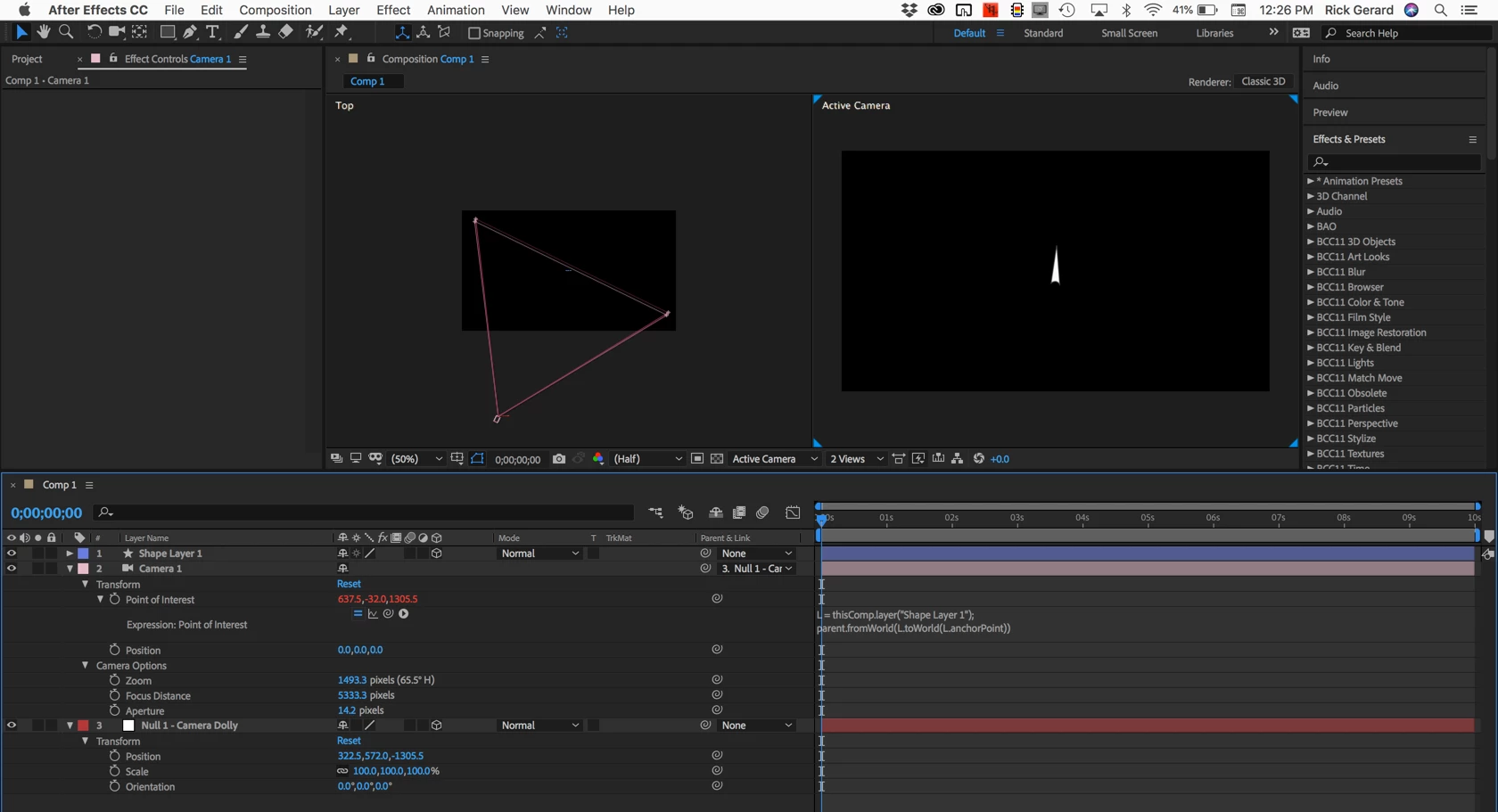
Attach your 3D camera to a 3D null, animate the null to move the camera, animate the point of interest to keep the camera pointed at the pointer. You could further simplify things by tying the camera's point of interest to the position property of the layer you want to follow. If this were a studio situation then the null would be the camera dolly and the target layer would be what the camera operator points the camera at. It would look something like this:

The expression for point of interest looks like this if your pointer is called Pointer Layer:

L = thisComp.layer("Pointer Layer");

parent.fromWorld(L.toWorld(L.anchorPoint))

It's easy to get the camera dolly 1 at the same position as the camera. Hold down the shift key and parent the null to the camera, then remove the parent, then parent the camera to the null. This should take you about a minute to set up. Then you can animate the null to move the camera and move the Pointer Layer to point the camera.

1 reply

Rick GerardCommunity ExpertCorrect answer
Community Expert
May 21, 2018

Attach your 3D camera to a 3D null, animate the null to move the camera, animate the point of interest to keep the camera pointed at the pointer. You could further simplify things by tying the camera's point of interest to the position property of the layer you want to follow. If this were a studio situation then the null would be the camera dolly and the target layer would be what the camera operator points the camera at. It would look something like this:

The expression for point of interest looks like this if your pointer is called Pointer Layer:

L = thisComp.layer("Pointer Layer");

parent.fromWorld(L.toWorld(L.anchorPoint))

It's easy to get the camera dolly 1 at the same position as the camera. Hold down the shift key and parent the null to the camera, then remove the parent, then parent the camera to the null. This should take you about a minute to set up. Then you can animate the null to move the camera and move the Pointer Layer to point the camera.