
June 13, 2018
Answered

Edit the stroke width.

  • June 13, 2018
  • 1 reply
  • 1405 views

Hi, I hope that you can help me.

I'm doing the arms of a character and I'm having problems. I was doing the pieces in Illustratior, but there is an error with the arms. To make them, I used the width tool in AI, but when I passed the document to AE, he did not recognize it as a stroke, but as a figure.
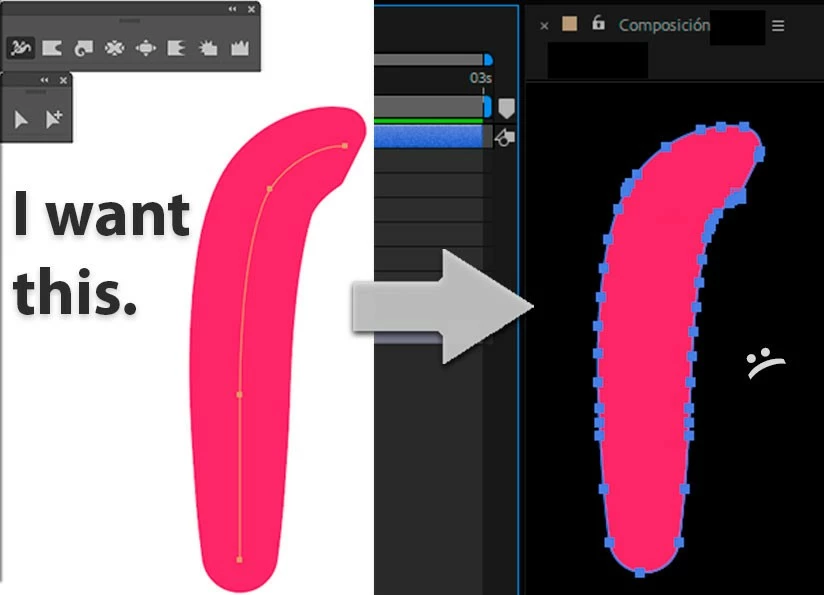
Then I can not cheer the arm. The solution would be easy, do not use the tool wide, but really the arms are very strange and monotonous.

An option that I see is for the arms of AE, although I do not like this, but I do not see the option of being able to edit the width of a stroke made in AI. And I'm going crazy. I've tried all day to solve this... Ahg.

I hope you can help me, I will be very grateful.

This topic has been closed for replies.
Correct answer Rick Gerard

I'm a little confused.

A vector file (an Illustrator layer) does not have a path you can manipulate in After Effects. Never had.

If you convert a vector layer to a shape layer in After Effects and that vector layer has a simple stroke, no brush, no style applied, then you will get a stroked single path. If the vector layer has a brush or any other modification to the stroked paths they will come in as a closed shape.

There is no reason to convert a vector layer to a shape layer unless you plan on using shape animators, which require a thorough understanding of shape layers, or you need to actually animate a path. If you plan on animating a path then you cannot have any custom effects or brushes applied to a stroked path. Once again, if you have custom brushes applied to strokes then they come in as closed shapes.

If you are using puppet pin or Character Animator, there is absolutely no reason to convert a vector path layer to a shape layer. None.

So, if I knew what you were trying to do and what your composition looked like I might be able to give you some help. If your path does not convert to a simple path when you create a shape layer from a vector layer, then you don't have a simple path to start with.

1 reply

June 13, 2018

Please, I do not need an absolute solution, I also appreciate tips that can help me! Thank you.

Rick GerardCommunity ExpertCorrect answer
Community Expert
June 13, 2018

I'm a little confused.

A vector file (an Illustrator layer) does not have a path you can manipulate in After Effects. Never had.

If you convert a vector layer to a shape layer in After Effects and that vector layer has a simple stroke, no brush, no style applied, then you will get a stroked single path. If the vector layer has a brush or any other modification to the stroked paths they will come in as a closed shape.

There is no reason to convert a vector layer to a shape layer unless you plan on using shape animators, which require a thorough understanding of shape layers, or you need to actually animate a path. If you plan on animating a path then you cannot have any custom effects or brushes applied to a stroked path. Once again, if you have custom brushes applied to strokes then they come in as closed shapes.

If you are using puppet pin or Character Animator, there is absolutely no reason to convert a vector path layer to a shape layer. None.

So, if I knew what you were trying to do and what your composition looked like I might be able to give you some help. If your path does not convert to a simple path when you create a shape layer from a vector layer, then you don't have a simple path to start with.