

Evaluated Expression Position Not Actual Position
I think I have either found a bug in the way expressions are handled on multiple instances of the same sub-comp within a composition, or some other weird undocumented behaviour...
I have made a copy of my AE 2020 example project available here:
https://drive.google.com/file/d/1uUdvwBsClis1eBvwk5fked9Spc568EHs/view?usp=sharing
First a summary of what I'm trying to achieve... I need a composition that allows me to put text messages on screen with variable content and timing. Because of the nature of the project it needs to be as automated as possible. The text comes from offscreen and animates to a defined position. If another message arrives while one is already on screen it moves to accomidate the new message.
So, with that in mind I've been through a lot of iterations but ultimately what I'm working on currently is a comp that contains multiple instances of a 'MESSAGE' sub-comp, which in turn contains a couple of text layers that are populated via Master Properties.
In my main comp I then also have a couple of text layers that are doing some evaluation work - the main one looks though the comp layers for instances of the MESSAGE sub-comp and puts a handful of vaules in an array which is sorted based on their in-points.
In the MESSAGE layers themselves I then walk through that array and set tween'ed animations based on the message itself and any that come after it.
So far, so good - it's a little hacky, but it works. And if all the messages have the same number of lines then it works. But when one copy of the MESSAGE comp has a different number of lines then it positioning doesn't behave as it should.
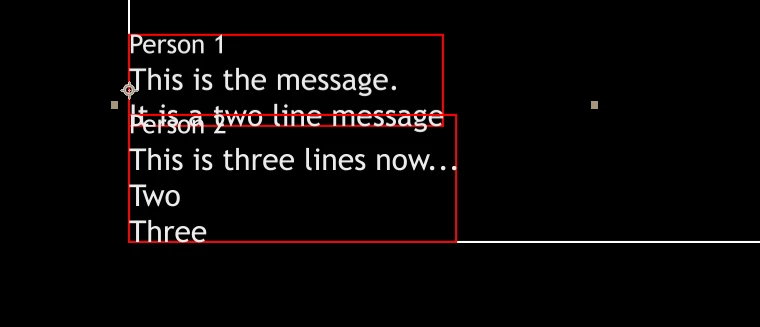
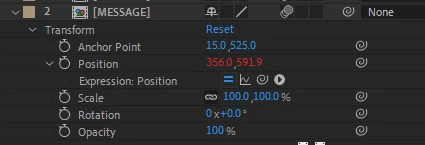
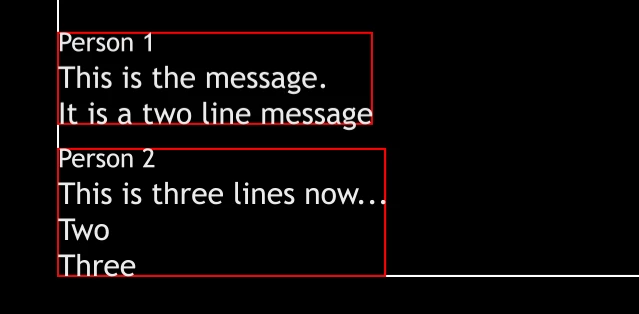
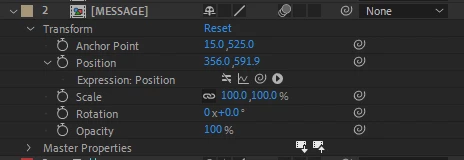
The evaluated Position will show correctly based on the calculated height of the subsequent messages, but it won't actually be drawn in the position that is indicated, which can be verified by disabling the expression and manually setting the position to that which is displayed.
The following images illustrate this - first is the way it's displayed and the position value when the expression is enabled, then the same layers when the expression is disabled and the values set statically to the same as the expression evaluated.
If I take a copy of the exact same composition, make an unchanged duplicate of the MESSAGE sub-comp in my project and replace the second instance of the MESSAGE layer with that duplicate composition (so that the two layers are referencing different comps) then it works as expected, but this isn't a practical workflow when I'm looking at hundreds of messages in many sequences.
In the demo comp I've linked above the questionable behavior is evident at around 3 seconds in "text v1" whereas an identical version of the comp with a second sequence referenced is there as "text v2"
There's also a bunch of weird hacky stuff going on in the comps which I'll briefly explain:
I'm setting the text content of the 'MESSAGE' layers from Markers on the layers, this provided the easiest way to access the values, rather than drilling to the Master Properties for each.
There are duplicate text layers that are just X's - they are used to help be calculate text height without descenders and I've found them necessary to maintain consistent spacing.
There are a variety of layers visible that in production would be either guide layers or simply have their visibility. They just provide clarity on values during development.
I have opted to create the text messages as comps rather than text layers as I need the ability to style the Sender Name text differently to the message body text. I had previously used a single text layer with a 'Basic Text' effect to achieve the Sender Name - this all worked fine, except the Basic Text effect wasn't be affected by motion blur.
Various values are being calculated in text layer JSON objects for visual debugging purposes - it was getting way too hard to determine what was being calculated otherwise.
If anyone has another good example of how I might achieve the end result I'm looking for, I'm interested.
 AdChoices