
Participant
July 5, 2018
Answered

exported gif leaves trace

  • July 5, 2018
  • 2 replies
  • 2480 views

Hello I'm new to After Effects, and today I tried to export a really simple animation I made into gif. Yet, every time exported to gif, each of frames seems to leave a parts of itself to the next frames.
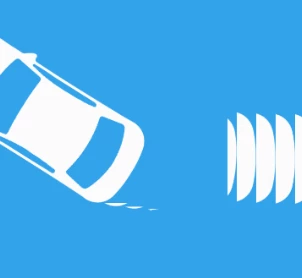
As you can see here. The sequence of the shapes on the right side is not supposed to be there. Any suggestions for this?

This topic has been closed for replies.
Correct answer Mylenium

Create the GIF through Photoshop or any other tool. These drawing artifacts occur due to issues with adapting the color tables. Export an image sequence, import it into PS, convert the timeline there to frames mode, export the optimized GIF. Much better results.

Mylenium

2 replies

Mylenium
MyleniumCorrect answer
Legend
July 6, 2018

Create the GIF through Photoshop or any other tool. These drawing artifacts occur due to issues with adapting the color tables. Export an image sequence, import it into PS, convert the timeline there to frames mode, export the optimized GIF. Much better results.

Mylenium

Community Expert
July 6, 2018

That question is impossible without workflow details or seeing the modified properties of all your layers. 99% chance that it is just caused by user error.