
alexandroj84889843
Participant
March 27, 2019
Question

Filter Effect

  • March 27, 2019
  • 3 replies
  • 666 views

Hello everyone!

I'm currently working on an animation project and I wanted to know if anyone knew how to do this kind glowy composite effect. I feel like the answer may have been right in my face but I'm not too welled versed in After Effects.

Additionally, if this can be done in Photoshop as well that would be fantastic since I have a bit more experience with the program.

Example Images:
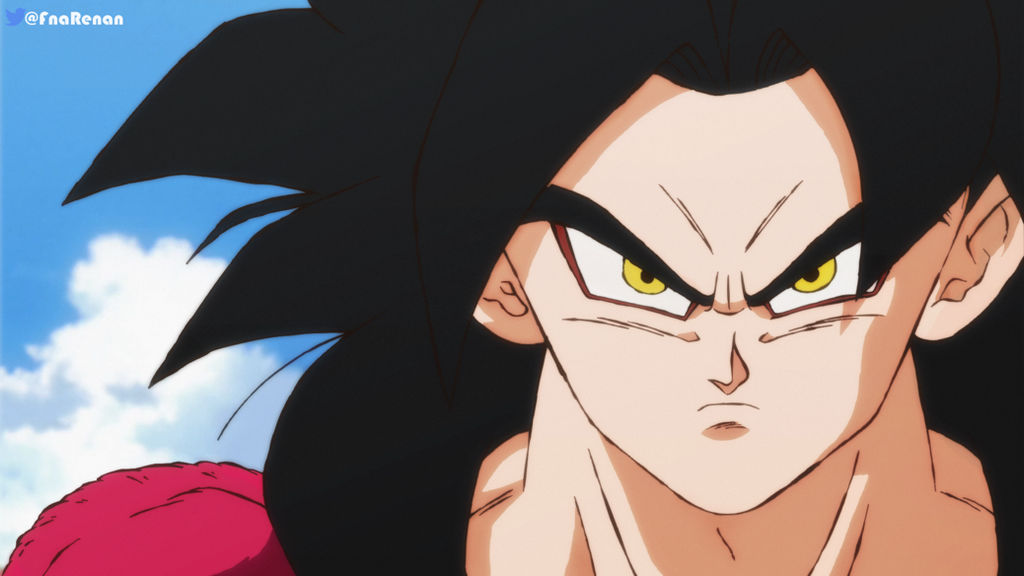
goku_ssj4_in_shintani_style_by_renanfna_dd2rel1-fullview.jpg?token=eyJ0eXAiOiJKV1QiLCJhbGciOiJIUzI1NiJ9.eyJzdWIiOiJ1cm46YXBwOjdlMGQxODg5ODIyNjQzNzNhNWYwZDQxNWVhMGQyNmUwIiwiaXNzIjoidXJuOmFwcDo3ZTBkMTg4OTgyMjY0MzczYTVmMGQ0MTVlYTBkMjZlMCIsIm9iaiI6W1t7ImhlaWdodCI6Ijw9NTc2IiwicGF0aCI6IlwvZlwvNmRkYWE1ZDEtMmQ2My00NGM1LTgzNzQtZmUzNzNhZGIxNjc0XC9kZDJyZWwxLTcwYTU2NmJiLTJlMWUtNDZlOS1iOTdlLWUyODViYWRkMDQ5NC5wbmciLCJ3aWR0aCI6Ijw9MTAyNCJ9XV0sImF1ZCI6WyJ1cm46c2VydmljZTppbWFnZS5vcGVyYXRpb25zIl19.s9SJaVxoL7c9eBuFELp9ux8pMM_HTLxGqisQoD3Zato

piccolo_by_renanfna_dcu83oz-fullview.jpg?token=eyJ0eXAiOiJKV1QiLCJhbGciOiJIUzI1NiJ9.eyJzdWIiOiJ1cm46YXBwOjdlMGQxODg5ODIyNjQzNzNhNWYwZDQxNWVhMGQyNmUwIiwiaXNzIjoidXJuOmFwcDo3ZTBkMTg4OTgyMjY0MzczYTVmMGQ0MTVlYTBkMjZlMCIsIm9iaiI6W1t7ImhlaWdodCI6Ijw9NTc1IiwicGF0aCI6IlwvZlwvNmRkYWE1ZDEtMmQ2My00NGM1LTgzNzQtZmUzNzNhZGIxNjc0XC9kY3U4M296LTZmNDcwODg0LTllNTgtNDMwMy1iMTU0LTg4ZDJmMTVhODI4Ny5wbmciLCJ3aWR0aCI6Ijw9MTAyNCJ9XV0sImF1ZCI6WyJ1cm46c2VydmljZTppbWFnZS5vcGVyYXRpb25zIl19.lniYs2cJxEVK4Wn1QHVFOT_VTEQicfqu9ZU-G1yMktg

broly_by_renanfna_dcug3en-fullview.jpg?token=eyJ0eXAiOiJKV1QiLCJhbGciOiJIUzI1NiJ9.eyJzdWIiOiJ1cm46YXBwOjdlMGQxODg5ODIyNjQzNzNhNWYwZDQxNWVhMGQyNmUwIiwiaXNzIjoidXJuOmFwcDo3ZTBkMTg4OTgyMjY0MzczYTVmMGQ0MTVlYTBkMjZlMCIsIm9iaiI6W1t7ImhlaWdodCI6Ijw9NTA2IiwicGF0aCI6IlwvZlwvNmRkYWE1ZDEtMmQ2My00NGM1LTgzNzQtZmUzNzNhZGIxNjc0XC9kY3VnM2VuLTQwZGRkZGQ5LTViN2EtNDI0MS1hZTA0LTE2YjI4OTNkNmM3NC5wbmciLCJ3aWR0aCI6Ijw9MTAyNCJ9XV0sImF1ZCI6WyJ1cm46c2VydmljZTppbWFnZS5vcGVyYXRpb25zIl19.p6s3QqtiwJ7i-tPLQ68y7wGoulloa6W06wvQfbCMt6w

    This topic has been closed for replies.

    3 replies

    Dave_LaRonde
    Inspiring
    March 27, 2019

    goku_ssj4_in_shintani_style_by_renanfna_dd2rel1-fullview.jpg?token=eyJ0eXAiOiJKV1QiLCJhbGciOiJIUzI1NiJ9.eyJzdWIiOiJ1cm46YXBwOjdlMGQxODg5ODIyNjQzNzNhNWYwZDQxNWVhMGQyNmUwIiwiaXNzIjoidXJuOmFwcDo3ZTBkMTg4OTgyMjY0MzczYTVmMGQ0MTVlYTBkMjZlMCIsIm9iaiI6W1t7ImhlaWdodCI6Ijw9NTc2IiwicGF0aCI6IlwvZlwvNmRkYWE1ZDEtMmQ2My00NGM1LTgzNzQtZmUzNzNhZGIxNjc0XC9kZDJyZWwxLTcwYTU2NmJiLTJlMWUtNDZlOS1iOTdlLWUyODViYWRkMDQ5NC5wbmciLCJ3aWR0aCI6Ijw9MTAyNCJ9XV0sImF1ZCI6WyJ1cm46c2VydmljZTppbWFnZS5vcGVyYXRpb25zIl19.s9SJaVxoL7c9eBuFELp9ux8pMM_HTLxGqisQoD3Zato

    piccolo_by_renanfna_dcu83oz-fullview.jpg?token=eyJ0eXAiOiJKV1QiLCJhbGciOiJIUzI1NiJ9.eyJzdWIiOiJ1cm46YXBwOjdlMGQxODg5ODIyNjQzNzNhNWYwZDQxNWVhMGQyNmUwIiwiaXNzIjoidXJuOmFwcDo3ZTBkMTg4OTgyMjY0MzczYTVmMGQ0MTVlYTBkMjZlMCIsIm9iaiI6W1t7ImhlaWdodCI6Ijw9NTc1IiwicGF0aCI6IlwvZlwvNmRkYWE1ZDEtMmQ2My00NGM1LTgzNzQtZmUzNzNhZGIxNjc0XC9kY3U4M296LTZmNDcwODg0LTllNTgtNDMwMy1iMTU0LTg4ZDJmMTVhODI4Ny5wbmciLCJ3aWR0aCI6Ijw9MTAyNCJ9XV0sImF1ZCI6WyJ1cm46c2VydmljZTppbWFnZS5vcGVyYXRpb25zIl19.lniYs2cJxEVK4Wn1QHVFOT_VTEQicfqu9ZU-G1yMktg

    broly_by_renanfna_dcug3en-fullview.jpg?token=eyJ0eXAiOiJKV1QiLCJhbGciOiJIUzI1NiJ9.eyJzdWIiOiJ1cm46YXBwOjdlMGQxODg5ODIyNjQzNzNhNWYwZDQxNWVhMGQyNmUwIiwiaXNzIjoidXJuOmFwcDo3ZTBkMTg4OTgyMjY0MzczYTVmMGQ0MTVlYTBkMjZlMCIsIm9iaiI6W1t7ImhlaWdodCI6Ijw9NTA2IiwicGF0aCI6IlwvZlwvNmRkYWE1ZDEtMmQ2My00NGM1LTgzNzQtZmUzNzNhZGIxNjc0XC9kY3VnM2VuLTQwZGRkZGQ5LTViN2EtNDI0MS1hZTA0LTE2YjI4OTNkNmM3NC5wbmciLCJ3aWR0aCI6Ijw9MTAyNCJ9XV0sImF1ZCI6WyJ1cm46c2VydmljZTppbWFnZS5vcGVyYXRpb25zIl19.p6s3QqtiwJ7i-tPLQ68y7wGoulloa6W06wvQfbCMt6w

    I see medium-tight shot of an angry guy.  I see a green guy.  I see a tight shot of a really angry guy.  I see highlights here and there on the artwork.

    Nowhere do I see anything that could be confused for an After Effects glow.

    DigitalSpatula
    Inspiring
    March 27, 2019

    I love this plug in called Deep Glow

    https://aescripts.com/deep-glow/

    The look is incredible. Super easy to tweak the settings as well.

    Steve

    Jose Panadero
    Community Expert
    Community Expert
    March 27, 2019

    You can do it using different ways. Here you have a couple of them:

    1.- Try to create an adjustment layer above all of your layers, and assign the Glow Effect. You can finf it in Effect > Stylize Glow. Try to use the Threshold and radius parameters to adjust. Then, change the opacity and transfer mode of the Adjustment layer.

    2.- Precompose the animation and duplicate as a new layer, use the Gaussian Blur effect over this duplicated layer and the use the Add transfer mode and opacity to adjust as desired.