
First time AE user running into Roto Brushing issue :)
Hey there. New AE user here, just started today. 
I've run into 2 problems so far that I can't find solutions to on the web. I'm really hoping someone could help.
UPDATE: Issue 1 magically fixed itself, literally as I wrote this post. I must have a slow computer or something. Issue 2 remains....
1. Any video imported is a black screen. This was initially resolved by running my needed clip through Media Encoder on the H.264 preset. Then my video showed, and I spent a couple hours working on my effect. But upon closing AE and re-opening, video is black again. I have no idea what changed: Videos started showing again.... carry on 
2. I created text to move with the camera (using Tracking) while hiding part of the text with a duplicate layer I'm Roto Brushing. It's all working fine except my duplicate later that I'm Roto Brushing (some rocks - see below) persist to show up "darker" while transparent as you see below. But I have 100% Opacity and ordered the layers properly:
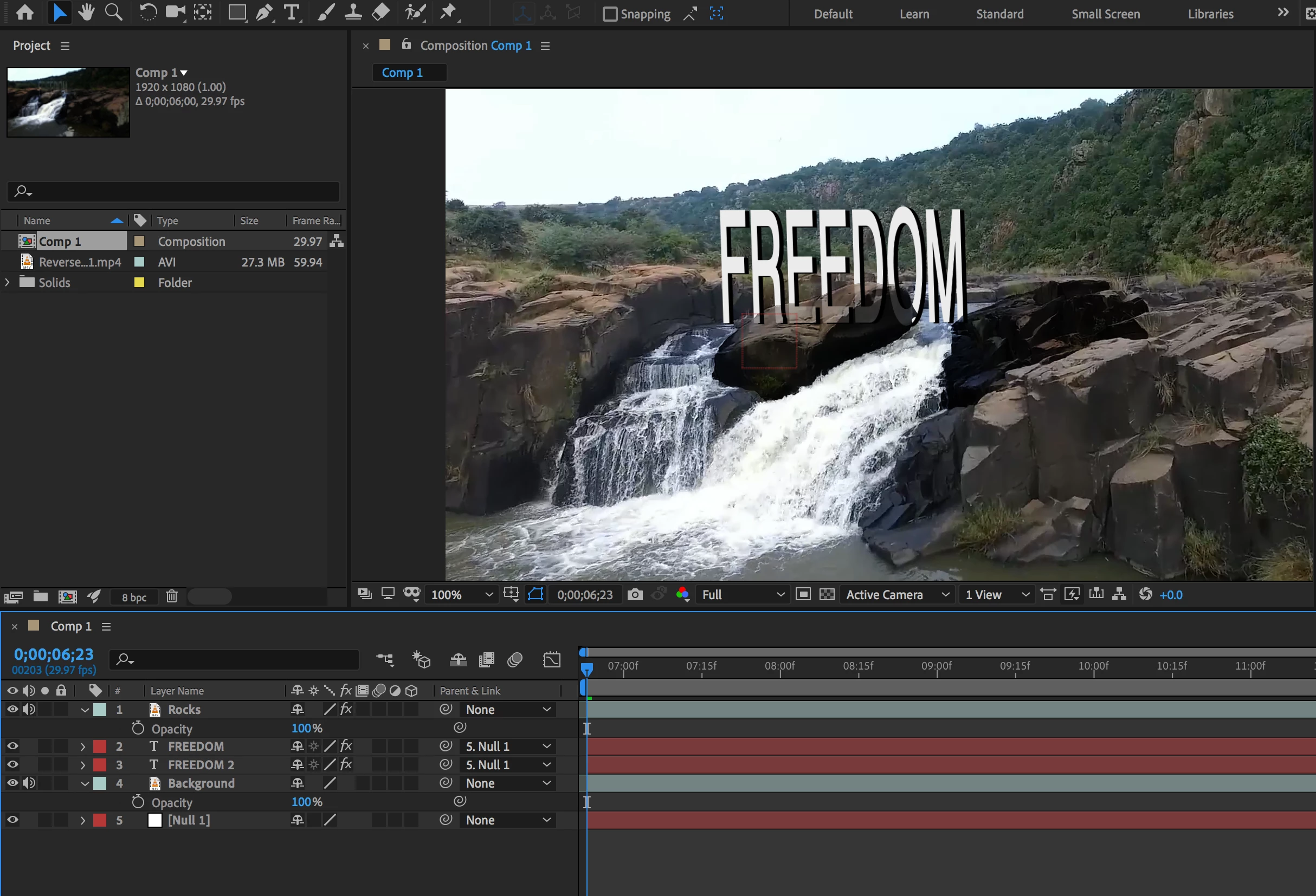
"FREEDOM" is meant to sit just behind those darker rocks that I placed on a duplicated layer.
Note the layer "Rocks" is on top of all of them, to be the closest, but they're still shadowy and transparent.
Any help would be much appreciated. Thank you!
 AdChoices